Minecraft 1.6.1 has 8 OptiFine shaders on MineUniverse, with 717,629 downloads combined. CH Motion is the most downloaded of them.
![SI: Spectre [DISCONTINUED]](https://media.forgecdn.net/avatars/thumbnails/1709/657/256/256/639086435563101127.jpg)

Give your Minecraft that retro 256-color look with low-res pixelation options!

This shaderpack turns your game into a retro 1980s-style CRT screen


The shaders of The Diamonds Devloppers. It's optimized and looks good. Practical for low-end computers.
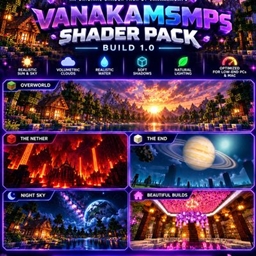
A realistic and performance-friendly Minecraft shader pack with dynamic lighting, volumetric clouds, realistic water, cinematic skies, and custom Net…
VANAKAMSMPs Shader Pack
A realistic and performance-friendly Minecraft shader pack with dynamic lighting, volumetric clouds, realistic water, cinematic skies, and … updated Oct 4, 2026
TDDshader
The shaders of The Diamonds Devloppers. It's optimized and looks good. Practical for low-end computers. updated Jul 21, 2026
 CH Motion
Super light weight motion blur pack updated Jun 24, 2026
Mew Chippa FX Shaders
Have a fun goofy experience with astigmatism and halo vision updated Apr 25, 2026
CRT Monochrome Shaders
This shaderpack turns your game into a retro 1980s-style CRT screen updated Jan 25, 2026
SI: Spectre [DISCONTINUED]
DISCONTINUED updated Dec 27, 2025
CH Motion
Super light weight motion blur pack updated Jun 24, 2026
Mew Chippa FX Shaders
Have a fun goofy experience with astigmatism and halo vision updated Apr 25, 2026
CRT Monochrome Shaders
This shaderpack turns your game into a retro 1980s-style CRT screen updated Jan 25, 2026
SI: Spectre [DISCONTINUED]
DISCONTINUED updated Dec 27, 2025
Behind CH Motion, the ranking continues with SI: Spectre [DISCONTINUED], Chippa256 Shaders, Sildurs Shaders TFC setup and CRT Monochrome Shaders.
With 8 of 11, OptiFine shaders account for 73% of all shaders for 1.6.1. OptiFine ranks first of two shader loaders for 1.6.1, ahead of Iris (6).
Recent activity: one OptiFine shader got a new file for 1.6.1 in the last 30 days. Recently updated picks include VANAKAMSMPs Shader Pack, TDDshader and Mew Chippa FX Shaders. Mojang released Minecraft 1.6.1 on June 28, 2013. Against its nearest versions, 1.6.1 has 9 fewer OptiFine shaders than 1.7.2 (17).
By downloads, the leading OptiFine shaders for Minecraft 1.6.1 are CH Motion, SI: Spectre [DISCONTINUED], Chippa256 Shaders, Sildurs Shaders TFC setup and CRT Monochrome Shaders.
MineUniverse currently has 8 OptiFine shaders for Minecraft 1.6.1. Recent activity: one OptiFine shader got a new file for 1.6.1 in the last 30 days. Together they have 717,629 downloads.
1. Install OptiFine for your Minecraft version (optifine.net) and start it once. 2. Download the shader pack .zip (do not extract it). 3. Put the .zip into .minecraft/shaderpacks. 4. In game open Options → Video Settings → Shaders and select the pack.
OptiFine has more: 8 shaders for Minecraft 1.6.1 support OptiFine, compared with 6 for Iris.
Yes. All 8 OptiFine shaders for Minecraft 1.6.1 on MineUniverse are free to download.
