Mineuniverse
Shaders
Unbound Visual +

Unbound Visual +

SHADER
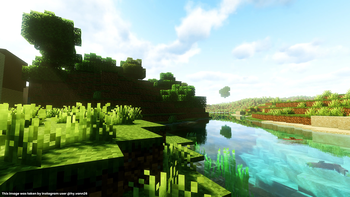
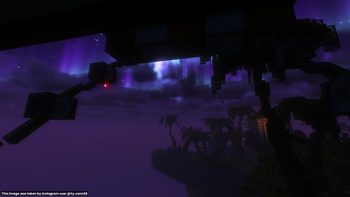
Unbound Visual+ is a modified version of Complementary Unbound, featuring various added effects and visual enhancements.
by Cornxx
Download Claim this project
9,387 downloads
0 likes
0 followers
Updated Oct 14, 2026
0 hypes
Follow0
Fantasy Realistic
Advertisement Remove ads with Premium →

Unbound Visual+ is a modified version of Complementary Unbound,with the addition of effects and visuals that differ from the original shaders and the addition of light Ray Tracing and Global Illumination, as well as improved saturation. We have no problems or cons against sheders, we only modify other users' sheders, if there are any problems, contact us.

Performance

If you experience lag, you can change the profile to Low, if it's still strong, you can change it to Standard, if it's strong, you can max it to Ultra for stunning visuals, which we call Visual +,If you want to be good, You can change the profile to Cinematic, specifically for landscapes.

We have designed the cinematic mode specifically for players who appreciate natural scenery and beauty; if you enjoy scenic views, we recommend choosing this option.

feature

  • Global Illumination
  • Using the Monte Carlo Global Illumination technique
  • SSGI (Screen-Space Global Illumination)
  • Standard Film ACES filter
  • New setting feature to adjust GI intensity.
  • TAA for rendering spot-polishing
  • Irradiance Caching and Photon maps
  • Screen Space Radiance Cache
  • colored lighting
  • GTAO Implementation
  • Implementation of RTAO

Advisory

The self-reflection technique for the reflection block is not yet fully perfected; issues such as leakage, data loss, and rendering problems persist, and we are currently working on improvements.

Required

  • Make sure you have installed Iris for the version of sheders you choose and the version of Minecraft you are playing.
  • Installing Fabric (Original)
  • Use special mods for optimizer and Ram (Optional)
  • OpenGL 4.3 (Do not use older versions of OpenGL, as the shaders will crash and fail to run for certain Global Illumination and vertex techniques.)

Credit

These sheds are modified sheds from Completentary Unbound, we do not claim these sheds are ours, these sheds are original from someone who makes sheds and Modrinth Creator.The creator is named EminGT and comes from Türkiye.he is known for making sheders which are definitely the brightest Complemantary Unbound and Complemantary Sheders and Complemantary Reimagined that we know of

Unbound Visual + PT v9.6.zip
MC 1.21.2-Snapshot, 1.21, 1.21.6-snapshot, 1.21.1-Snapshot, 1.21.8, 1.21.5, 1.21.4, 1.21.5-Snapshot, 1.21.1, 1.21.6, 1.21.3, 1.21.7, 1.21-Snapshot, 1.21.4-Snapshot, Iris, 1.21.2
Release 2026-09-04 Get
Unbound Visual + PT v9.3.zip
MC 1.21.2-Snapshot, 1.21, 1.21.6-snapshot, 1.21.1-Snapshot, 1.21.8, 1.21.5, 1.21.4, 1.21.5-Snapshot, 1.21.1, 1.21.6, 1.21.3, 1.21.7, 1.21-Snapshot, 1.21.4-Snapshot, Iris, 1.21.2
Release 2026-08-29 Get
Unbound Visual + PT v6.3.zip
MC 1.21.2-Snapshot, 1.21, 1.21.6-snapshot, 1.21.1-Snapshot, 1.21.8, 1.21.5, 1.21.4, 1.21.5-Snapshot, 1.21.1, 1.21.6, 1.21.3, 1.21.7, 1.21-Snapshot, 1.21.4-Snapshot, Iris, 1.21.2
Release 2026-08-12 Get
PT-v5.4
MC 1.21.2-Snapshot, 1.21, 1.21.6-snapshot, 1.21.1-Snapshot, 1.21.8, 1.21.5, 1.21.4, 1.21.5-Snapshot, 1.21.1, 1.21.6, 1.21.3, 1.21.7, 1.21-Snapshot, 1.21.4-Snapshot, Iris, 1.21.2
Release 2026-08-09 Get
Unbound Visual + PT v1.4.0.zip
MC 1.21.2-Snapshot, 1.21, 1.21.6-snapshot, 1.21.1-Snapshot, 1.21.8, 1.21.5, 1.21.4, 1.21.5-Snapshot, 1.21.1, 1.21.6, 1.21.3, 1.21.7, 1.21-Snapshot, 1.21.4-Snapshot, Iris, 1.21.2
Release 2026-07-28 Get
Unbound Visual + v6.8.zip
MC 1.21.2-Snapshot, 1.21, 1.21.6-snapshot, 1.21.1-Snapshot, 1.21.8, 1.21.5, 1.21.4, 1.21.5-Snapshot, 1.21.1, 1.21.6, 1.21.3, 1.21.7, 1.21-Snapshot, 1.21.4-Snapshot, Iris, 1.21.2
Release 2026-07-19 Get
Unbound Visual + v5.5
MC 1.21.2-Snapshot, 1.21, 1.21.6-snapshot, 1.21.1-Snapshot, 1.21.8, 1.21.5, 1.21.4, 1.21.5-Snapshot, 1.21.1, 1.21.6, 1.21.3, 1.21.7, 1.21-Snapshot, 1.21.4-Snapshot, Iris, 1.21.2
Release 2026-07-08 Get

Requirements & install

How to use this shader in Minecraft
Shader loader
Iris
Minecraft
1.21.4-Snapshot – 1.21.8
Install folder
.minecraft/shaderpacks

Install with Iris

  1. Install Iris with the Iris installer (irisshaders.dev); it sets up Fabric and Sodium for you.
  2. Download the shader pack .zip (do not extract it).
  3. Put the .zip into .minecraft/shaderpacks.
  4. In game open Options → Video Settings → Shader Packs, select the pack and click Apply.
Browse more: Iris shaders OptiFine shaders Shaders for 1.21.8 All shaders
Advertisement Remove ads with Premium →

You Might Also Like