About
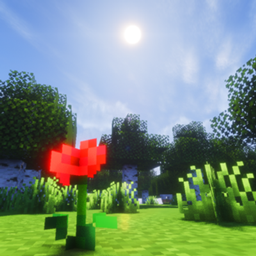
Hey, I'm Toasty. I make Minecraft shader shorts. I made Toasted Shaders because I wanted a pack that feels warm and real at the same time: a proper sun and sky, soft shadows, warm windows on a rainy night, and water you actually want to stand next to.
I set the look, art-directed every effect and tested it scene by scene. It's built on published rendering research (the papers are listed under Credits), and none of it is copied from another shader pack. The look is warm and cozy, with serious realism underneath.
This is the first public beta. It looks the way I want in most scenes, and it still has rough edges, so tell me what you find.
Links: YouTube
Features
- Physically based sky
- Sky and sunsets calculated from real atmospheric scattering, including an ozone layer for the blue hour
- Sun with limb darkening, moon phases, procedural stars that turn with the sky, airglow at night
- Rainbows when the sun comes out after rain
- Volumetric clouds
- 3D cumulus clouds with multiple scattering, plus a high cirrus layer
- Cloud shadows on the ground, pink and orange clouds after sunset, clouds in water reflections
- Light and shadow
- Soft shadows that get softer with distance (PCSS), coloured light through stained glass
- Coloured block light: torches glow warm, soul fire and sea lanterns cyan, amethyst purple, with no light leaking through walls
- Ground-truth ambient occlusion (GTAO), light shafts in the air and under water
- Subsurface light in leaves and grass, glowing emissive blocks, light from the item in your hand
- Water
- FFT ocean waves (the same method as film and Blender's Ocean), with swell and fine ripples
- Caustics traced through the waves onto the floor, real refraction, absorption and depth colour
- Screen-space reflections with a ray-traced fallback on Ultra, Snell's window from below, underwater fog
- Weather
- Rain drawn in 3D: streaks with depth that stop under roofs and glow orange near a lantern
- Surfaces get wet only where rain lands: porous blocks soak dark, smooth ones get a reflective film, puddles form on flat ground
- Raindrop ripples and splashes, storm skies, lightning that lights the world, misty haloes around lamps, slow drying afterwards
- Nether and End
- Nether haze lit by the lava sea, embers and spores, heat shimmer, lava light on ceilings
- End sky with a galaxy band and nebulae, and a black hole that bends the starlight behind it
- Camera and post-processing
- Temporal anti-aliasing (up to 16 samples), auto exposure, bloom, filmic tone curve
- Cinematic options (off by default): depth of field with bokeh, motion blur, lens flare, anamorphic streaks, chromatic aberration, colour grades, film grain, vignette, letterbox
- Photo mode: hold still and the frame keeps refining into a clean, noise-free screenshot
- Settings
- Low / Medium / High / Ultra profiles, and a slider for every effect
Details
More screenshots are in the Images tab.
Compatibility
| Shader loader |
Iris 1.6 or newer (made on Iris 1.11). OptiFine is not supported, because the pack needs compute shaders and custom images |
| Minecraft |
Java Edition. Built and tested on 26.2 and 26.3 |
| Graphics card |
Needs OpenGL 4.3. Tested on NVIDIA; AMD and Intel should work but are untested in this beta |
| macOS |
Not supported. Apple stops at OpenGL 4.1 |
| Distant Horizons |
Supported: terrain and water LODs are lit and shaded like the rest of the world |
| PBR resource packs |
Not yet. labPBR support is planned |
Installation
With the CurseForge App: open your Minecraft profile, add Iris, then install Toasted Shaders from Shaders.
By hand:
- Install Iris (and Sodium) for your Minecraft version.
- Download Toasted Shaders. Don't unzip it.
- In game, open Options → Video Settings → Shader Packs → Open Shader Pack Folder and drop the zip in.
- Select Toasted Shaders and click Apply.
- Optional: open Shader Pack Settings and pick a profile.
Performance
Toasted Shaders is a heavy pack. It's built for good-looking screenshots and videos first, so a mid-range or better GPU is recommended.
| Profile |
Use it for |
| Low |
Older or laptop GPUs |
| Medium |
Smooth everyday play |
| High (default) |
The intended look |
| Ultra |
Screenshots and videos: 16-sample TAA, ray-traced reflection fallback, photo mode |
On an RTX 5070 Ti, the High profile runs at about 35-55 FPS in my test scenes. Coloured block light is the biggest cost: turning it off in Lighting roughly doubles your FPS.
Terms of use
You can:
- Use Toasted Shaders in screenshots and videos, including monetized ones. Putting "Shader: Toasted Shaders" in your description is appreciated.
- Change the pack for your own personal use.
- Include it in a modpack that downloads it from CurseForge or Modrinth.
You can't:
- Re-upload the pack or share its file anywhere else.
- Rename it, or claim the pack or its code as your own.
- Copy its code into another shader pack without asking me first.
- Put it behind monetized link shorteners or paywalls.
Credits
Toasted Shaders doesn't copy code from any other shader pack. It is built on published research, with thanks to:
- Sky and atmosphere: S. Hillaire (EGSR 2020, SIGGRAPH 2015), E. Bruneton (2017), Cornette & Shanks (1992)
- Clouds: A. Schneider & N. Vos, The Real-time Volumetric Cloudscapes of Horizon Zero Dawn (2015); M. Wrenninge et al. (2013)
- Water: J. Tessendorf, Simulating Ocean Water (2001); Cox & Munk (1954); J. Arvo (1986)
- Rain: N. Tatarchuk (2006), S. Lagarde (2013), K. Garg & S. Nayar (2006), B. Cloward's Weather Shaders series
- Shadows, lighting and AO: R. Fernando (PCSS, 2005), E. Heitz (2014), Ramamoorthi & Hanrahan (2001), Jimenez et al. (GTAO, 2016), Amanatides & Woo (1987)
- Image quality: B. Karis (2014), M. Salvi (2016), J. Jimenez (2014), T. Lottes (2016), Jarzynski & Olano (2020), Cigolle et al. (2014)
- The black hole: A. Einstein (1936). Yes, really.
- The Iris and Distant Horizons teams, for making packs like this possible.
FAQ
Does it work with OptiFine? No. It needs Iris.
Does it work on a Mac? No. macOS doesn't support the OpenGL version the pack needs.
Will it work on the newest Minecraft version? Shader packs depend on Iris much more than on Minecraft. If Iris is out for your version, the pack should run.
It's too dark / too bright / too slow. Open Shader Pack Settings. Pick a lower profile for speed, or adjust exposure under Camera & Color.
Where do I report bugs? Leave a comment on my YouTube with your GPU, Minecraft and Iris versions, and a screenshot.