🇬🇧 English
RealyTy Shaders
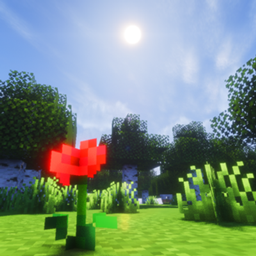
Experience Minecraft like never before with a modern shader focused on realistic lighting, immersive atmospheres, and smooth performance.
Designed from the ground up for Minecraft Java Edition 1.21.1-1.21.6, this shader delivers cinematic visuals while remaining highly configurable for a wide range of hardware.
✨ Features
- 🌅 Physically-inspired lighting
- ☀️ Soft dynamic shadows
- 🌤️ Volumetric clouds
- 🌊 Realistic water with reflections and refraction
- 🌫️ Atmospheric and volumetric fog
- 🌧️ Enhanced weather effects
- 🌿 Animated vegetation
- 💡 Bloom and cinematic color grading
- 🌌 Beautiful day/night cycle
- 🔥 Improved Nether atmosphere
- 🌌 Immersive End visuals
- 🎮 Multiple quality presets
- ⚙️ Fully customizable settings
🚀 Performance
Includes multiple presets:
- Potato
- Low
- Medium
- High
- Ultra
Choose the perfect balance between image quality and FPS.
✅ Compatibility
- Minecraft Java Edition 1.21.1-1.21.6 tested versions but you can try newer versions.
- Iris Shaders (Recommended)
- OptiFine (Experimental)
❤️ Support
If you enjoy this shader, consider leaving a rating and sharing your screenshots!
🇪🇸 Español
RealyTy Shaders
Disfruta de Minecraft como nunca antes con un shader moderno centrado en una iluminación realista, atmósferas inmersivas y un excelente rendimiento.
Diseñado desde cero para Minecraft Java Edition 1.21.1-1.21.6, este shader ofrece gráficos cinematográficos manteniendo una gran capacidad de personalización para adaptarse a cualquier tipo de ordenador.
✨ Características
- 🌅 Iluminación inspirada en la física
- ☀️ Sombras dinámicas suaves
- 🌤️ Nubes volumétricas
- 🌊 Agua realista con reflejos y refracción
- 🌫️ Niebla atmosférica y volumétrica
- 🌧️ Efectos climáticos mejorados
- 🌿 Vegetación animada
- 💡 Bloom y corrección de color cinematográfica
- 🌌 Ciclo de día y noche mejorado
- 🔥 Ambiente renovado en el Nether
- 🌌 Aspecto inmersivo del End
- 🎮 Varios perfiles de calidad
- ⚙️ Gran cantidad de opciones de configuración
🚀 Rendimiento
Incluye varios perfiles predefinidos:
- Potato
- Bajo
- Medio
- Alto
- Ultra
Elige el equilibrio perfecto entre calidad gráfica y FPS.
✅ Compatibilidad
- Minecraft Java Edition 1.21.1-1.21.6 son las versiones testeadas pero puedes probar mas nuevas.
- Iris Shaders (Recomendado)
- OptiFine (Experimental)
❤️ Apoya el proyecto
Si te gusta el shader, ¡no olvides dejar una valoración y compartir tus capturas de pantalla!