Mineuniverse
Shaders
Kuki-shader (official)

Kuki-shader (official)

SHADER
Fixes kukis body
by KukiYLrealityiboYL
Download Claim this project
74 downloads
0 likes
0 followers
Updated Oct 14, 2026
0 hypes
Follow0
Fantasy Realistic
Advertisement Remove ads with Premium →

🦜 Kuki Shader

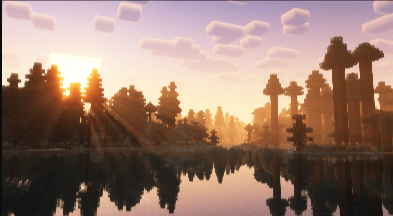
Welcome to Kuki Shader, a custom-tailored shader pack designed to bring a fresh, vibrant, and atmospheric look to your Minecraft worlds! Inspired by my beloved pet cockatiel, Kuki, this shader focuses on clean visuals, beautiful lighting, and smooth performance.

✨ Features

Vibrant Atmosphere: Brighter daylight and cozy torch lighting.

Performance Friendly: Optimized to run smoothly without lagging your game.

Custom Vibe: Tailored to give your survival worlds a unique and lively aesthetic.

📥 How to Install

Download the shader file.

Place it inside your shaderpacks folder.

Launch Minecraft, go to Video Settings > Shader Packs, and select Kuki Shader.

Enjoy the new look of your world!

kuki-shader.zip
MC 1.20.1, 1.21.1, Iris
Release 2026-08-25 Get

Requirements & install

How to use this shader in Minecraft
Shader loader
Iris
Minecraft
1.20.1 – 1.21.1
Install folder
.minecraft/shaderpacks

Install with Iris

  1. Install Iris with the Iris installer (irisshaders.dev); it sets up Fabric and Sodium for you.
  2. Download the shader pack .zip (do not extract it).
  3. Put the .zip into .minecraft/shaderpacks.
  4. In game open Options → Video Settings → Shader Packs, select the pack and click Apply.
Browse more: Iris shaders OptiFine shaders Shaders for 1.21.1 All shaders

More from KukiYLrealityiboYL

Advertisement Remove ads with Premium →

You Might Also Like