Mineuniverse
Shaders
Bloop Shaders - Official

Bloop Shaders - Official

SHADER
A shader aimed at maximum speed while maintaining good visuals. Scalable from low to high end computers.
by Espen96
Download Claim this project
215,547 downloads
0 likes
Updated Oct 14, 2026
0 hypes
Fantasy Realistic Vanilla
Advertisement Remove ads with Premium →

ABOUT BLOOP

Bloop is a Minecraft shader designed to deliver excellent graphics while maximizing performance.

Perfectly scalable, it offers smooth gameplay on low-end PCs and higher graphics options for more powerful systems, from integrated graphics to an RTX 3090.

Enjoy an enhanced visual experience without compromising on frame rates.
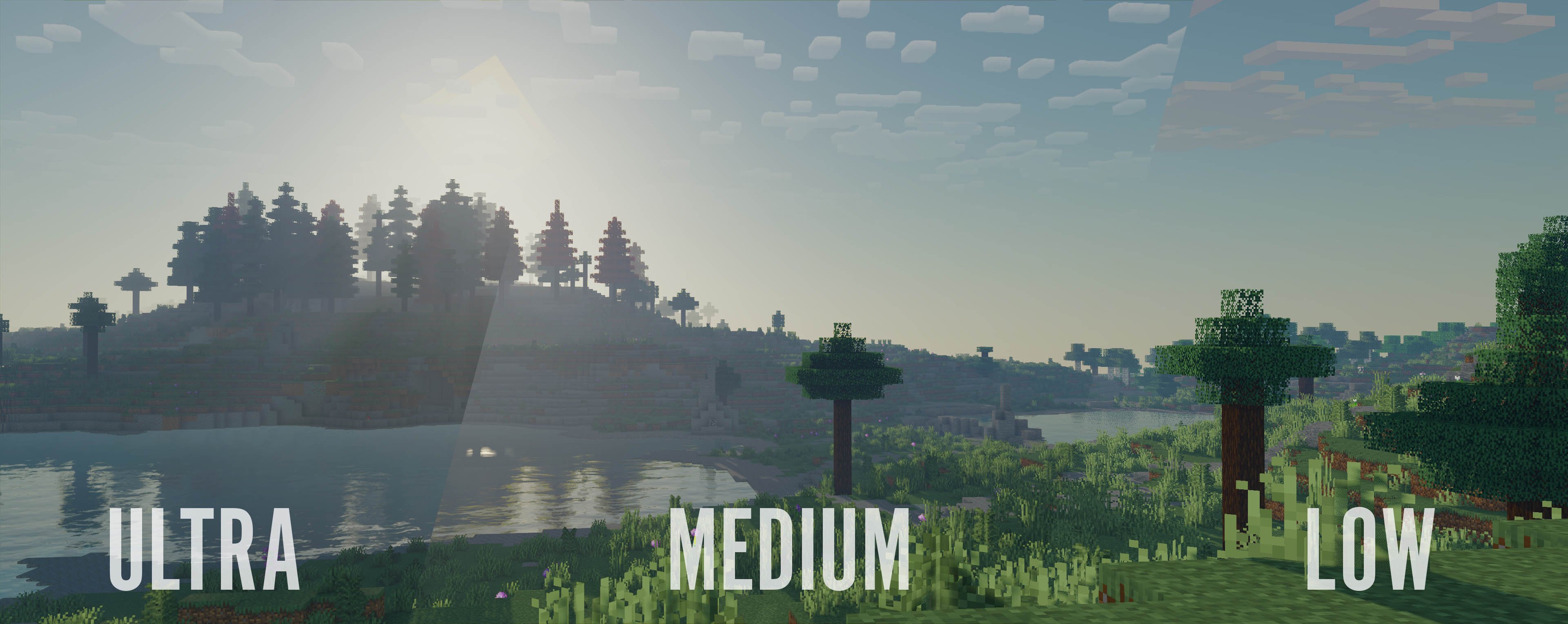
Profile comparisons

This shader includes:

  • Performance oriented profiles and simple settings

  • Realtime Shadows with simple and advanced shadow filtering

  • Distant Horizons support, Including Shadows

  • Physics Mod support

  • Floodfill lighting

  • Advanced and Simple AO

  • Full LabPBR compatibility

  • POM and Material SSR

  • Volumetric Light and Mist

  • cloud and contact shadows

  • Bloom

  • Depth of field

  • Volumetric and vanilla cloud support

  • Custom tonemapping

  • TAA with support for anti ghosting on entities

  • Support for various modded blocks

and a lot more

Bloop Shaders 1.8.0 - Alpha 2
MC 1.16.3, 1.16-Snapshot, 1.17.1, 1.21.2-Snapshot, 1.21, 1.21.6-snapshot, 1.16.1, 1.18.1, 1.20.2-Snapshot, 1.20.5-Snapshot, 1.16, 1.19-Snapshot, 1.21.1-Snapshot, 1.16.5, 1.19.3, 1.20.2
Alpha 2026-03-03 Get
1.8.0- Alpha 1
MC 1.16.3, 1.16-Snapshot, 1.17.1, 1.21.2-Snapshot, 1.21, 1.21.6-snapshot, 1.16.1, 1.20.2-Snapshot, 1.20.5-Snapshot, 1.16, 1.19-Snapshot, 1.21.1-Snapshot, 1.16.5, 1.19.3, 1.20.2, 1.19.4
Alpha 2026-01-19 Get
Bloop-1.7.0-Fixes.zip
MC 1.17.1, 1.21.2-Snapshot, 1.21, 1.21.6-snapshot, 1.18.1, 1.20.2-Snapshot, 1.20.5-Snapshot, 1.19-Snapshot, 1.21.1-Snapshot, 1.19.3, 1.20.2, 1.19.4, 1.21.8, 1.17, 1.20.5, 1.21.5
Release 2025-07-27 Get
Bloop-1.7.0.zip
MC 1.17.1, 1.19.3, 1.20.2, 1.21.2-Snapshot, 1.21, 1.21.6-snapshot, 1.18.1, 1.19.4-Snapshot, 1.20.5, 1.21.5, 1.17, 1.20.2-Snapshot, 1.20.5-Snapshot, 1.19.4, 1.21.8, 1.19-Snapshot
Release 2025-07-18 Get
1.7.0 - Public Beta 2
MC 1.17.1, 1.19.3, 1.20.2, 1.21.2-Snapshot, 1.21, 1.21.6-snapshot, 1.18.1, 1.19.4-Snapshot, 1.20.5, 1.21.5, 1.17, 1.20.2-Snapshot, 1.20.5-Snapshot, 1.19.4, 1.19-Snapshot
Beta 2025-06-12 Get
1.7.0 - Public Beta 1
MC 1.17.1, 1.19.3, 1.20.2, 1.21.2-Snapshot, 1.21, 1.21.6-snapshot, 1.18.1, 1.19.4-Snapshot, 1.20.5, 1.21.5, 1.17, 1.20.2-Snapshot, 1.20.5-Snapshot, 1.19.4, 1.19-Snapshot
Beta 2025-05-27 Get

Requirements & install

How to use this shader in Minecraft
Shader loader
Iris or OptiFine
Minecraft
1.20.5-Snapshot – 1.21.8
Install folder
.minecraft/shaderpacks

How to install shaders

  1. Install a shader loader for your Minecraft version: Iris (with Sodium) or OptiFine.
  2. Download the shader pack .zip file (do not extract it).
  3. Put the .zip into the shaderpacks folder (.minecraft/shaderpacks).
  4. In game open Options → Video Settings → Shader Packs, select the pack and apply it.
Browse more: Iris shaders OptiFine shaders Shaders for 1.21.8 All shaders
Advertisement Remove ads with Premium →

You Might Also Like