Mineuniverse
Resource Packs
X-ray Vision TP

X-ray Vision TP

RESOURCE PACK
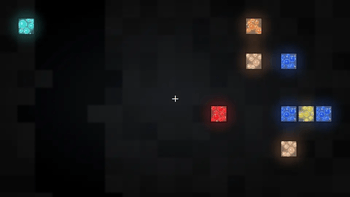
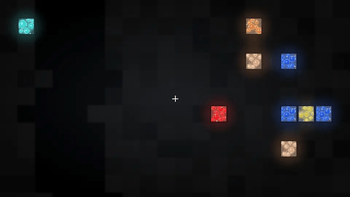
This Texture Pack add the X-ray to Minecraft, but remember only surface ores :)
by Tav642
Download Claim this project
2,249 downloads
0 likes
Updated Oct 14, 2026
0 hypes
32x
Advertisement Remove ads with Premium →

## X-Ray Vision Pack — Enhanced

spot every ore from a mile away, and never waste another pickaxe swing on empty rock. This pack makes terrain blocks translucent and gives every ore a hand-crafted, glowing, sparkling texture that's impossible to miss — no mods, no shaders, just a resource pack.


## What it does

Terrain becomes see-through — Stone, cobblestone, deepslate, dirt, sand, gravel, sandstone, netherrack, end stone, tuff, calcite, andesite, diorite, granite, blackstone, basalt, mud, terracotta, soul sand/soil, mycelium, podzol, and crimson/warped nylium are all rendered mostly transparent.


Every ore, reimagined — Coal, Iron, Copper, Gold, Redstone, Lapis, Diamond, and Emerald (both stone and deepslate variants), plus Nether Gold Ore, Nether Quartz Ore, and Ancient Debris all get:


A textured rock background instead of a flat color

Multiple shaded mineral clusters with highlight/shadow for a faceted, gem-like look

A soft two-layer glow (bloom) behind each cluster

Scattered sparkle flecks for extra shimmer

A crisp dark border so they pop against the transparent stone

2x resolution (32x32) textures for crisper detail than vanilla's 16x16.


Bedrock and obsidian are left solid on purpose — so you don't accidentally see straight through to the void or bottom of the world.


## Intended use

This pack is built for singleplayer and creative-mode use — testing builds, finding your own resources faster, or just enjoying a different way to explore caves. Most multiplayer servers prohibit X-ray resource packs, so please don't use this to gain an unfair advantage on someone else's server — check server rules first.


## A quick note on how this works

This is a pure texture-based effect — no gamma hacks, no mods. Because of that, two honest limitations:


You'll see ore clearly once it's near an exposed face (a wall, tunnel, or cave), but ore buried many blocks deep inside solid stone may still be hidden — that's a rendering optimization built into Minecraft itself, not something a texture pack can fully override.

This pack doesn't change screen brightness. For the best visibility in unlit caves, pair it with your Video Settings → Brightness slider set to max, or a shader pack with a brightness option.

The Optifine And Iris Shaders Are Recommended For Better Ores Rendering

xray-vision-pack-V3_1_1-26_2.zip
MC 1.21, 1.21.8, 1.21.5, 1.21.4, 1.21.1, 1.21.6, 1.21.3, 1.21.7, 1.21.2, 1.21.9, 1.21.10, 1.21.11
Release 2026-09-01 Get
xray-vision-pack-V3.0.0-26.2.zip
MC 26.2
Release 2026-08-28 Get
xray-vision-pack-V3.0.0-1.21x.zip
MC 1.21, 1.21.8, 1.21.5, 1.21.4, 1.21.1, 1.21.6, 1.21.3, 1.21.7, 1.21.2, 1.21.9, 1.21.10, 1.21.11
Release 2026-08-28 Get
xray-vision-pack-V2.3-26.2.zip
MC 26.2
Release 2026-08-08 Get
xray-vision-pack-V2.3-1.21x.zip
MC 1.21, 1.21.8, 1.21.5, 1.21.4, 1.21.1, 1.21.6, 1.21.3, 1.21.7, 1.21.2
Release 2026-08-08 Get
X-ray-Vision-Pack-V2.2-MC26.2
MC 26.2
Release 2026-08-01 Get
xray-vision-pack-V2_2-MC1.21x.zip
MC 1.21, 1.21.8, 1.21.5, 1.21.4, 1.21.1, 1.21.6, 1.21.3, 1.21.7, 1.21.2
Release 2026-08-01 Get
xray-vision-pack-V2.0-1.21x.zip
MC 1.21
Release 2026-07-24 Get
xray-vision-pack-V2.0-1.21.11.zip
MC 1.21.11
Release 2026-07-24 Get
xray-vision-pack-V2.0-26.1.2.zip
MC 26.1.2
Release 2026-07-24 Get
xray-vision-pack-V2.0-26.2.zip
MC 26.2
Release 2026-07-24 Get
xray-vision-pack-V1.9-1.21.11.zip
MC 1.21.11
Release 2026-07-21 Get
xray-vision-pack-V1.9-26.1.2.zip
MC 26.1.2
Release 2026-07-21 Get
xray-vision-pack-V1.9-26.2.zip
MC 26.2
Release 2026-07-21 Get
xray-vision-pack-V1_8-26.1.2.zip
MC 26.1.2
Release 2026-07-19 Get
xray-vision-pack-V1.8 1.21.11.zip
MC 1.21.11
Release 2026-07-19 Get
xray-vision-pack-V1.8 .zip
MC 26.2
Release 2026-07-18 Get
X-ray vision TP V1.7
MC 26.2
Release 2026-07-13 Get
X-ray Vision TP
MC 26.2
Release 2026-07-06 Get
xray-vision-pack.zip
MC 26.2
Beta 2026-07-03 Get

Requirements & install

How to use this resource pack in Minecraft
Resolution
32x
Minecraft
1.21.6 – 26.2
Install folder
.minecraft/resourcepacks

How to install resource packs

  1. Download the resource pack .zip file (do not extract it).
  2. In Minecraft open Options → Resource Packs → Open Pack Folder.
  3. Drop the .zip into the resourcepacks folder (.minecraft/resourcepacks).
  4. Move the pack to the Selected column and click Done.
Browse more: 16x resource packs 32x resource packs 64x resource packs 128x resource packs 256x resource packs 512x+ resource packs Resource Packs for 26.2 All resource packs

More from Tav642

Advertisement Remove ads with Premium →

You Might Also Like