Mineuniverse
Resource Packs
Vexal's Random Model Conversions for IR

Vexal's Random Model Conversions for IR

RESOURCE PACK
3d models converted to work with IR
by Vexal_Railroading
Download Claim this project
Add a badge to your pageLink to Vexal's Random Model Conversions for IR from a README, website or forum post.
Preview: Badge

Badges update automatically and link to the resource pack page on MineUniverse.

81 downloads
0 likes
0 followers
Updated Oct 14, 2026
0 hypes
Follow0
64x Miscellaneous
Advertisement Remove ads with Premium →

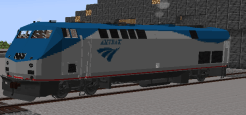
CREDITS FOR ORIGINAL MODELERS POSTED ON EACH PACK, these packs each contain one model of a train that has been converted from a 3d model to a model that is ready to use in Immersive railroading, Just drag&drop into your config file and hit play!

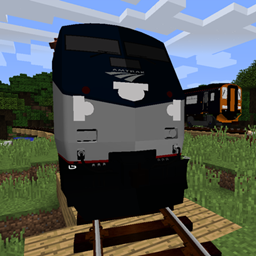
P42DC
MC 1.21.2-Snapshot, 1.21, 1.21.6-snapshot, 1.21.1-Snapshot, 1.21.8, 1.21.5, 1.21.4, 1.21.5-Snapshot, 1.21.1, 1.21.6, 1.21.3, 1.21.7, 1.21.2, 1.21.9-snapshot, 1.21.9, 1.21.10
Release 2026-06-08 Get
Class 150
MC 1.21.2-Snapshot, 1.21, 1.21.6-snapshot, 1.21.1-Snapshot, 1.21.8, 1.21.5, 1.21.4, 1.21.5-Snapshot, 1.21.1, 1.21.6, 1.21.3, 1.21.7, 1.21.2, 1.21.9-snapshot, 1.21.9, 1.21.10
Release 2026-06-08 Get

Requirements & install

How to use this resource pack in Minecraft
Resolution
64x
Minecraft
1.21.5 – 1.21.10
Install folder
.minecraft/resourcepacks

How to install resource packs

  1. Download the resource pack .zip file (do not extract it).
  2. In Minecraft open Options → Resource Packs → Open Pack Folder.
  3. Drop the .zip into the resourcepacks folder (.minecraft/resourcepacks).
  4. Move the pack to the Selected column and click Done.
Browse more: 16x resource packs 32x resource packs 64x resource packs 128x resource packs 256x resource packs 512x+ resource packs Resource Packs for 1.21.10 All resource packs

More from Vexal_Railroading

Advertisement Remove ads with Premium →

You Might Also Like