Mineuniverse
Resource Packs
V7_NeOZz_PACKPVP v3 [x128]

V7_NeOZz_PACKPVP v3 [x128]

RESOURCE PACK
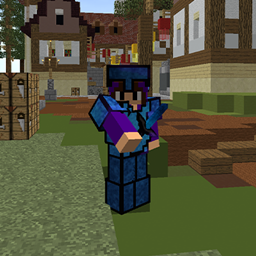
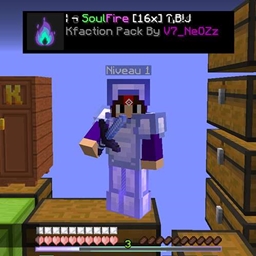
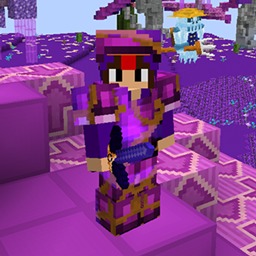
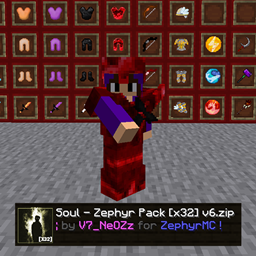
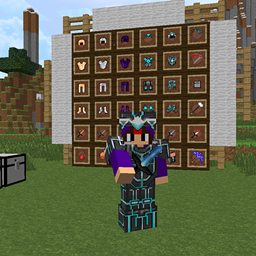
Texture pack with custom items designed for PvP faction and Skyblock servers.
by V7_NeOZz
Download Claim this project
Add a badge to your pageLink to V7_NeOZz_PACKPVP v3 [x128] from a README, website or forum post.
Preview: Badge

Badges update automatically and link to the resource pack page on MineUniverse.

4,407 downloads
0 likes
0 followers
Updated Oct 14, 2026
0 hypes
Follow0
128x
Advertisement Remove ads with Premium →

Texture pack for PvP/ skyblock / survival classic

Designed to work seamlessly with both Vanilla and modded versions of Minecraft Java, from 1.7 to 1.8.9! Perfect for PvP, Factions, and Skyblock servers, this pack introduces custom-crafted weapons, tools, and armor, giving your gameplay a vibrant and dynamic new look.

This pack isn’t just for multiplayer action it's also fully optimized for traditional vanilla survival or creative modes, allowing you to enjoy its stunning textures whether you're exploring new lands, building your dream world, or simply enjoying the classics in single-player mode. The smooth and high-quality designs bring a fresh perspective, adding a level of immersion to every adventure, whether it’s grinding on Skyblock, engaging in faction raids, or navigating through Minecraft's vast, untamed landscapes.

Transform your gear, boost your style, and take your Minecraft experience to new heights with this all-encompassing texture pack!

Let me know if you need any further tweaks!


Version: Java 1.7 - 1.8.9

Video of the pack: 

Discord link for more pack:  https://discord.gg/xUQwpKs9hf

V7_NeOZz_PackPVP v3 .zip
MC 1.7.6, 1.8.7, 1.7.4, 1.7.7, 1.7.5, 1.8.4, 1.7.9, 1.8.8, 1.7.3, 1.7.2, 1.8-Snapshot, 1.8.3, 1.8.6, 1.7.8, 1.7.10, 1.8, 1.8.2, 1.8.5, 1.8.9, 1.8.1
Release 2024-12-12 Get

Requirements & install

How to use this resource pack in Minecraft
Resolution
128x
Minecraft
1.8.2 – 1.8.9
Install folder
.minecraft/resourcepacks

How to install resource packs

  1. Download the resource pack .zip file (do not extract it).
  2. In Minecraft open Options → Resource Packs → Open Pack Folder.
  3. Drop the .zip into the resourcepacks folder (.minecraft/resourcepacks).
  4. Move the pack to the Selected column and click Done.

Packs from 128x upwards need more video memory: install a performance mod such as Sodium for smooth frame rates.

Browse more: 16x resource packs 32x resource packs 64x resource packs 128x resource packs 256x resource packs 512x+ resource packs Resource Packs for 1.8.9 All resource packs

More from V7_NeOZz

Advertisement Remove ads with Premium →

You Might Also Like