Mineuniverse
Resource Packs
Trails & Tales Update (1.20) Themed GUI

Trails & Tales Update (1.20) Themed GUI

RESOURCE PACK
Trails & Tales Update Background Panorama and Settings Rework
by itsme64
Download Claim this project
Add a badge to your pageLink to Trails & Tales Update (1.20) Themed GUI from a README, website or forum post.
Preview: Badge

Badges update automatically and link to the resource pack page on MineUniverse.

4,436 downloads
0 likes
0 followers
Updated Oct 14, 2026
0 hypes
Follow0
512x and Higher Miscellaneous
Advertisement Remove ads with Premium →

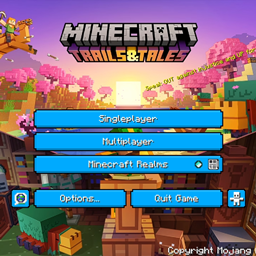
This is Itsme64's Minecraft 1.20 (The Trails & Tales Update) Themed GUI texture pack.

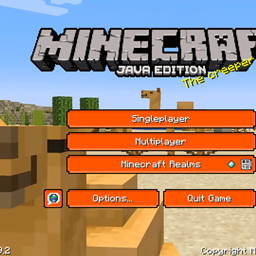
This custom GUI pack made by Itsme64 changes every button in Minecraft to a happy blue color and adds a cool different background, instead of the regular background panorama for all three available versions of this packs. The main version is version 1 and is also the main download of this project. The other two versions can be found under the 'files' tab. Check the 'images' tab to see what all three versions look like.


Consider subscribing to my YouTube as I am putting a lot of effort into this pack: https://www.youtube.com/c/Itsme64

Video explaining the texture: 


This pack also exists for Minecraft Bedrock Edition: https://legacy.curseforge.com/minecraft-bedrock/addons/minecraft-trails-tales-1-20-update-themed-gui 


If you have any questions/comments/concerns/suggestions for future packs please feel free to leave those in the comments section below or contact me via Discord: https://discord.gg/f2TH4TQ3J5

Itsme64's 1.20 Themed GUI V3 [1.2.1]
MC 1.20
Release 2023-06-09 Get
Itsme64's 1.20 Themed GUI V2 [1.2.1]
MC 1.20
Release 2023-06-09 Get
Itsme64's 1.20 Themed GUI V1 [1.2.1]
MC 1.20.1, 1.20
Release 2023-06-09 Get
Itsme64's 1.20 Themed GUI V3 [1.1.1]
MC 1.19.4
Release 2023-05-27 Get
Itsme64's 1.20 Themed GUI V2 [1.1.1]
MC 1.19.4
Release 2023-05-27 Get
Itsme64's 1.20 Themed GUI V1 [1.1.1]
MC 1.19.4
Release 2023-05-27 Get

Requirements & install

How to use this resource pack in Minecraft
Resolution
512x+
Minecraft
1.19.4 – 1.20.1
Install folder
.minecraft/resourcepacks

How to install resource packs

  1. Download the resource pack .zip file (do not extract it).
  2. In Minecraft open Options → Resource Packs → Open Pack Folder.
  3. Drop the .zip into the resourcepacks folder (.minecraft/resourcepacks).
  4. Move the pack to the Selected column and click Done.

512x packs need a strong GPU and at least 4 GB of RAM for Minecraft; a performance mod such as Sodium is strongly recommended.

Browse more: 16x resource packs 32x resource packs 64x resource packs 128x resource packs 256x resource packs 512x+ resource packs Resource Packs for 1.20.1 All resource packs

More from itsme64

Advertisement Remove ads with Premium →

You Might Also Like