Mineuniverse
Resource Packs
The Unnamed Update (1.20) Themed GUI

The Unnamed Update (1.20) Themed GUI

RESOURCE PACK
3 GUI Packs With Custom Backgrounds and Buttons Relating To Minecraft 1.20
by itsme64
Download Claim this project
Add a badge to your pageLink to The Unnamed Update (1.20) Themed GUI from a README, website or forum post.
Preview: Badge

Badges update automatically and link to the resource pack page on MineUniverse.

3,714 downloads
0 likes
0 followers
Updated Oct 14, 2026
0 hypes
Follow0
512x and Higher Miscellaneous
Advertisement Remove ads with Premium →

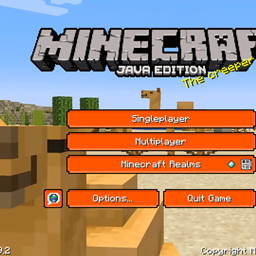
This is Itsme64's Minecraft 1.20 (The Unnamed Update) Themed GUI texture pack.

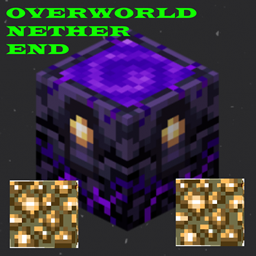
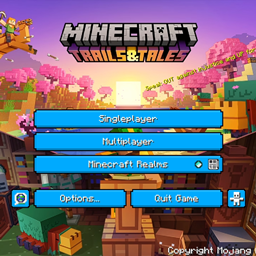
This custom GUI pack made by Itsme64 changes every button in Minecraft to a dark green, bright orange, or sick blue color (depending on the version) and adds a cool unique, 1.20-themed background, instead of the regular background panorama.

Each of the three versions has a different background image, as well as different colored buttons to match the images. (see 'images' tab for more)

Consider subscribing to my YouTube as I am putting a lot of effort into this pack: https://www.youtube.com/c/Itsme64
Video explaining the texture:

All three packs are available for download, the main download is Version 3, the other two can be found under the downloads tab

If you have any questions/comments/concerns/suggestions for future packs please feel free to leave those in the comments section below or contact me via discord: https://discord.gg/f2TH4TQ3J5

Itsme64's 1.20 Themed GUI V1 [1.2.1]
MC 1.19.3
Release 2023-01-10 Get
Itsme64's 1.20 Themed GUI V2 [1.2.1]
MC 1.19.3
Release 2023-01-10 Get
Itsme64's 1.20 Themed GUI V3 [1.2.1]
MC 1.19.3
Release 2023-01-10 Get
Itsme64's 1.20 themed GUI V1 1.1.1.zip
MC 1.19-Snapshot, 1.19.2, 1.19.1, 1.19
Release 2022-10-16 Get
Itsme64's 1.20 themed GUI V2 1.1.1.zip
MC 1.19-Snapshot, 1.19.2, 1.19.1, 1.19
Release 2022-10-16 Get
Itsme64's 1.20 themed GUI V3 1.1.1.zip
MC 1.19-Snapshot, 1.19.2, 1.19.1, 1.19
Release 2022-10-16 Get

Requirements & install

How to use this resource pack in Minecraft
Resolution
512x+
Minecraft
1.19-Snapshot – 1.19.3
Install folder
.minecraft/resourcepacks

How to install resource packs

  1. Download the resource pack .zip file (do not extract it).
  2. In Minecraft open Options → Resource Packs → Open Pack Folder.
  3. Drop the .zip into the resourcepacks folder (.minecraft/resourcepacks).
  4. Move the pack to the Selected column and click Done.

512x packs need a strong GPU and at least 4 GB of RAM for Minecraft; a performance mod such as Sodium is strongly recommended.

Browse more: 16x resource packs 32x resource packs 64x resource packs 128x resource packs 256x resource packs 512x+ resource packs Resource Packs for 1.19.3 All resource packs

More from itsme64

Advertisement Remove ads with Premium →

You Might Also Like