Mineuniverse
Resource Packs
Smoothee's Elytra Dragon

Smoothee's Elytra Dragon

RESOURCE PACK
Makes your elytra look better
by Smootheez
Download Claim this project
Add a badge to your pageLink to Smoothee's Elytra Dragon from a README, website or forum post.
Preview: Badge

Badges update automatically and link to the resource pack page on MineUniverse.

3,493 downloads
0 likes
0 followers
Updated Oct 14, 2026
0 hypes
Follow0
512x and Higher Miscellaneous
Advertisement Remove ads with Premium →

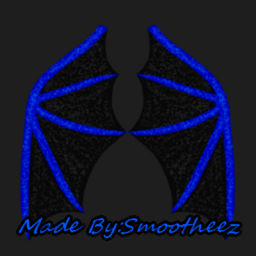
It's a simple texture that makes your elytra look better

**This texture changes elytra visuals**

Optifine required!

#New Update 1.1

  -Now You Can Choose The Color!

#Method

>Use Anvil

>Rename The Elytra to  "(color name) dragon elytra" All In Lowercase

#Color Available

-blue

-brown

-cyan

-green

-orange

-pink

-purple

-red

-white

-yellow


Example Image

Smoothee's Elytra Dragon 1.1 beta
MC 1.19.3, 1.19-Snapshot, 1.19.2, 1.19.1, 1.19
Beta 2023-01-08 Get

Requirements & install

How to use this resource pack in Minecraft
Resolution
512x+
Minecraft
1.19-Snapshot – 1.19.3
Install folder
.minecraft/resourcepacks

How to install resource packs

  1. Download the resource pack .zip file (do not extract it).
  2. In Minecraft open Options → Resource Packs → Open Pack Folder.
  3. Drop the .zip into the resourcepacks folder (.minecraft/resourcepacks).
  4. Move the pack to the Selected column and click Done.

512x packs need a strong GPU and at least 4 GB of RAM for Minecraft; a performance mod such as Sodium is strongly recommended.

Browse more: 16x resource packs 32x resource packs 64x resource packs 128x resource packs 256x resource packs 512x+ resource packs Resource Packs for 1.19.3 All resource packs

More from Smootheez

Advertisement Remove ads with Premium →

You Might Also Like