Compatible with all versions. (You can find the Bedrock version on my profile)
Pink Hearts Resource Pack
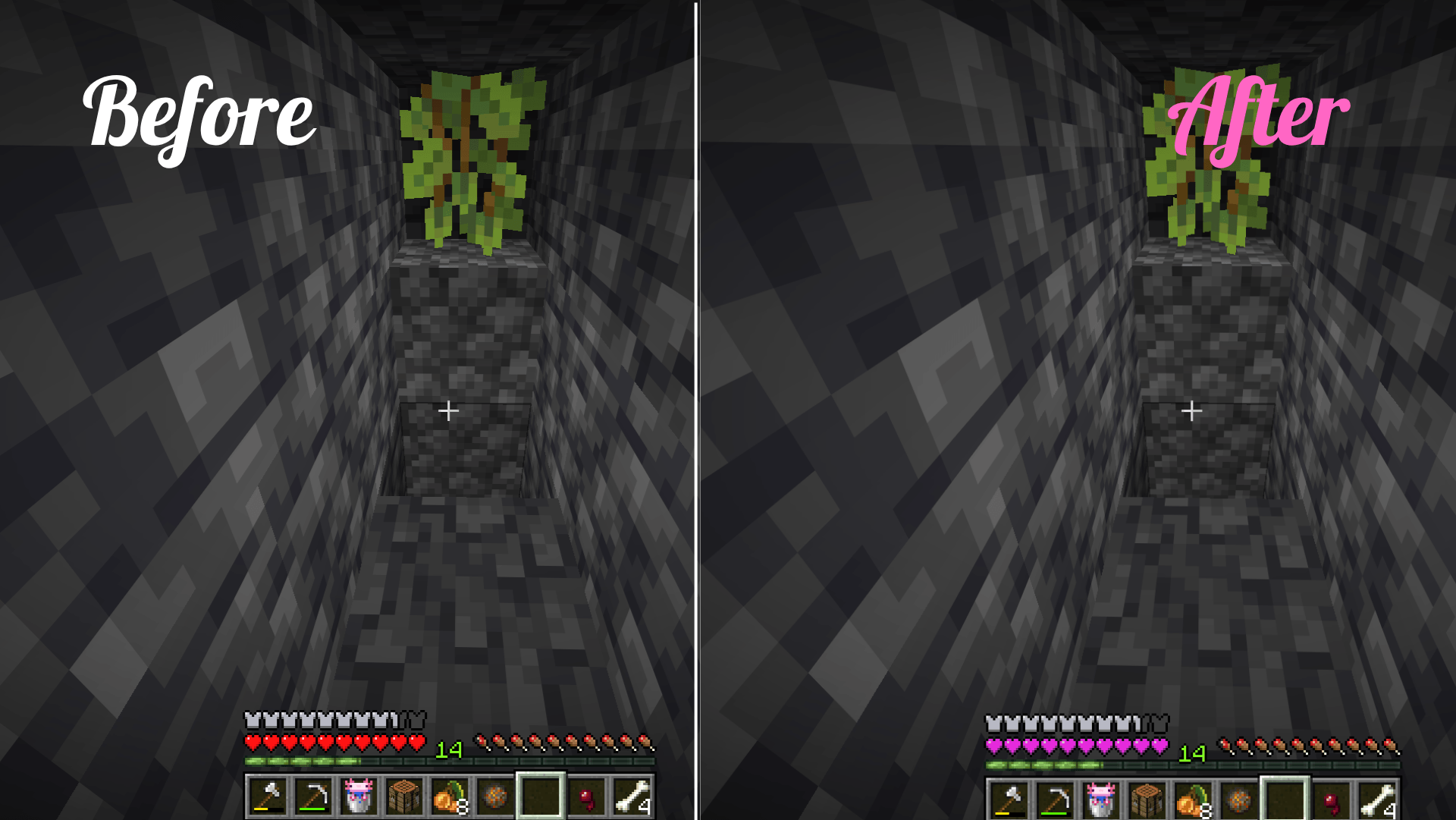
Looking to add a touch of cuteness and aesthetic vibes to your Minecraft world? Pink Hearts is a clean, minimal, and adorable resource pack that replaces the classic red health bar and heart icons with soft, beautiful pink hearts!
Whether you are fighting bosses or just building a cozy cottage, this pack will make your gaming experience much more delightful.
✨ Features
Pink Health Bar: Custom-designed pastel pink hearts replacing the vanilla red ones.
Hardcore Mode Support: Even the hardcore mode hearts get a sweet, stylized makeover!
Pet & Particle Hearts: The hearts that appear when breeding or taming animals are now pink too.
🛠️ How to Install
Download the resource pack (do not unzip the .zip file).
Launch Minecraft and go to Options > Resource Packs.
Click Open Pack Folder.
Drag and drop the downloaded .zip file into the folder.
Select the pack from the in-game list, click Done, and enjoy!
⚠️ Important: If you find any bugs or have suggestions for future updates, please feel free to leave a comment in the Comments section!
If you love this resource pack, don't forget to give it a download and share it with your friends!
Happy gaming!