Mineuniverse
Resource Packs
Purple Crosshair

Purple Crosshair

RESOURCE PACK
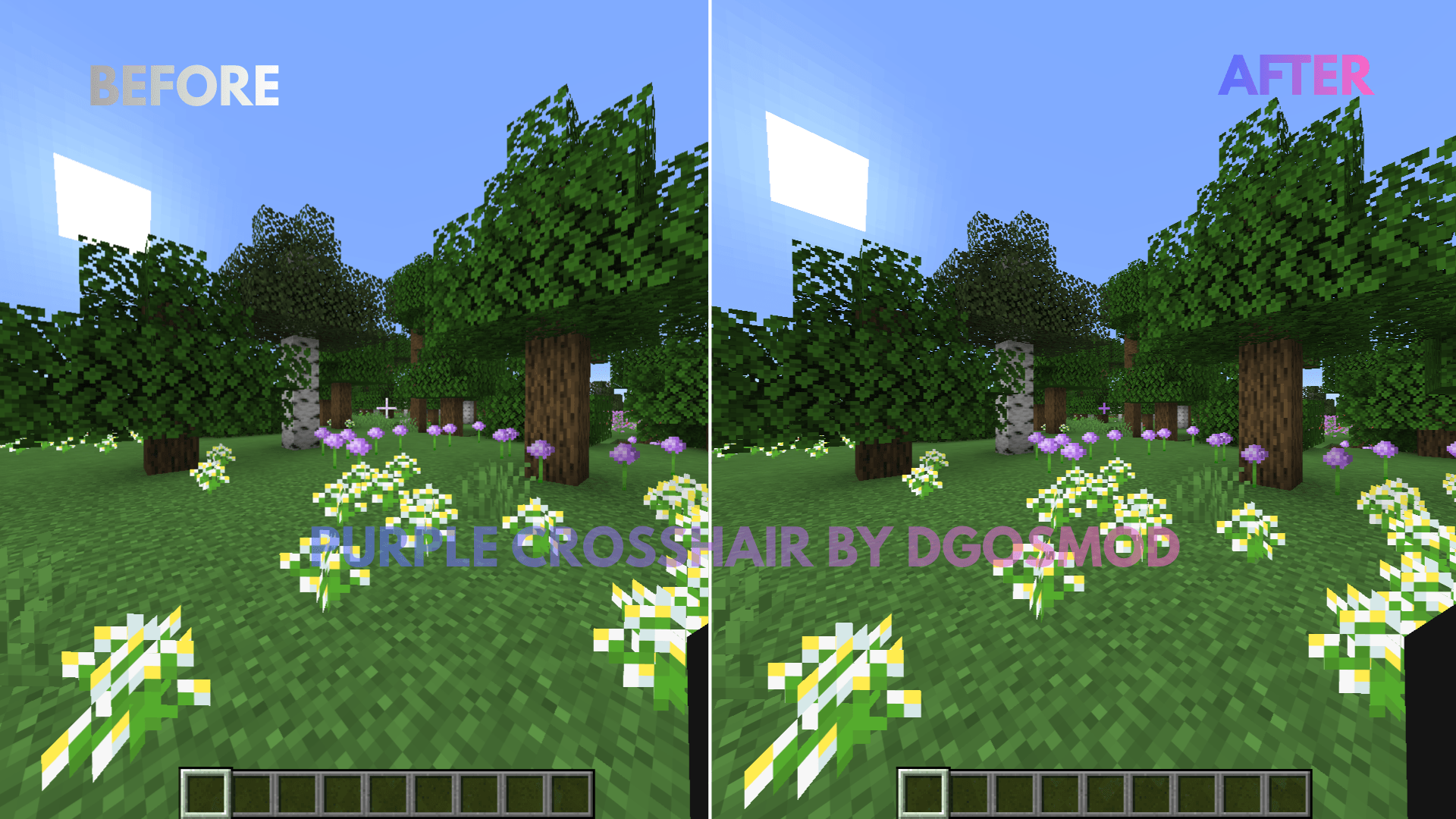
A clean, minimalist purple crosshair designed to improve aiming precision and visibility in Minecraft. Perfect for PvP, Survival, and everyday gameplay.
by DGOsMod
Download Claim this project
Add a badge to your pageLink to Purple Crosshair from a README, website or forum post.
Preview: Badge

Badges update automatically and link to the resource pack page on MineUniverse.

890 downloads
0 likes
0 followers
Updated Oct 14, 2026
0 hypes
Follow0
16x Animated Miscellaneous Traditional
Advertisement Remove ads with Premium →

Purple Crosshair Resource Pack Upgrade your Minecraft HUD with a custom-designed purple crosshair that blends high visibility with a modern aesthetic. Whether you are aiming with a bow, tracking targets in fast-paced PvP, or building in Survival mode, this pack ensures your crosshair stands out against any biome background.

Key Features

  • Vibrant Purple Color: High-contrast tint makes it easy to spot against dark caves, nether terrain, and bright skies.

  • Minimalist Design: Clean geometry keeps your screen uncluttered for maximum visibility.

  • Universal Compatibility: Works seamlessly with default Minecraft textures and fits alongside most other resource packs.

  • Zero Lag: Lightweight file with no impact on performance or FPS.

Installation

  1. Download the .zip file.

  2. Open Minecraft and navigate to Options > Resource Packs.

  3. Drag and drop the downloaded file into your resource packs folder.

  4. Move the pack to the right side of the menu and click Done.

Purple_Crosshair.zip
MC 1.21.2-Snapshot, 1.21, 1.21.6-snapshot, 1.20.2-Snapshot, 1.20.5-Snapshot, 1.21.1-Snapshot, 1.20.2, 1.21.8, 1.20.5, 1.21.5, 1.21.4, 1.21.5-Snapshot, 1.20.1, 1.20, 1.20.6
Release 2026-08-23 Get

Requirements & install

How to use this resource pack in Minecraft
Resolution
16x
Minecraft
1.21 – 1.21.8
Install folder
.minecraft/resourcepacks

How to install resource packs

  1. Download the resource pack .zip file (do not extract it).
  2. In Minecraft open Options → Resource Packs → Open Pack Folder.
  3. Drop the .zip into the resourcepacks folder (.minecraft/resourcepacks).
  4. Move the pack to the Selected column and click Done.
Browse more: 16x resource packs 32x resource packs 64x resource packs 128x resource packs 256x resource packs 512x+ resource packs Resource Packs for 1.21.8 All resource packs

More from DGOsMod

Advertisement Remove ads with Premium →

You Might Also Like