Badges update automatically and link to the resource pack page on MineUniverse.
All versions are supported.
Custom PvP Crosshair Resource Pack
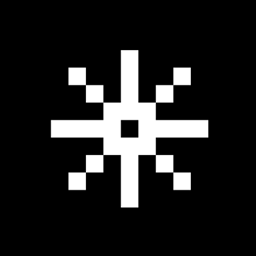
Take your PvP skills to the next level with a clean, precise, and highly optimized crosshair! This resource pack replaces the bulky vanilla crosshair with a custom-designed, minimal pointer tailored for competitive gameplay.
Whether you are bridging in BedWars, comboing in Duels, or practicing your bow aim, this crosshair provides maximum visibility and perfect centering without cluttering your screen.
✨ Features
Perfect Pixel Precision: Designed specifically for PvP to help you track your targets and land your hits easily.
High Visibility: Optimized to stand out perfectly against various backgrounds, from dark caves to bright sky islands.
FPS Friendly: Extremely lightweight and minimal, ensuring absolutely 0% impact on your game performance.
Clean & Minimal: Removes unnecessary screen clutter so you can focus purely on your opponent and your positioning.
🛠️ How to Install
Download the resource pack .zip file.
Open Minecraft and navigate to Options > Resource Packs.
Click on Open Pack Folder.
Move the downloaded .zip file into this folder.
Activate the pack from the menu, move it to the top of your list, and start dominating!
📝 Notes & Feedback
💡 Pro-Tip: For the best competitive experience, you can layer this pack on top of your favorite PvP texture pack!
If this crosshair helps you get more wins and cleaner clips, please leave a comment and share it! Good luck in your matches! 🚀