Fuller trees, denser forests.
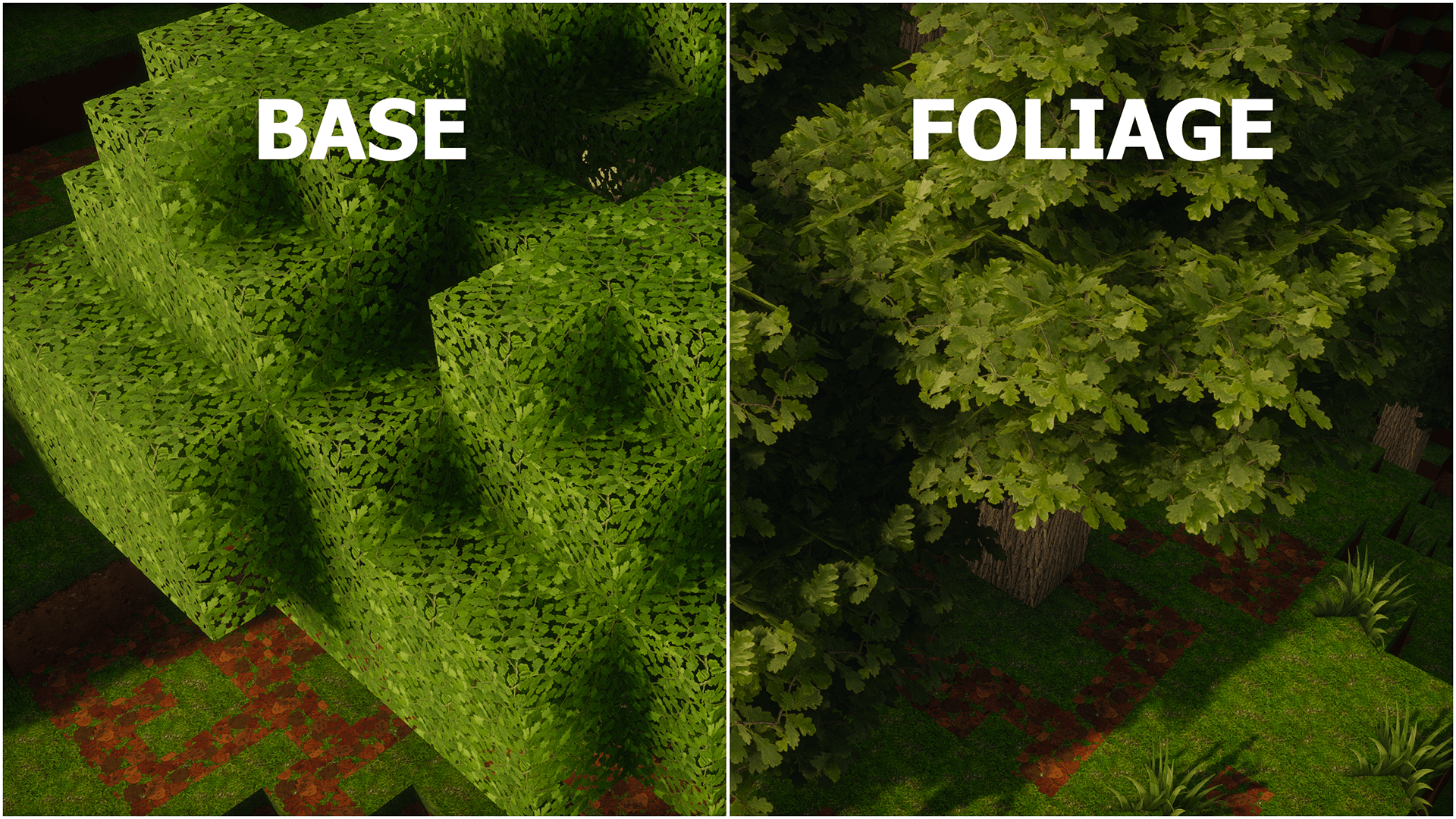
OdarIs Foliage is an optional add-on that gives Minecraft trees more depth and volume.
I did not want to completely redesign the shape of vanilla trees. Instead, Foliage builds on their familiar appearance with additional leaf detail, making individual trees feel fuller and larger forests feel denser while still looking like Minecraft.
The first release focuses on the tree types currently covered by OdarIs.
The added foliage is designed to work naturally with the Base Pack and stay readable both up close and from normal gameplay distances.
The goal is more depth and structure, not simply more leaves everywhere.
OdarIs Base is required.
Foliage works on its own with the Base Pack. You do not need any of the other optional add-ons.
Recommended setup:
40 - OdarIs Foliage
10 - OdarIs Base
If you use the full OdarIs add-on set:
40 - OdarIs Foliage
31 - OdarIs Random Overlay
30 - OdarIs Overlay
20 - OdarIs Random Blocks
10 - OdarIs Base
Higher-numbered OdarIs packs go above lower-numbered ones in the Minecraft resource-pack list.
OdarIs is split into the main Base Pack and several optional add-ons.
You do not need every OdarIs add-on. Just use the ones you actually want.
OdarIs Foliage is available in the same seven resolutions as the Base Pack:
32x • 64x • 128x • 256x • 512x • 1024x • 2048x
I recommend using the same resolution for OdarIs Foliage and your OdarIs Base Pack.
Shaders are optional. Different shader packs and settings can change how the overlays look in-game.
Foliage adds extra depth and volume around tree leaves.
Up close, this gives the canopy more structure. From farther away, it helps trees feel less flat and makes forests appear fuller.
I still want each tree type to remain recognizable. If the extra foliage starts hiding the original shape instead of improving it, then it has gone too far.
Foliage will expand as more tree types, vegetation, and environments are added to OdarIs.
I will also keep adjusting existing foliage when needed as it is tested alongside new textures and different environments.
The goal will stay the same: fuller, more natural-looking trees without losing the familiar Minecraft character.
Feedback is genuinely useful while these add-ons are still being developed.
If an overlay does not match correctly, tiles strangely, looks wrong with a shader, or causes another visual problem, I'd rather know about it.
When reporting an issue, please include:
• Minecraft version
• OdarIs resolution
• Shader pack, if used
• Other visual mods or resource packs
• Screenshots when possible
The OdarIs Discord is the best place for bug reports, performance feedback, suggestions, and general discussion.
Thanks for checking out OdarIs.
*Gallery screenshots were captured with Photon Shaders. Some images also show optional OdarIs add-ons.*