Mineuniverse
Resource Packs
No Scary Cave Sounds

No Scary Cave Sounds

RESOURCE PACK
Removes Minecraft's scary cave ambience sounds. No more random cave audio jumpscares. Enjoy calmer caving without muting all sounds. Client-side resource pack.
by Avrok
Download Claim this project
Add a badge to your pageLink to No Scary Cave Sounds from a README, website or forum post.
Preview: Badge

Badges update automatically and link to the resource pack page on MineUniverse.

2,231 downloads
0 likes
0 followers
Updated Oct 14, 2026
0 hypes
Follow0
16x
Advertisement Remove ads with Premium →


What is it?

This resource pack mutes the default scary cave audio files while keeping the rest of the ambience untouched. 

Once users enter caves, it triggers Minecraft to que files like cave1.ogg and cave2.ogg to play every 5 minutes. Those files contain the sudden loud horror-type sounds you often hear.

I replaced the .ogg files with with just silence. Keeping the default cave ambience and only removes those jumpscares. 


1. Removes creepy cave found files

2. Keeps all other Minecraft sounds unchanged

3. No mods needed
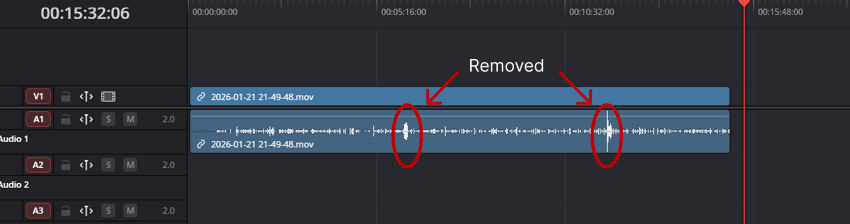


a screenshot of a timeline within a video editor tool showing the waveforms of a gameplay recording. There are two audio spikes with red circles around them and arrows pointing to each one to draw attention to what the pack is fixing.


Why use this?

Perfect for content creators doing Relaxing Longplays, SMPs, single player worlds, hardcore, PvP, builders, explorers, streamers, and average players who want calm gameplay. No more listening to your chill music and then 5 minutes later get an unnecessarily loud horror sound effect just for being down in the caves. 


Compatibility

  • Works with Vanilla Minecraft
  • Works with most resource and modpacks
  • Safe to use on servers as client-side.


👤 Created by Avrok
© 2025 Avrok. All rights reserved.


No Scary Cave Sounds
MC 1.21, 1.21.8, 1.21.5, 1.21.4, 1.21.1, 1.21.6, 1.21.3, 1.21.7, 1.21.2, 1.21.9, 1.21.10, 1.21.11, 26.1, 26.1.1, 26.1.2, 26.2, 26.3
Release 2026-06-06 Get
No Scary Cave Sounds
MC 1.21, 1.21.8, 1.21.5, 1.21.4, 1.21.1, 1.21.6, 1.21.3, 1.21.7, 1.21.2, 1.21.9, 1.21.10, 1.21.11, 26.1, 26.1.1, 26.1.2
Release 2026-01-30 Get

Requirements & install

How to use this resource pack in Minecraft
Resolution
16x
Minecraft
1.21.9 – 26.3
Install folder
.minecraft/resourcepacks

How to install resource packs

  1. Download the resource pack .zip file (do not extract it).
  2. In Minecraft open Options → Resource Packs → Open Pack Folder.
  3. Drop the .zip into the resourcepacks folder (.minecraft/resourcepacks).
  4. Move the pack to the Selected column and click Done.
Browse more: 16x resource packs 32x resource packs 64x resource packs 128x resource packs 256x resource packs 512x+ resource packs Resource Packs for 26.3 All resource packs

More from Avrok

Advertisement Remove ads with Premium →

You Might Also Like