Mineuniverse
Resource Packs
Japanese Fireworks Festival Resources

Japanese Fireworks Festival Resources

RESOURCE PACK
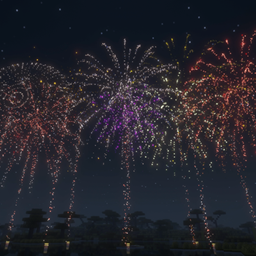
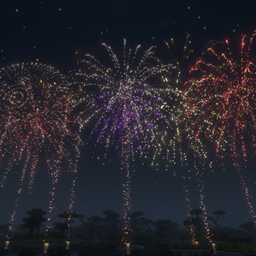
The required luminous particles, launch-tube model, and positional sounds for Japanese Fireworks Festival.
by carkn
Download Claim this project
Add a badge to your pageLink to Japanese Fireworks Festival Resources from a README, website or forum post.
Preview: Badge

Badges update automatically and link to the resource pack page on MineUniverse.

137 downloads
0 likes
0 followers
Updated Oct 14, 2026
0 hypes
Follow0
64x Miscellaneous
Advertisement Remove ads with Premium →

Required companion pack for Japanese Fireworks Festival

This resource pack provides the intended visuals and sounds for the Japanese Fireworks Festival datapack. It is not designed as a standalone fireworks system; install it together with the datapack.

Included

  • 64x64 luminous particle textures in multiple colors
  • Bright white sparkle and trailing-light effects
  • A custom launch-tube item model
  • Positional launch, burst, distant echo, and taiko sounds

The pack replaces a small number of vanilla particle textures while enabled. Disable it when you are not using Japanese Fireworks Festival if you want the original vanilla particle appearance.

Installation

  1. Download the resource pack and keep it as a ZIP file.
  2. Place it in .minecraft/resourcepacks/.
  3. Enable it from Options > Resource Packs.
  4. Install the Japanese Fireworks Festival datapack in your world.

Every player watching a multiplayer show must enable this resource pack.

Requirements

  • Minecraft Java Edition 26.2
  • Japanese Fireworks Festival datapack

Showcase video: https://www.youtube.com/watch?v=osphMEK1dAY

japanese-fireworks-resources-v1.0.0-en-mc26.2.zip
MC 26.2
Release 2026-07-24 Get

Requirements & install

How to use this resource pack in Minecraft
Resolution
64x
Minecraft
26.2
Install folder
.minecraft/resourcepacks

How to install resource packs

  1. Download the resource pack .zip file (do not extract it).
  2. In Minecraft open Options → Resource Packs → Open Pack Folder.
  3. Drop the .zip into the resourcepacks folder (.minecraft/resourcepacks).
  4. Move the pack to the Selected column and click Done.
Browse more: 16x resource packs 32x resource packs 64x resource packs 128x resource packs 256x resource packs 512x+ resource packs Resource Packs for 26.2 All resource packs

More from carkn

Advertisement Remove ads with Premium →

You Might Also Like