Mineuniverse
Resource Packs
HCT Collectibles Visual Assets

HCT Collectibles Visual Assets

RESOURCE PACK
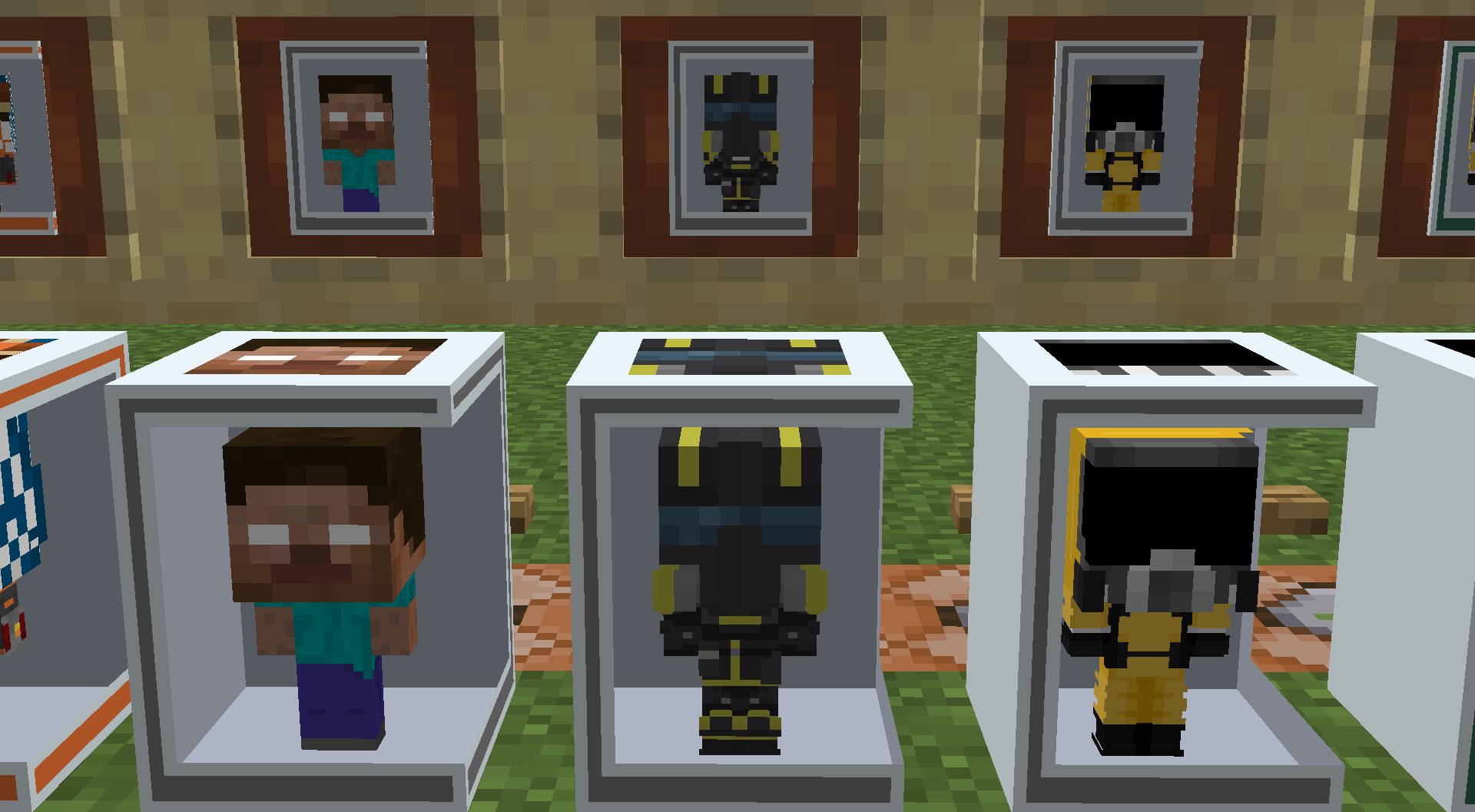
Provides the necessary custom 3D models and high-definition textures required to render the custom pop figures included in the HCT Collectibles ecosystem.
by HCTSon
Download Claim this project
Add a badge to your pageLink to HCT Collectibles Visual Assets from a README, website or forum post.
Preview: Badge

Badges update automatically and link to the resource pack page on MineUniverse.

24 downloads
0 likes
0 followers
Updated Oct 14, 2026
0 hypes
Follow0
64x Miscellaneous Modern
Advertisement Remove ads with Premium →

Overview

HCT Collectibles Visual Assets is the official companion resource pack designed exclusively to provide the 3D geometry, textures, and custom model data overrides for the HCT Collectibles modding framework. This pack introduces high-fidelity, arcade-style collectible figure models that seamlessly integrate into the Minecraft world engine.

Features Included

  • Custom 3D Models: Full geometric model definitions for rare pop figures, including the Backrooms Pop and the Helldiver Pop.
  • Custom Model Data Mapping: Precise client-side predicates designed to map custom NBT identifiers cleanly onto base items without overriding vanilla textures.
  • High-Definition Textures: Unique, vibrant pixel art skins specifically tailored for collectible display boxes.

Runtime Modification

This resource pack fully supports hot-reloading mid-playthrough. If asset updates are applied to the active directory, operators can utilize the vanilla /reload or F3 + T commands to immediately refresh the client-side rendering pipeline and register new models without restarting the game client.

HCT Collectibles Visual Assets.zip
MC 1.21.1
Release 2026-05-28 Get
HCT Collectibles Visual Assets.zip
MC 1.21.1
Release 2026-05-23 Get

Requirements & install

How to use this resource pack in Minecraft
Resolution
64x
Minecraft
1.21.1
Install folder
.minecraft/resourcepacks

How to install resource packs

  1. Download the resource pack .zip file (do not extract it).
  2. In Minecraft open Options → Resource Packs → Open Pack Folder.
  3. Drop the .zip into the resourcepacks folder (.minecraft/resourcepacks).
  4. Move the pack to the Selected column and click Done.
Browse more: 16x resource packs 32x resource packs 64x resource packs 128x resource packs 256x resource packs 512x+ resource packs Resource Packs for 1.21.1 All resource packs

More from HCTSon

Advertisement Remove ads with Premium →

You Might Also Like