Mineuniverse
Resource Packs
Gibster's Locomotive Pack - Immersive Railroading

Gibster's Locomotive Pack - Immersive Railroading

RESOURCE PACK
A collection of locomotives for Immersive Railroading
by DerGibster
Download Claim this project
Add a badge to your pageLink to Gibster's Locomotive Pack - Immersive Railroading from a README, website or forum post.
Preview: Badge

Badges update automatically and link to the resource pack page on MineUniverse.

6,253 downloads
0 likes
0 followers
Updated Oct 14, 2026
0 hypes
Follow0
256x Mod Support Modern
Advertisement Remove ads with Premium →
NEW! Added fully realistic controls and lighting to the M-4 Mogul, this requires the latest test build of IR to work.
 
For use with the Immersive Railroading Mod (link)
 
Adds a few locomotives that I've made over time. Additions are not likely but custodial updates to keep this compatible with the mod are made whenever neccessary. 
 
 
Currently contains the following:
  • A5a camelback steam locomotive with tender
  • Rail speeder, comes in yellow, orange, and red
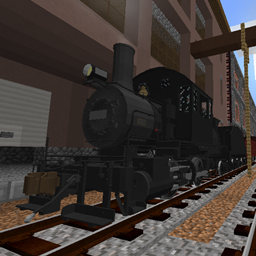
  • M-4 Mogul Steam locomotive with Vanderbilt tender, now with lighting and cab controls (SEE BELOW FOR CONTROL INFO)
  Image
Image


Like my stuff? Please consider donating - anything helps! :)
 
Check out my trello page to see what I have planned next --> https://trello.com/b/JvO1ZBmM/ir-modeling-to-do


Mogul Controls  
  • Lighting - The marker lights and headlights can be controlled from the switch box above the fireman’s seat (L side) inside the cab.
  • Headlight Variants - Headlight and number board variations can be switched on or off to reflect different prototypes. Inside the cab there is a set of 3 valves in a row centered on the backhead that control the headlight variations and one immediately above left that controls the number board. 
Headlight controls  
Gibster's+Locomotive+Pack+v2.5.zip
MC 1.12, 1.15, 1.16, 1.13, 1.11, 1.14, 1.10
Release 2022-04-26 Get
Gibster's+Locomotive+Pack+v2.0.zip
MC 1.12, 1.15, 1.16, 1.13, 1.11, 1.14, 1.10
Release 2020-08-01 Get
Gibster's+Locomotive+Pack+v1.01.zip
MC 1.12, 1.11, 1.14
Release 2019-11-23 Get
Gibster's+Locomotive+Pack.zip
MC 1.12, 1.11, 1.14
Release 2019-11-16 Get

Requirements & install

How to use this resource pack in Minecraft
Resolution
256x
Minecraft
1.10 – 1.16
Install folder
.minecraft/resourcepacks

How to install resource packs

  1. Download the resource pack .zip file (do not extract it).
  2. In Minecraft open Options → Resource Packs → Open Pack Folder.
  3. Drop the .zip into the resourcepacks folder (.minecraft/resourcepacks).
  4. Move the pack to the Selected column and click Done.

Packs from 128x upwards need more video memory: install a performance mod such as Sodium for smooth frame rates.

Browse more: 16x resource packs 32x resource packs 64x resource packs 128x resource packs 256x resource packs 512x+ resource packs Resource Packs for 1.16 All resource packs

More from DerGibster

Advertisement Remove ads with Premium →

You Might Also Like