Badges update automatically and link to the resource pack page on MineUniverse.
Attention! You need to use with Forge the OptiFine mod for it to make it working!
This resource pack is about better fox, wolf variants from a mod and better standard wolf variants. The better wolf variants are connected with Revamped Wolf mod, you can find it here:
https://legacy.curseforge.com/minecraft/mc-mods/revampedwolf
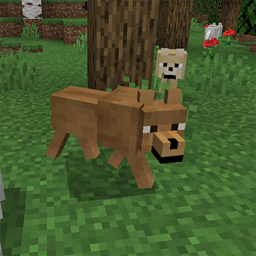
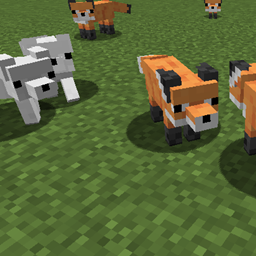
The resource pack is for 1.19(.1, 2). The wolves have some different color variants and by the Revamped Wolf mod you can find few other colored wolf variants too, if you use the linked Revamped Wolf mod with this resource pack. These are butter beige, brown and grey. The standard wolf variants are grey (too), dark grey, white, grey-white, black, black-grey and black-white (it's the most rare, but not too rare). If you want to use this resource pack only, i mean not with the Revamped Wolf mod, you will recognize you get the standard wolf variants only (the grey is the most common usually). Plus the foxes are a bit darker orange and they have light orange, black and a rare crossfox (orange-black) variants too, the snow/white fox have a rare kitsune fox variant, which have small red and flame shaped markings.
Of course you can see some screenshots about the changes in the Images.
If you doesn't know how to add to the Minecraft a resource pack, i help you in that. After you downloaded the ZIP file to your Minecraft version, don't extract it, or it won't work. Copy the ZIP file in your Minecraft folder to the resourcepacks folder. After that run the Minecraft, go to the Settings, choose the Resource Packs and there add it to the Minecraft, wait a bit, after it's done. If you did it well, it should be working.