Mineuniverse
Resource Packs
Floral weapons CIT

Floral weapons CIT

RESOURCE PACK
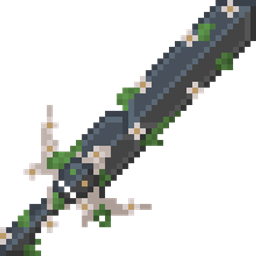
Changes the appearance of the sword, axe, pickaxe and shield to a floral appearance
by SirRiesling
Download Claim this project
2,781 downloads
0 likes
0 followers
Updated Oct 14, 2026
0 hypes
Follow0
64x Medieval Modern Traditional
Advertisement Remove ads with Premium →

[ES]

Este paquete de texturas inspirado en esta skin fue una comision que me hicieron en mi perfil de fiverr.

[EN]

This texture pack inspired by this skin was a commission that I received on my fiverr profile.

[ES]

Dale a la espada, hacha, pico de netherite y al escudo un estilo floral y con un toque metalizado con este texture pack, añadiré progresivamente texturas para la azada y pala.
Para conseguir que tus armas tengan la apariencia deseada, solo renombralas de la siguiente manera:
-Floral sword
-Floral axe
-Floral pickaxe
-Floral shield
Adicionalmente, hay un archivo que directamente reemplaza las herramientas de netherite, úsalo si no usas optifine o un mod que soporte archivos CIT.

[EN]

Give your netherite sword, axe, pickaxe and shield a floral and metallic look with this texture pack, I'll be progressively adding textures for your hoe and shovel.
To get your weapons to look the way you want, just rename them like this:
-Floral sword
-Floral axe
-Floral pickaxe
-Floral shield
Additionally, there is a file that directly replaces the netherite tools, use it if you don't use optifine or a mod that supports CIT files.


Floral weapons CIT.zip
MC 1.17, 1.16, 1.20, 1.21.1, 1.18, 1.19
Release 2024-10-24 Get
Floral weapons Netherite.zip
MC 1.21, 1.17, 1.16, 1.20, 1.18, 1.19
Release 2024-10-24 Get

Requirements & install

How to use this resource pack in Minecraft
Resolution
64x
Minecraft
1.16 – 1.21.1
Install folder
.minecraft/resourcepacks

How to install resource packs

  1. Download the resource pack .zip file (do not extract it).
  2. In Minecraft open Options → Resource Packs → Open Pack Folder.
  3. Drop the .zip into the resourcepacks folder (.minecraft/resourcepacks).
  4. Move the pack to the Selected column and click Done.
Browse more: 16x resource packs 32x resource packs 64x resource packs 128x resource packs 256x resource packs 512x+ resource packs Resource Packs for 1.21.1 All resource packs

More from SirRiesling

Advertisement Remove ads with Premium →

You Might Also Like