Mineuniverse
Resource Packs
Diamond Totem of Undying

Diamond Totem of Undying

RESOURCE PACK
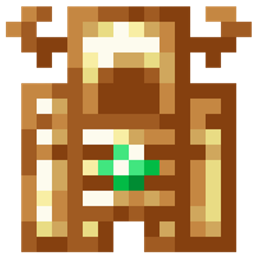
The Diamond Totem resource pack elevates the aesthetic of Minecraft's totem of undying by giving it a diamond makeover, introducing a touch of luxury and sparkle to the survival aspect of the game.
by dihogenn
Download Claim this project
Add a badge to your pageLink to Diamond Totem of Undying from a README, website or forum post.
Preview: Badge

Badges update automatically and link to the resource pack page on MineUniverse.

18,215 downloads
0 likes
0 followers
Updated Oct 14, 2026
0 hypes
Follow0
16x Miscellaneous Modern Traditional
Advertisement Remove ads with Premium →

Sparkle in Survival with Diamond Totem

Elevate Your Game with Luxurious Shine

The Diamond Totem resource pack updates the classic Totem of Undying in Minecraft to a dazzling diamond version. This upgrade adds a brilliant and luxurious aesthetic to your gameplay, making each survival moment not only safer but also more glamorous. Ideal for players who desire elegance along with functionality in their gaming experience.

Resource Pack Feature


Feature:

  • Visual Enhancement: Features a sparkling diamond effect that enhances the visual appeal and makes the totem a standout survival tool.

Transform your gameplay with the dazzling Diamond Totem and shine in every Minecraft adventure!

Thank You Banner


Experience luxury in survival with the Diamond Totem, where functionality meets flair in every aspect of your gameplay.


Diamond Totem.zip
MC 1.17.1, 1.16.3, 1.13.1, 1.19.3, 1.20.2, 1.21, 1.16.1, 1.18.1, 1.20.5, 1.21.5, 1.14.4, 1.14.1, 1.12.1, 1.17, 1.12, 1.14.3, 1.15, 1.16, 1.13, 1.19.4, 1.16.5, 1.21.4, 1.11
Release 2025-01-25 Get

Requirements & install

How to use this resource pack in Minecraft
Resolution
16x
Minecraft
1.18.1 – 1.21.5
Install folder
.minecraft/resourcepacks

How to install resource packs

  1. Download the resource pack .zip file (do not extract it).
  2. In Minecraft open Options → Resource Packs → Open Pack Folder.
  3. Drop the .zip into the resourcepacks folder (.minecraft/resourcepacks).
  4. Move the pack to the Selected column and click Done.
Browse more: 16x resource packs 32x resource packs 64x resource packs 128x resource packs 256x resource packs 512x+ resource packs Resource Packs for 1.21.5 All resource packs

More from dihogenn

Advertisement Remove ads with Premium →

You Might Also Like