Mineuniverse
Resource Packs
Catnap Beds

Catnap Beds

RESOURCE PACK
A cozy resource pack that gives all 16 bed colors adorable cat-themed designs with paw prints, playful details, and sleeping feline artwork.
by 5055r
Download Claim this project
510 downloads
0 likes
Updated Oct 14, 2026
0 hypes
256x
Advertisement Remove ads with Premium →

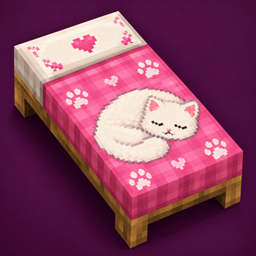
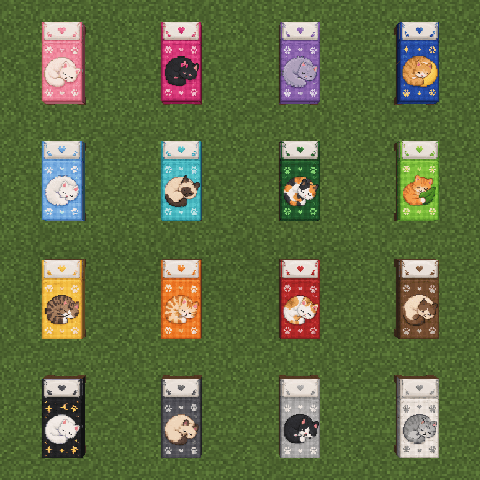
Catnap Beds gives Minecraft’s classic beds a cozy feline makeover. Every one of the 16 vanilla bed colors receives its own redesigned texture featuring an adorable sleeping cat, paw prints, and small decorative details while keeping the original color of each bed recognizable.

The pack is designed to blend naturally with Minecraft while adding a cute and cozy touch to bedrooms, houses, cottages, and other builds. Each color has been individually adapted so you can freely mix and match beds without losing the consistent Catnap Beds style.

Features:

  • Custom textures for all 16 Minecraft bed colors
  • Adorable sleeping cat artwork
  • Paw-print and cat-themed decorative details
  • Keeps the recognizable vanilla bed colors
Catnap Beds 1.0.2 | Java 1.6.1–26.3
MC 1.16.3, 1.13.1, 1.9.3, 1.8.7, 1.7.4, 1.7.7, 1.7.6, 1.17.1, 1.9.1, 1.21, 1.7.5, 1.6.1, 1.16.1, 1.18.1, 1.14.3, 1.15, 1.16, 1.13, 1.7.3, 1.7.2, 1.16.5, 1.10.2, 1.19.3, 1.20.2
Release 2026-10-07 Get
catnap-beds-1.0.0-java-26.3.zip
MC 26.3
Release 2026-09-29 Get
catnap-beds-1.0.0-java-1.21.x.zip
MC 1.21.2-Snapshot, 1.21.6-snapshot, 1.21.1-Snapshot, 1.21.8, 1.21.5, 1.21.4, 1.21.5-Snapshot, 1.21.1, 1.21.6, 1.21.3, 1.21.7, 1.21.4-Snapshot, 1.21.2, 1.21.9-snapshot, 1.21.9, 1.21.10
Release 2026-09-29 Get
catnap-beds-1.0.0-java-26.2.zip
MC 26.2
Release 2026-09-29 Get

Requirements & install

How to use this resource pack in Minecraft
Resolution
256x
Minecraft
1.21.6 – 26.3
Install folder
.minecraft/resourcepacks

How to install resource packs

  1. Download the resource pack .zip file (do not extract it).
  2. In Minecraft open Options → Resource Packs → Open Pack Folder.
  3. Drop the .zip into the resourcepacks folder (.minecraft/resourcepacks).
  4. Move the pack to the Selected column and click Done.

Packs from 128x upwards need more video memory: install a performance mod such as Sodium for smooth frame rates.

Browse more: 16x resource packs 32x resource packs 64x resource packs 128x resource packs 256x resource packs 512x+ resource packs Resource Packs for 26.3 All resource packs

More from 5055r

Advertisement Remove ads with Premium →

You Might Also Like