Mineuniverse
Resource Packs
Better Modern Crosshair

Better Modern Crosshair

RESOURCE PACK
Better Crosshair for vanilla, sodium, optifine, vulcan
by DGOsMod
Download Claim this project
Add a badge to your pageLink to Better Modern Crosshair from a README, website or forum post.
Preview: Badge

Badges update automatically and link to the resource pack page on MineUniverse.

1,663 downloads
0 likes
0 followers
Updated Oct 14, 2026
0 hypes
Follow0
16x Miscellaneous Modern Photo Realistic Traditional
Advertisement Remove ads with Premium →

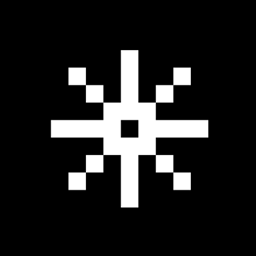
Better Modern Crosshair

A clean, minimalist, and precise crosshair upgrade for Minecraft.

Tired of the bulky, default vanilla crosshairs that block your view? Better Modern Crosshair replaces the outdated target with a sleek, high-visibility modern design optimized for both casual building and intense PvP/PvE combat.

🌟 Key Features

  • Pixel-Perfect Accuracy: Designed to give you the cleanest center point without cluttering your screen.

  • Modern & Minimalist: Sleek aesthetics that blend perfectly with modern UI elements.

  • High Contrast: Tested across various biomes to ensure you never lose your target in the snow, desert, or dark caves.

⚙️ Compatibility

Built to work seamlessly with your favorite performance and graphics setups:

  • Vanilla Minecraft

  • Sodium / Iris

  • OptiFine

🛠️ Installation

  1. Download the resource pack.

  2. Move the .zip file into your resourcepacks folder.

  3. Activate it in-game and enjoy a cleaner view!

Feedback or suggestions? Feel free to leave a comment! If you enjoy the cleaner view, don't forget to drop a like.

Better_Modern_Crosshair.zip
MC 1.16.3, 1.17.1, 1.21.2-Snapshot, 1.21, 1.21.6-snapshot, 1.18.1, 1.20.2-Snapshot, 1.20.5-Snapshot, 1.19-Snapshot, 1.21.1-Snapshot, 1.16.5, 1.19.3, 1.20.2, 1.19.4, 1.21.8, 1.17
Release 2026-06-24 Get

Requirements & install

How to use this resource pack in Minecraft
Resolution
16x
Minecraft
1.20.2-Snapshot – 1.21.8
Install folder
.minecraft/resourcepacks

How to install resource packs

  1. Download the resource pack .zip file (do not extract it).
  2. In Minecraft open Options → Resource Packs → Open Pack Folder.
  3. Drop the .zip into the resourcepacks folder (.minecraft/resourcepacks).
  4. Move the pack to the Selected column and click Done.
Browse more: 16x resource packs 32x resource packs 64x resource packs 128x resource packs 256x resource packs 512x+ resource packs Resource Packs for 1.21.8 All resource packs

More from DGOsMod

Advertisement Remove ads with Premium →

You Might Also Like