Mineuniverse
Resource Packs
Better Cushion

Better Cushion

RESOURCE PACK
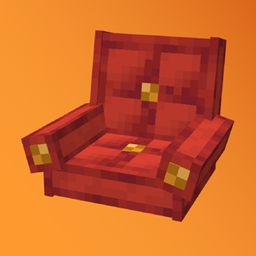
This resource pack adds multiple model variants for the cushion when renamed
by ShorkBee
Download Claim this project
52 downloads
0 likes
Updated Oct 14, 2026
0 hypes
64x Medieval Modern
Advertisement Remove ads with Premium →

Better Cushion


I made this resource pack for my Hardcore World.
The reason I made this is so that when Minecraft gets a new update,I can still enjoy my decorations without relying on furniture mods or other decoration mods.
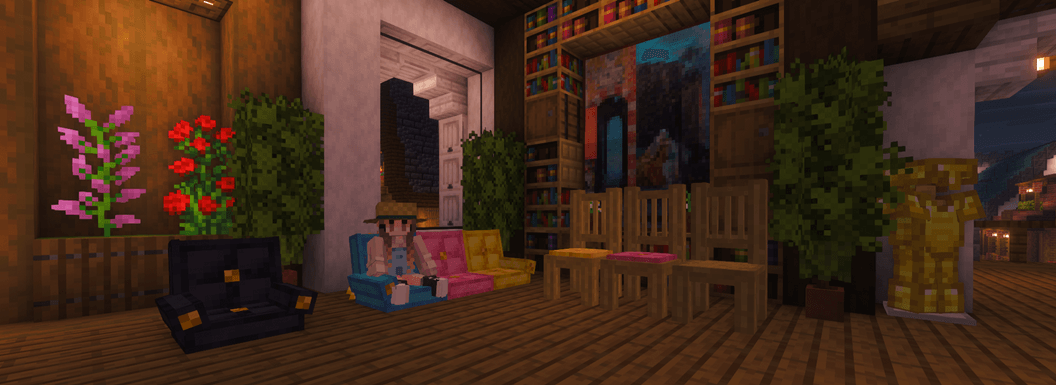
This resource pack includes 3 cushion variants: Couch, Chair, and Chair with Cushion.
How does it work? Simply rename the cushion with Anvil or Nametag.

e

Requires

Rename

Couch

Couch has 4 models, and you can combine them so they look connected.
Example:

Couch
Couch Right
Couch Left
Couch Middle

Chair

To use the chair, just place a string and put the cushion on top.
Note: Strings in this resource pack are invisible.

Chair without cushion.
Example:

Chair

Chair with cushion.
Example:

Chair Cushion


Invisible Cushion

Example:

.


Showcase


Other Project:

Link to ShorkBee Link to ShorkBee

Better Cushion.zip
MC 26.3
Release 2026-10-07 Get

Requirements & install

How to use this resource pack in Minecraft
Resolution
64x
Minecraft
26.3
Install folder
.minecraft/resourcepacks

How to install resource packs

  1. Download the resource pack .zip file (do not extract it).
  2. In Minecraft open Options → Resource Packs → Open Pack Folder.
  3. Drop the .zip into the resourcepacks folder (.minecraft/resourcepacks).
  4. Move the pack to the Selected column and click Done.
Browse more: 16x resource packs 32x resource packs 64x resource packs 128x resource packs 256x resource packs 512x+ resource packs Resource Packs for 26.3 All resource packs

More from ShorkBee

Advertisement Remove ads with Premium →

You Might Also Like