Mineuniverse
Resource Packs
Amaro's Toolbox

Amaro's Toolbox

RESOURCE PACK
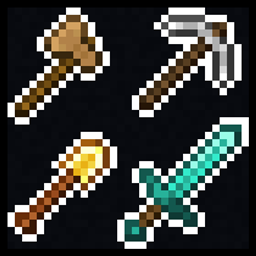
Texture pack that alters various tool tiers to reference the different wood types present in the game.
by Amaro_Lunatico
Download Claim this project
1,364 downloads
0 likes
0 followers
Updated Oct 14, 2026
0 hypes
Follow0
16x Traditional
Advertisement Remove ads with Premium →

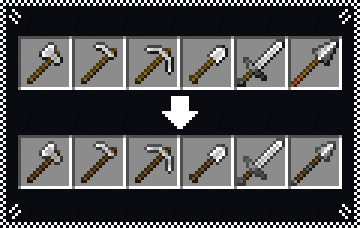
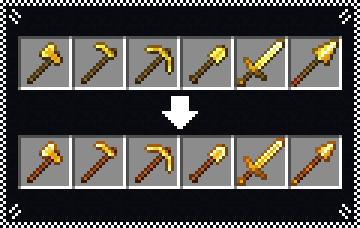
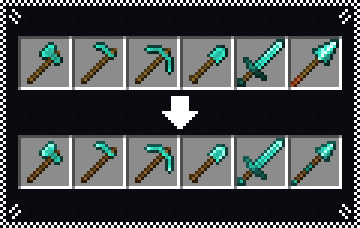
This pack changes the texture of wooden, stone, iron, copper, golden and diamond tools to give them the color palettes reminicent of different wood types present in the game, similarly to netherite tools and their crimson wood handles.

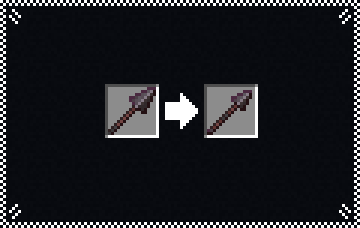
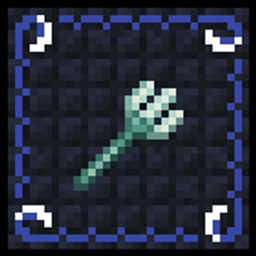
It also gives spears smaller icons that better showcase the items, similar to the trident.

The pack changes each of the tiers in the following ways:

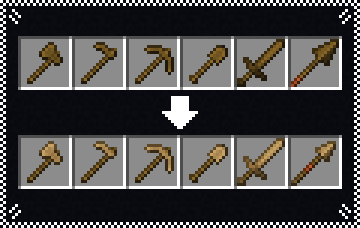
  • Wooden tools have their blades and heads altered to color of oak wood, as a reference to it being the first wood type added to the game.
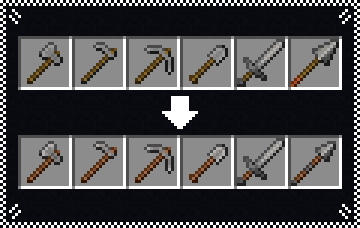
  • Stone tools have their handles recolored to be reminiscent of jungle wood, in addition to having the outline of the stone hoe fixed.
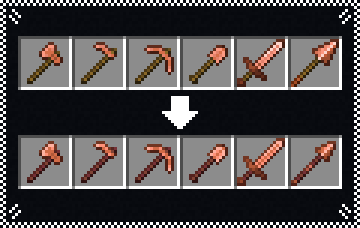
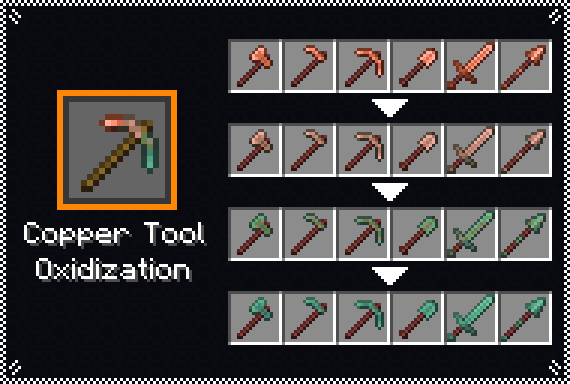
  • Copper tools have their handles recolored to be reminiscent of mangrove wood, in addition to brighter highlights to make them look shinier.
  • Iron tools have their handles darkened to reference dark oak wood, in addition to having the outline of the iron hoe fixed.
  • Gold tools get orange handles as a reference to acacia wood, in addition to having the shading of the blades and heads altered to make them look shinier.
  • Diamond tools have their handles recolored to be reminiscent of spruce wood, in addition to having the shading of the blades and heads altered to make them look shinier.

Pack Modifier

This texture pack includes a modifier for "Copper Tool Oxidization" from Vanilla Tweaks, allowing you to utilize the style of copper items seen here alongside that pack.

Extra Details

  • the zip file can just be dragged and dropped in your "resourcepacks" folder, unzipping isn't required.

Amaros_Toolbox_v17.zip
MC 1.21.8, 1.21.7, 1.21.9, 1.21.10, 1.21.11, 26.1, 26.1.1, 26.1.2
Release 2026-03-05 Get
AT_All_Tools_v16.zip
MC 1.21.9, 1.21.10, 1.21.11
Release 2025-12-29 Get
AT_All_Tools_v12111.zip
MC 1.21.11
Release 2025-12-16 Get
AT_All_Tools_v1219.zip
MC 1.21.9, 1.21.10
Release 2025-10-16 Get
AT_All_Tools_v118.zip
MC 1.18.1, 1.18.2, 1.18
Release 2025-02-03 Get
AT_All_Tools_v119.zip
MC 1.19.2, 1.19
Release 2025-02-03 Get
AT_All_Tools_v120.zip
MC 1.20.2, 1.21, 1.20.5, 1.21.5, 1.21.4, 1.20.3, 1.20.1, 1.20, 1.20.6, 1.20.4, 1.21.3, 1.21.1, 1.21.2
Release 2025-02-03 Get

Requirements & install

How to use this resource pack in Minecraft
Resolution
16x
Minecraft
1.21.7 – 26.1.2
Install folder
.minecraft/resourcepacks

How to install resource packs

  1. Download the resource pack .zip file (do not extract it).
  2. In Minecraft open Options → Resource Packs → Open Pack Folder.
  3. Drop the .zip into the resourcepacks folder (.minecraft/resourcepacks).
  4. Move the pack to the Selected column and click Done.
Browse more: 16x resource packs 32x resource packs 64x resource packs 128x resource packs 256x resource packs 512x+ resource packs Resource Packs for 26.1.2 All resource packs

More from Amaro_Lunatico

Advertisement Remove ads with Premium →

You Might Also Like