Mineuniverse
Resource Packs
Workstation Icons

Workstation Icons

RESOURCE PACK
Gives anvils, composters, grindstones and lecterns 2d item icons.
by Amaro_Lunatico
Download Claim this project
Add a badge to your pageLink to Workstation Icons from a README, website or forum post.
Preview: Badge

Badges update automatically and link to the resource pack page on MineUniverse.

562 downloads
0 likes
0 followers
Updated Oct 14, 2026
0 hypes
Follow0
16x Traditional
Advertisement Remove ads with Premium →

This pack adds 2d icons for a few of the game's workstations, being the anvil (and its variants), composter, grindstone and lectern. These blocks were picked to sorta make it more of a consistent "rule" that complexly shaped workstations get shown as sprites rather than renders, and in the composter's case it was because I decided to drawn a parellel between it and the cauldron, with both of them being UI-less workstations and having similarly shaped recipes.

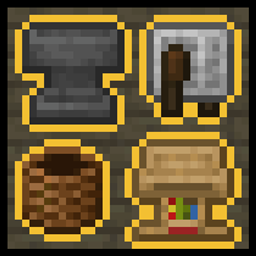
  • the current version of the pack is compatible with 1.21.6 to 1.21.10.
Workstation_Icons_v12111.zip
MC 1.21.11, 26.1, 26.1.1, 26.1.2
Release 2025-12-16 Get
Workstation_Icons_v1216.zip
MC 1.21.8, 1.21.7, 1.21.6
Release 2025-10-17 Get
Workstation_Icons_v1219.zip
MC 1.21.9, 1.21.10
Release 2025-10-17 Get

Requirements & install

How to use this resource pack in Minecraft
Resolution
16x
Minecraft
1.21.7 – 26.1.2
Install folder
.minecraft/resourcepacks

How to install resource packs

  1. Download the resource pack .zip file (do not extract it).
  2. In Minecraft open Options → Resource Packs → Open Pack Folder.
  3. Drop the .zip into the resourcepacks folder (.minecraft/resourcepacks).
  4. Move the pack to the Selected column and click Done.
Browse more: 16x resource packs 32x resource packs 64x resource packs 128x resource packs 256x resource packs 512x+ resource packs Resource Packs for 26.1.2 All resource packs

More from Amaro_Lunatico

Advertisement Remove ads with Premium →

You Might Also Like