Mineuniverse
Resource Packs
Alex And Steve Villagers

Alex And Steve Villagers

RESOURCE PACK
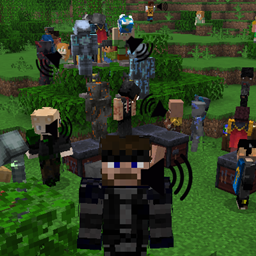
Bring default player skins to villagers.
by Seb_Semos
Download Claim this project
Add a badge to your pageLink to Alex And Steve Villagers from a README, website or forum post.
Preview: Badge

Badges update automatically and link to the resource pack page on MineUniverse.

1,050 downloads
0 likes
0 followers
Updated Oct 14, 2026
0 hypes
Follow0
64x Miscellaneous
Advertisement Remove ads with Premium →

This pack uses some ETF/EMF exclusive features and therefore is not compatible with optifine!

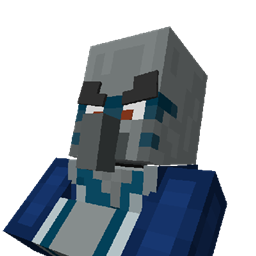
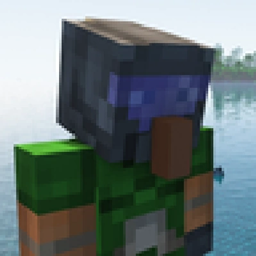
This pack will give villagers skins from the game. All 9 default plus a few from skin pack available for Minecraft Java. Also Derp!

Addons:

Keep track of what versions of my packs are compatible with wich addon version with this file: [with this link]

  • [Animations] With Semos Animations Lib the model will have Fresh Animations inspired animations.
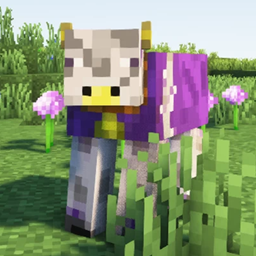
  • [Capes] Capes will have about 50% to render. The texture distribution follow the actual number of owner per cape
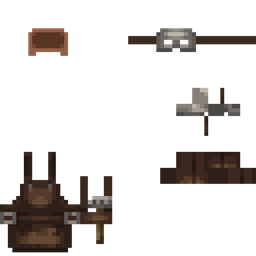
  • [Cosmetics] Let you use several cosmetics packs Warning! Can be heavy on performances
  • [Multi Semos Villagers pack] You like this one but also another of my villagers pack? You can mix them with the help of this addon. My other packs: [Hermitcraft Villagers] and [Songs Of War Villagers]
  • <s>Modded support</s> (comming soon)

Compatibility:

Villager professions and biome will render on my models but won't be affected by packs changing them. Those that add variations to those will not work properly on the vanilla models villagers. My pack will randomize 10 of their textures. To retain their full fonctionality you will need to edit their .properties texture files. you should copy the following at the top of those properties files:

modelSuffix.2=100-500
skins.2=1000

(And increments the suffixes accordinly) Those packs will also need to be on top of mine in the ressource pack list!

Advanced Control:

You can control the texture by using a name tag. You can also toggle a nose and the second layer visibility. The list of Custom names for each hermit is below. Use nose and 2nd layer to toggle the later. Additionaly, you can control the cape displayed if you use the cape addon pack, the list is on the ressource pack page.

The order in the custom name has no importance.

Custom names list:

This list is also in a pdf inside the pack.

Wide Skins:

- Steve Wide
- Alex Wide
- Ari Wide
- Efe Wide
- Kai Wide
- Makean Wide
- Noor Wide
- Sunny Wide
- Zuri wide
- Derpobrine
- Herobrine
- Derp

Slim Skins:

- Steve Slim
- Alex Slim
- Ari Slim
- Efe Slim
- Kai Slim
- Makean Slim
- Noor Slim
- Sunny Slim
- Zuri Slim

MINECON Earth 2017 skin pack:

- Alex Globe
- Alex Party
- Cardboard Cosplayer
- Creeper Cosplayer
- Creeper Pinata Cosplayer
- Sheep Cosplayer
- Steve Cake
- Steve Party

Builders & Biomes skin pack:

- Barn Builder
- Bee Friender 1
- Bee Friender 2
- Buff Butcher 1
- Buff Butcher 2
- Homestead Healer
- Pig Whisperer 1
- Pig Whisperer 2
- Ranch Ranger

Striding Hero skin pack:

- Snowfeather
- Stray
- Strider
- Villager 1
- Villager 2
- Wither Skeleton

The Garden Awakens skin pack:

- Creaking Skin
- Pale Lumberjack

Chase the Skies skin pack:

- Ghast Riding Swimmer
- Happy Ghast Pilot

The Copper Age skin pack:

- Copper Chemist
- Copper Welder


Issues:

  • Jobs and Biomes outfit currently not supported by my custom model. I hope this will be in the future
  • Fresh Animation villagers will not close their eyes when sleeping
Alex and Steve 7.0.2.zip
MC 1.21.2-Snapshot, 1.21, 1.21.6-snapshot, 1.20.2-Snapshot, 1.20.5-Snapshot, 1.21.1-Snapshot, 1.20.2, 1.21.8, 1.20.5, 1.21.5, 1.21.4, 1.21.5-Snapshot, 1.20.1, 1.20, 1.20.6, 1.21.1
Release 2026-09-25 Get
Alex and Steve 7.0.1.zip
MC 1.21.2-Snapshot, 1.21, 1.21.6-snapshot, 1.20.2-Snapshot, 1.20.5-Snapshot, 1.21.1-Snapshot, 1.20.2, 1.21.8, 1.20.5, 1.21.5, 1.21.4, 1.21.5-Snapshot, 1.20.1, 1.20, 1.20.6, 1.21.1
Release 2026-06-28 Get
Alex and Steve 7.0.0.zip
MC 1.21.2-Snapshot, 1.21, 1.21.6-snapshot, 1.20.2-Snapshot, 1.20.5-Snapshot, 1.21.1-Snapshot, 1.20.2, 1.21.8, 1.20.5, 1.21.5, 1.21.4, 1.21.5-Snapshot, 1.20.1, 1.20, 1.20.6, 1.21.1
Release 2026-03-29 Get
Alex And Steve Villagers 6.0.6.zip
MC 1.21.2-Snapshot, 1.21, 1.21.6-snapshot, 1.20.2-Snapshot, 1.20.5-Snapshot, 1.21.1-Snapshot, 1.20.2, 1.21.8, 1.20.5, 1.21.5, 1.21.4, 1.21.5-Snapshot, 1.20.1, 1.20, 1.20.6, 1.21.1
Release 2026-01-06 Get
Alex And Steve Villagers 6.0.5.zip
MC 1.21.2-Snapshot, 1.21, 1.21.6-snapshot, 1.20.2-Snapshot, 1.20.5-Snapshot, 1.21.1-Snapshot, 1.20.2, 1.21.8, 1.20.5, 1.21.5, 1.21.4, 1.21.5-Snapshot, 1.20.1, 1.20, 1.20.6, 1.21.1
Release 2025-12-06 Get
Alex And Steve Villagers 6.0.4.zip
MC 1.21.2-Snapshot, 1.21, 1.21.6-snapshot, 1.20.2-Snapshot, 1.20.5-Snapshot, 1.21.1-Snapshot, 1.20.2, 1.21.8, 1.20.5, 1.21.5, 1.21.4, 1.21.5-Snapshot, 1.20.1, 1.20, 1.20.6, 1.21.1
Release 2025-11-23 Get
Alex And Steve 6.0.3.zip
MC 1.21.2-Snapshot, 1.21, 1.21.6-snapshot, 1.20.2-Snapshot, 1.20.5-Snapshot, 1.21.1-Snapshot, 1.20.2, 1.21.8, 1.20.5, 1.21.5, 1.21.4, 1.21.5-Snapshot, 1.20.1, 1.20, 1.20.6, 1.21.1
Release 2025-11-15 Get
Alex And Steve 6.0.2.zip
MC 1.21.2-Snapshot, 1.21, 1.21.6-snapshot, 1.20.2-Snapshot, 1.20.5-Snapshot, 1.21.1-Snapshot, 1.20.2, 1.21.8, 1.20.5, 1.21.5, 1.21.4, 1.21.5-Snapshot, 1.20.1, 1.20, 1.20.6, 1.21.1
Release 2025-11-14 Get
Alex And Steve 6.0.1.zip
MC 1.20.2, 1.21.2-Snapshot, 1.21, 1.21.6-snapshot, 1.20.5, 1.21.5, 1.20.2-Snapshot, 1.20.5-Snapshot, 1.21.8, 1.21.1-Snapshot, 1.21.9, 1.21.10, 1.21.4, 1.21.5-Snapshot, 1.20.3-Snapshot
Release 2025-11-02 Get
Alex And Steve Villagers 6.0.0.zip
MC 1.20.2, 1.21.2-Snapshot, 1.21, 1.21.6-snapshot, 1.20.5, 1.21.5, 1.20.2-Snapshot, 1.20.5-Snapshot, 1.21.8, 1.21.1-Snapshot, 1.21.9, 1.21.10, 1.21.4, 1.21.5-Snapshot, 1.20.3-Snapshot
Release 2025-11-01 Get

Requirements & install

How to use this resource pack in Minecraft
Resolution
64x
Minecraft
1.21.2-Snapshot – 1.21.10
Install folder
.minecraft/resourcepacks

How to install resource packs

  1. Download the resource pack .zip file (do not extract it).
  2. In Minecraft open Options → Resource Packs → Open Pack Folder.
  3. Drop the .zip into the resourcepacks folder (.minecraft/resourcepacks).
  4. Move the pack to the Selected column and click Done.
Browse more: 16x resource packs 32x resource packs 64x resource packs 128x resource packs 256x resource packs 512x+ resource packs Resource Packs for 1.21.10 All resource packs

More from Seb_Semos

Advertisement Remove ads with Premium →

You Might Also Like