(Fabric)
Know what you're looking at. A small panel names the block, creature or player in front of you, even through water and lava, with health, harvest info, crop growth, light level and more. Hold Z to zoom in and identify things far away, and a crosshair can follow you into third person.
What you see
    [icon] Block: Wheat Crops
           Growth: 57%
           Light: 0 · Sky: 15 (Light level: Both)
           minecraft:wheat
MinecraftDisplay options (each can be turned on or off)
minecraft:stone, so blocks and mobs from other mods are easy to tell apart.Light Only "Light: 7" block light (torches, lava...)Sky Only "Sky: 12" daylight reaching that spot (15 under open sky, 0 in a sealed room)Both "Light: 7 · Sky: 12" the two on one lineCombined "Light: 12" the one value mobs and crops feel: the brighter of the two, with sky light dimmed at night and in stormsHiding things
Sees through liquids
Your look, your place
/idconfig > Position): drag it with the mouse, click it once and click again where you want it (handy on trackpads and touchscreens), or nudge it with the arrow buttons.Zoom
Third-person crosshair
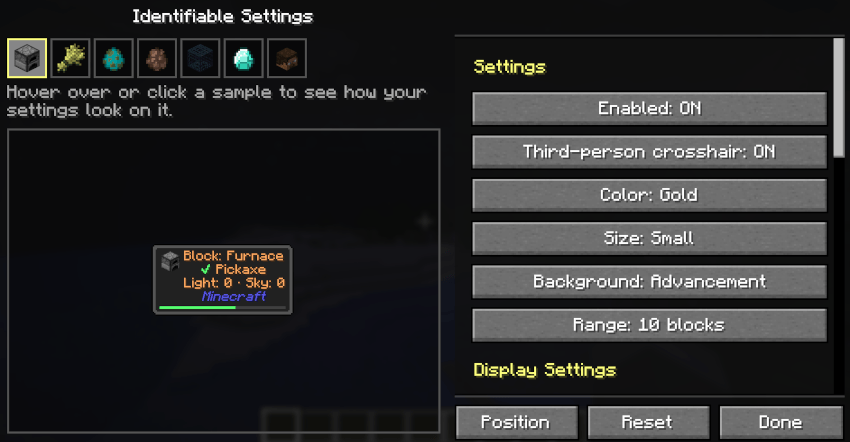
Z (hold) — Zoom. The mouse wheel zooms further in or out./idconfig — All the settings, on one screen. The right side scrolls (wheel or scroll bar): Enabled, Third-person crosshair, Color, Size, Background and Range, then Display Settings (what the panel shows, Light level, Text align and Clear blacklist). Position, Reset (back to the defaults; the blacklist stays) and Done are always under the list. Change them with /idconfig. Saved in config/identifiable.json (just for you, not shared with the server).
| Setting | Default | Description |
|---|---|---|
hud_x |
0.2 |
Left edge of the text, as a fraction of the screen width. |
hud_y |
0.05 |
Top edge of the text, as a fraction of the screen height. |
hud_color |
white |
white, yellow, red, green, blue, aqua, gold, light_purple, gray |
enabled |
true |
Identifiable on at all. |
show_id |
true |
The id line. |
text_align |
left |
left or center: where lines sit in the panel. |
show_mod_name |
true |
The mod name line. |
show_icon |
true |
The icon. |
show_health |
true |
Creatures' health. |
show_armor |
true |
Creatures' armor. |
show_player_health |
false |
Other players' health and armor. |
show_block_details |
true |
Growth, power, levels, on/off... |
show_harvest |
true |
Harvest info. |
light_mode |
off |
off, light, sky, both, combined: the light line (see Light level). |
show_spawnable |
false |
The red ⚠ Spawnable warning. |
show_villager |
true |
Villager job and level. |
show_items |
true |
Dropped items, item frames, armor stands. |
show_spawner |
true |
A spawner's mob. |
show_breaking |
true |
Breaking progress bar. |
hidden |
[] |
The blacklist (set with the key). |
align |
manual |
manual, left, center, right (left/right sit 10% in from the screen's edge) |
text_size |
normal |
small, normal, large, huge |
background_style |
dark |
dark, button, advancement, tooltip, none |
range |
5 |
How far things are identified: 5, 10, 16 or 32 blocks. |
third_person_crosshair |
false |
Crosshair in third person from behind. |
With HQ installed, an "Identifiable" button in the HQ list opens /idconfig. Without HQ the mod works exactly the same.