HQ
(Fabric)
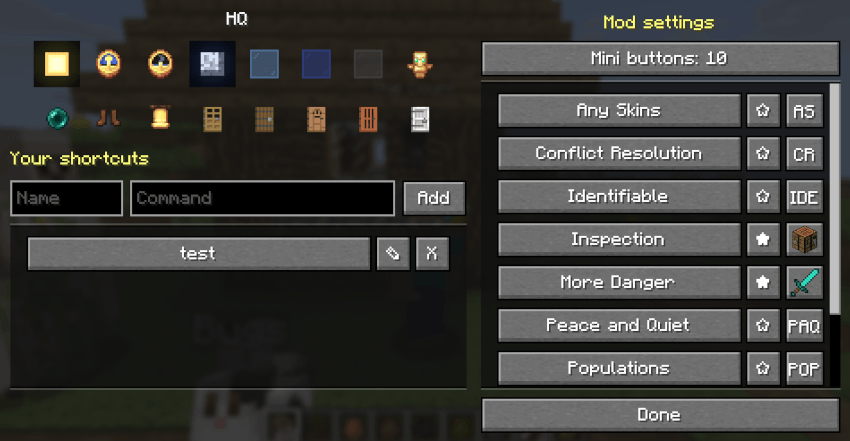
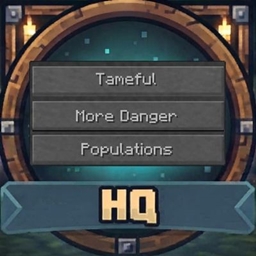
One button for everything: HQ adds an "HQ" button to your inventory that opens a list of shortcuts to your mods' settings screens and to any command you save.
FEATURES
The HQ button and the mini buttons
- Centered above the inventory panel, in survival and creative (above the creative tabs). It moves with the inventory when the recipe book opens.
- Next to it, in the same row, are the mini buttons of the mods you have turned on (see Mini buttons below). The whole row is centered.
- Kept away from the sides, where item-list mods like JEI, REI and EMI, inventory sort buttons and tabs usually go. Only on a very small screen, with no room above, does the row move to the left of the panel (one button under the other).
Mini buttons
- A mini button is a small button above your inventory that runs a mod's shortcut in one click. HQ draws all of them: the mods don't add buttons of their own, so it doesn't matter how many of your mods have one, nothing overlaps, and you decide which show.
- In the HQ screen, each mod in the list on the right has a star: click it to turn that mod's mini button on or off. Above the list,
"Mini buttons" is the most that show at once (0 to 10, default 4): if you have turned on more, the first ones in the list show.
- Mods that ask for a mini button (see "HQ COMPATIBILITY") are on from the start, with the picture they chose. A mod that doesn't ask has its star off; turn it on and pick its picture with the picture button next to the star. Click it to go to the next of ten: its short name (made from the first letters of its name, for example
WM for Wave Matrix), a spawn egg, a crafting table, a furnace, a chest, a bookshelf, a diamond sword, an iron chestplate, an oak door or a compass.
- A picture can be a block or item, or take turns between several every few seconds. Hover over a mini button for the mod's name and its command.
- Clicking a mini button closes the inventory and runs the mod's shortcut, like the button in the list.
- Your choices are saved in
config/hq.json.
The HQ screen
- Right side: a scrolling list of the shortcuts mods offer, one button per mod, each with a star and a picture button for its mini button (see Mini buttons). Hover over a button to see its command and who added it.
- Left side, top: two rows of eight picture buttons. Hover over one for what it does.
- Row 1: Sun = time to day, Clock (noon) = time to noon, Clock (midnight) = time to midnight, Moon = time to night, Light blue glass = clear weather, Blue glass = rain, Gray glass = thunder (it flashes white twice, quickly, every 5 seconds, like lightning), and the game mode toggle: a Diamond Sword when you are in survival, a Totem of Undying in creative. Press it to switch.
- Row 2: Night vision toggle (Eye of Ender = on, Ender Pearl = off), Speed toggle (Diamond Boots = on, Leather Boots = off; Speed II), then find the nearest village and go there: any village (Bell), or a plains (Oak Door), taiga (Spruce Door), desert (Jungle Door), savanna (Acacia Door) or snowy (Pale Oak Door) village.
Everything keeps HQ open except the village buttons, which close it (you are teleported). The game mode, night vision and speed pictures change to show the new state. The picture buttons run /time, /weather, /gamemode, /effect and /locate + /tp, so they need operator permission (cheats on in singleplayer). Without it the picture buttons are hidden altogether (and appear as soon as you get permission). The pictures are always Minecraft's own, read from the game itself, so resource packs and texture packs don't change them.
- Left side, below: type a name and a command, then Add, to save your own shortcut. Yours are in a scrolling list under it. Each has a pencil to edit it (its name and command load into the boxes, the Add button becomes Save, and Cancel backs out; a rename keeps its place) and an X to delete it.
- Pressing a shortcut runs its command as if you typed it.
Villages
- The village buttons ask the game where the nearest village is, wait for the place to load, then put you on the ground there. If none is found nearby, HQ says so and you stay put. (Villages don't exist in the Nether or End, and there are no jungle villages in Minecraft.)
Shortcuts from mods
- Mods that support HQ add their own shortcut automatically. Nothing to set up.
- If you remove a mod, its shortcut is gone the next time you start the game. Nothing is left behind in your config.
- Mod shortcuts can't be deleted (they belong to the mod).
Your own shortcuts
COMMANDS
/hq — Open the HQ list./hq add <name> <command> — Save a command as a shortcut. The leading / is optional./hq <name> — Run a shortcut./hq remove <name> — Delete one of your shortcuts./hq list — List every shortcut in chat.
Names can use letters, numbers, _ and - (up to 32). "add", "remove" and "list" are reserved.
SETTINGS
Your shortcuts are saved in config/hq.json. Everything is managed from the HQ list or the /hq commands.
HQ COMPATIBILITY (for mod authors)
Add your mod's shortcut with no code and no dependency on HQ. Put this in your mod's fabric.mod.json:
"custom": {
  "hq": { "name": "My Mod", "command": "mymod" }
}
"command": what to run, without the slash."name": the button label (default: your mod's name)."id": optional, the name for /hq <id> (default: your mod id).- For several shortcuts, use a list of these objects.
HQ reads these from the installed mods every time the game starts.
Optional: a mini button
Your mod never draws a button of its own. If you would like it to be offered as a mini button above the inventory, say how it should look in the same object. HQ draws it, keeps it in line with everyone else's and lets the player decide which mods show (and how many), so nothing needs coordinating between mods:
"hq": { "name": "My Mod", "command": "mymod",
        "icon": "minecraft:note_block", "short": "MM" }
"icon": an item or block id from Minecraft (a picture from the game itself; custom pictures are not supported yet)."icons": a list of item or block ids instead of one: they take turns, a new one every "icon_seconds" seconds (default 5, 1 to 60). For example a list of spawn eggs."short": a short name, up to 8 characters, written on the button when there is no picture (and used if every icon you list is unknown). Make it a shorthand, like HQ for headquarters or WM for Wave Matrix.- An id HQ doesn't know is ignored (it is logged). If nothing usable is left, the mod is treated as if it asked for nothing.
- The tooltip on the button shows your mod's name, the command and who added it, so
"name" should be the whole name.
- Mods that ask for a mini button are on in the player's HQ from the start. Mods that don't ask are offered to the player in the HQ list with a star and ten standard pictures to pick from (a short name made from the first letters of your name is one of them), so it is optional.
- Nothing in your jar needs HQ: the lines above are just data. Without HQ they are ignored. In a mod's metadata, list HQ as suggested, not required.
Mods with HQ shortcuts: More Danger, Populations, Tameful, Conflict Resolution, Any Skins, Identifiable, Peace and Quiet, Mob Crate, Magic Square, Wave Matrix, Wide Awake.
COMPATIBILITY & NOTES
- Client only: it doesn't need to be on the server.
- Works with mods that open their screens through a client command (like
/md) as well as with server commands.