Mineuniverse
Data Packs
Upgradable Backpack

Upgradable Backpack

DATA PACK
Dyeable, renamable, wearable, and upgradeable backpacks (9-slots, 18-slots, 26-slots)
by paul90317
Download Claim this project
1,364 downloads
0 likes
Updated Oct 14, 2026
0 hypes
Tech Utility
Advertisement Remove ads with Premium →

I made the backpack, which is

  • Dyeable through the crafting table.
  • Easily renamable using an anvil.
  • Wearable in your chest slot.
  • Upgradable to get more slots (9 -> 18 -> 26 slots)

How to Use Backpacks

  • To store or retrieve items, simply drop the backpack on the ground. It will transform into a barrel, allowing you to manage your items. Click the "Exit" button slot to revert it to a backpack item.

Crafting Recipes

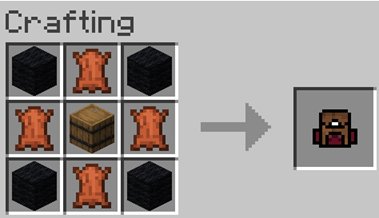
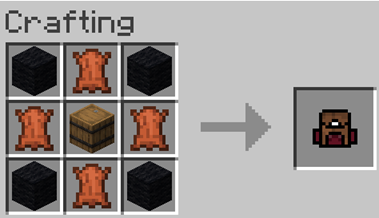
  • Craft a Small Backpack:
    (4 wools, 4 leathers, and a barrel)

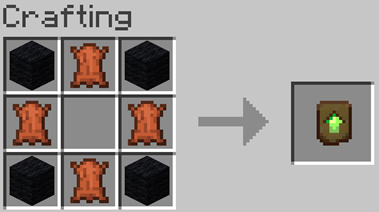
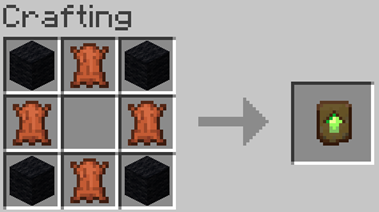
  • Craft a Backpack Upgrader:

  • Upgrading to a 26-Slot Backpack:
    Place the upgrader into your backpack block.
 
 
Upgradable Backpack v11.3.zip
MC 1.21.9, 1.21.10
Release 2025-11-17 Get
upgradable_backpack-v11.2.zip
MC 1.21.5, 1.21.8, 1.21.9, 1.21.10, 1.21.4, 1.21.7, 1.21.6
Release 2025-11-02 Get

Requirements & install

How to use this data pack in Minecraft
Mods needed
None, works in vanilla
Minecraft
1.21.4 – 1.21.10
Install folder
saves/<world>/datapacks

How to install data packs

  1. Download the data pack .zip file (do not extract it).
  2. New world: click Data Packs on the world creation screen and drop the .zip in. Existing world: open .minecraft/saves/<world>/datapacks.
  3. Put the .zip into the datapacks folder of the world (servers: world/datapacks).
  4. Run /reload in game (or rejoin the world) and check it with /datapack list.
Browse more: Data Packs for 1.21.10 All data packs

More from paul90317

Advertisement Remove ads with Premium →

You Might Also Like