Mineuniverse
Data Packs
Mining Dimension

Mining Dimension

DATA PACK
Mining Dimension for more Resources!
by Blizzor
Download Claim this project
81,629 downloads
0 likes
Updated Oct 14, 2026
0 hypes
Miscellaneous Mod Support Tech Utility
Advertisement Remove ads with Premium →

⚠️ Requires Create mod to work! For a Vanilla-compatible version, make sure to download the correct files!

Mining Dimension

Sick of strip-mining the Overworld for a handful of diamonds? Mining Dimension gives you a brand-new realm overflowing with resources. Every vanilla ore spawns at significantly higher rates, and—thanks to full Create integration—you’ll also uncover Zinc. Spend less time branch-mining and more time building contraptions!
Key Features

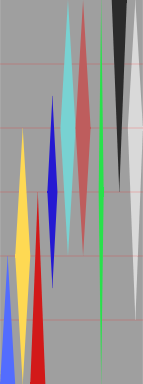
  • Super-rich generation: All vanilla ores spawn ~2-4 × more frequently than in the Overworld
  • Create-ready: Includes generation layers for Zinc 
  • Balanced height map: Diamond & Gold sit deep, while coal and copper are abundant near the ceiling.

Ore Distribution

Access

You can enter the Dimension with the command /execute in mining_dimension:mining_dimension run tp @s 0 128 0.

But be careful. This Datapack is made for Modpack Developer. Modpack Developers should develop a way to access it!

Installation

  1. Download the latest release from the Files tab

  2. Place the .zip in <world>/datapacks/

  3. Run /reload or restart the world


Bugs

You can report bugs on the datapack's repository linked to the project.

Mining Dimension v1.0.0 - Vanilla
MC 1.21.1
Release 2025-06-17 Get
Mining Dimension v1.0.0
MC 1.21.1
Release 2025-06-02 Get

Requirements & install

How to use this data pack in Minecraft
Mods needed
None, works in vanilla
Minecraft
1.21.1
Install folder
saves/<world>/datapacks

How to install data packs

  1. Download the data pack .zip file (do not extract it).
  2. New world: click Data Packs on the world creation screen and drop the .zip in. Existing world: open .minecraft/saves/<world>/datapacks.
  3. Put the .zip into the datapacks folder of the world (servers: world/datapacks).
  4. Run /reload in game (or rejoin the world) and check it with /datapack list.
Browse more: Data Packs for 1.21.1 All data packs

More from Blizzor

Advertisement Remove ads with Premium →

You Might Also Like