Mineuniverse
Data Packs
Simply Bows - A Bow-tastic Experience

Simply Bows - A Bow-tastic Experience

DATA PACK
⭐This is Datapack adds new types of Bows!⭐
by C_univerz
Download Claim this project
243 downloads
0 likes
0 followers
Updated Oct 14, 2026
0 hypes
Follow0
Adventure Fantasy Library Miscellaneous Tech
Advertisement Remove ads with Premium →

◽◽◽◽𝕊𝕚𝕞𝕡𝕝𝕪 𝕓𝕠𝕨𝕤-𝔻𝕒𝕥𝕒 𝕡𝕒𝕔𝕜 ◽◽◽◽

  REGUIRED -  Simply Bows - Texturepack. Download here
Adds a bunch of custom bows with cool effects. Power bows like fire, poison, freeze, and explosive, plus custom gold/iron/diamond bows with different stats. Uses custom model data strings (1.21.4+). Fully survival-friendly and fun to mess with.


◽◽◽◽ℂ𝕣𝕒𝕗𝕥𝕚𝕟𝕘 𝕣𝕖𝕔𝕚𝕡𝕖𝕤 ◽◽◽◽


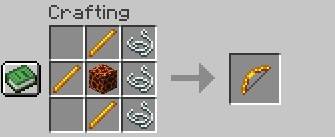
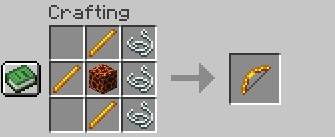
🔥 Fire Bow

3 blaze rods, 1 magma cube, 3 strings

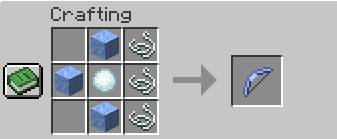
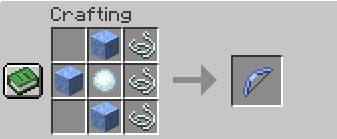
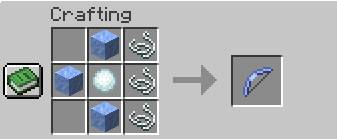
🧊 Freeze Bow

3 packed ice, 1 snowball, 3 strings

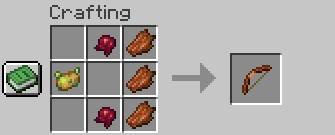
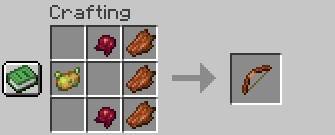
🩸 Rotten Bow

1 poisonous potatoe, 2 fermented spider eyes, 3 rotten flesh
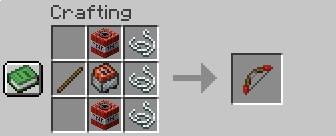
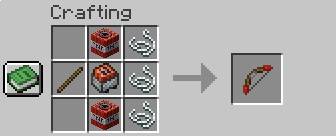
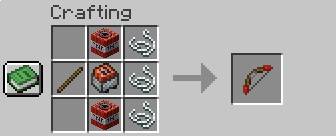
🧨 Explosive Bow

1 stick, 2 tnt, 1 minecraft tnt, 3 strings
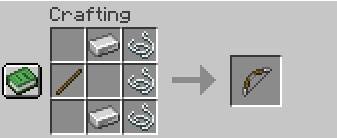
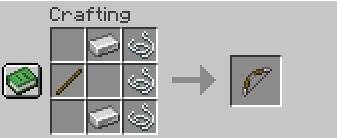
🏹 Iron Bow

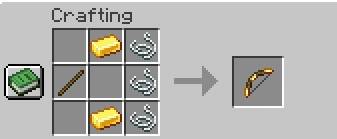
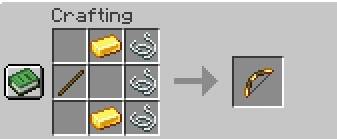
🔱 Gold Bow

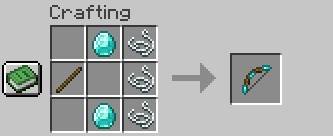
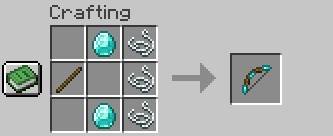
💎 Diamond Bow


🔥 Power Bows

  • Fire Bow – shoots fast fireballs that burn enemies and burns the ground.
  • Freeze Bow – slows down mobs on hit and creates a small ice particles on impact.
  • Poison Bow – poisons targets over time and leaves a red particle trail.
  • Explosive Bow – fires explosive shots that go boom on contact.

🛠️ Custom Bows

  • Gold Bow – faster draw speed but breaks quickly, for quick strikes.
  • Iron Bow – balanced and reliable, a solid upgrade from the basic bow.
  • Diamond Bow – high durability and hits harder, built for long fights.

ading more types of wepons such as swords, shield and new system soon. 

 

----Credit----

  • Cuniverz

----Server (use this)----

  • VPSS.aternos.me:29116
simply-bows-1.21.4+
MC 1.21.4, 1.21.4-Snapshot
Release 2025-04-15 Get

Requirements & install

How to use this data pack in Minecraft
Mods needed
None, works in vanilla
Minecraft
1.21.4-Snapshot – 1.21.4
Install folder
saves/<world>/datapacks

How to install data packs

  1. Download the data pack .zip file (do not extract it).
  2. New world: click Data Packs on the world creation screen and drop the .zip in. Existing world: open .minecraft/saves/<world>/datapacks.
  3. Put the .zip into the datapacks folder of the world (servers: world/datapacks).
  4. Run /reload in game (or rejoin the world) and check it with /datapack list.
Browse more: Data Packs for 1.21.4 All data packs

More from C_univerz

Advertisement Remove ads with Premium →

You Might Also Like