Mineuniverse
Data Packs
More Powerful Apples

More Powerful Apples

DATA PACK
A Datapack for 1.21.5+ that adds unique custom apples in your game
by seefer
Download Claim this project
3,316 downloads
0 likes
Updated Oct 14, 2026
0 hypes
Adventure Miscellaneous Utility
Advertisement Remove ads with Premium →

The More Powerful Apples Datapack adds lots of different kinds of craftable apples, with different effects each.

These are all of the apples included:
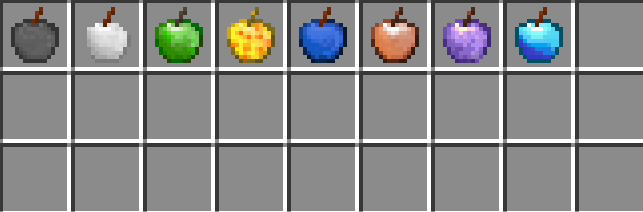
Stone Apples, Iron Apples, Emerald Apples, Glowing Apples (craftable with glow berries), Lapis Lazuli Apple, Copper Apple (If selected in main hand during rain it summons lightning bolts), Amethyst Apple and Diamond Apple.

-------------------------------------------------------------------------------------------------------------------------------------

A Copper Apple during the rain:
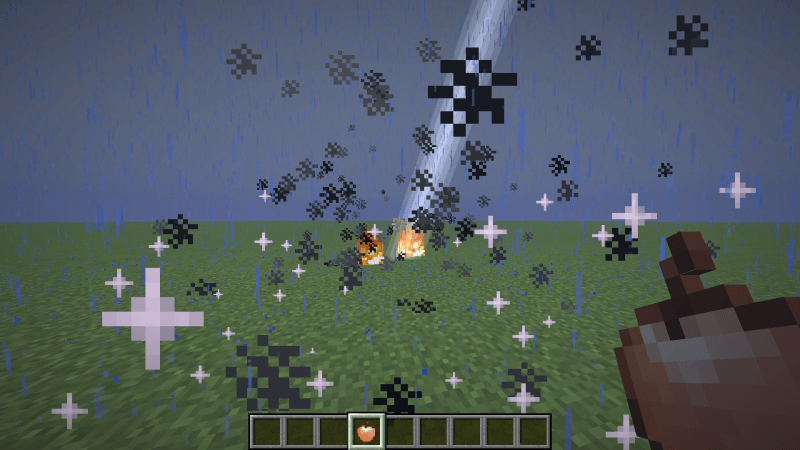
Have fun with the datapack, and remember to leave a comment if you have any suggestions

!The datapack requires the related texture pack in the files page to work!

TWISTED MIND: INSANITY HORROR MAP AVAILABLE NOW ON MY PROFILE!

MorePowerfulApplesTexturePack 1.21.11
MC 1.21.11
Release 2025-12-20 Get
MorePowerfulApplesDatapack 1.21.11
MC 1.21.11
Release 2025-12-20 Get
MorePowerfulApplesTexturePack_1.21.9-10.zip
MC 1.21.9, 1.21.10
Release 2025-10-15 Get
MorePowerfulApplesDatapack_1.21.9-10.zip
MC 1.21.9, 1.21.10
Release 2025-10-15 Get
MorePowerfulApplesDatapack_1.21.5.zip
MC 1.21.5
Release 2025-09-05 Get
MorePowerfulApplesDatapack_1.21.6.zip
MC 1.21.6
Release 2025-09-05 Get
MorePowerfulApplesDatapack_1.21.7-8.zip
MC 1.21.8, 1.21.7
Release 2025-09-05 Get
MorePowerfulApplesTexturePack_1.21.5.zip
MC 1.21.5
Release 2025-09-05 Get
MorePowerfulApplesTexturePack_1.21.6.zip
MC 1.21.6
Release 2025-09-05 Get
MorePowerfulApplesTexturePack_1.21.7-8.zip
MC 1.21.8, 1.21.7
Release 2025-09-05 Get

Requirements & install

How to use this data pack in Minecraft
Mods needed
None, works in vanilla
Minecraft
1.21.5 – 1.21.11
Install folder
saves/<world>/datapacks

How to install data packs

  1. Download the data pack .zip file (do not extract it).
  2. New world: click Data Packs on the world creation screen and drop the .zip in. Existing world: open .minecraft/saves/<world>/datapacks.
  3. Put the .zip into the datapacks folder of the world (servers: world/datapacks).
  4. Run /reload in game (or rejoin the world) and check it with /datapack list.
Browse more: Data Packs for 1.21.11 All data packs

More from seefer

Advertisement Remove ads with Premium →

You Might Also Like