Mineuniverse
Data Packs
Minipurge:Grey

Minipurge:Grey

DATA PACK
Add-on to Minipurge. Adds custom recipes tailored to faster Minipurge progression.
by JayPyro2000
Download Claim this project
85 downloads
0 likes
Updated Oct 14, 2026
0 hypes
Adventure Miscellaneous Utility
Advertisement Remove ads with Premium →

⚔️ Minipurge: Grey | Fast-Paced Progression Add-on

Skip the grind and get straight to the action! Minipurge: Grey is an official add-on for the Minipurge event framework designed by Smite_Blade to accelerate early-game gearing.

By introducing a carefully balanced set of custom crafting recipes, this data pack ensures players spend less time hiding in caves and more time fighting. It is perfect for fast-paced events, shorter play sessions, or servers that want to keep the adrenaline pumping!


✨ What's Included?

🛡️ Faster Armor Progression: Craft essential gear using cheaper, custom recipes. Experience the exact same satisfying gear progression without the tedious resource grind.

🧪 Accessible Potions: No Nether Fortress? No problem! This pack adds custom recipes to give you the brewing basics.
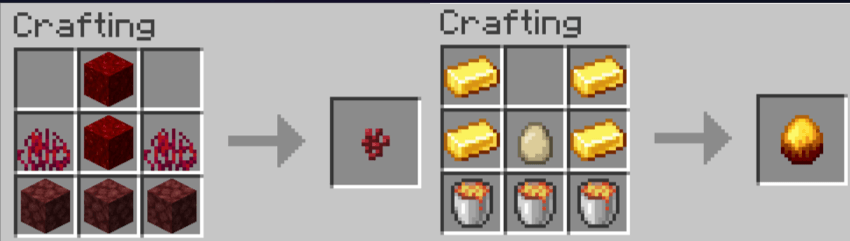
🍎 Golden Apples: Everyone can use more golden apples…

⚔️ Expanded Arsenal: Access to miscellaneous custom weapon recipes to give you the upper hand in battle.


⚙️ How to Install

  1. Ensure the core Minipurge data pack is installed in your world.
  2. Drop the Minipurge:Grey .zip file into your world's datapacks folder alongside it.
  3. Start your event! Minipurge will automatically detect and integrate the custom recipes.


🛠️ Create Your Own Add-ons!

Minipurge is built to be a modular framework. Want to make your own custom recipes, loot tables, or events?

Check out the Developer Wiki here!


🤝 Feedback & Support

Let the games begin!

— Smite_Blade & The Minipurge Team

minipurgegrey1.0.1.zip
MC 26.1.2, 26.2
Release 2026-06-03 Get
minipurgegrey1.0.0.zip
MC 1.21.8, 1.21.9, 1.21.10, 1.21.11
Release 2025-08-21 Get

Requirements & install

How to use this data pack in Minecraft
Mods needed
None, works in vanilla
Minecraft
1.21.8 – 26.2
Install folder
saves/<world>/datapacks

How to install data packs

  1. Download the data pack .zip file (do not extract it).
  2. New world: click Data Packs on the world creation screen and drop the .zip in. Existing world: open .minecraft/saves/<world>/datapacks.
  3. Put the .zip into the datapacks folder of the world (servers: world/datapacks).
  4. Run /reload in game (or rejoin the world) and check it with /datapack list.
Browse more: Data Packs for 26.2 All data packs

More from JayPyro2000

Advertisement Remove ads with Premium →

You Might Also Like