Mineuniverse
Data Packs
Ingots to Raw - Mystical Agriculture Data Pack

Ingots to Raw - Mystical Agriculture Data Pack

DATA PACK
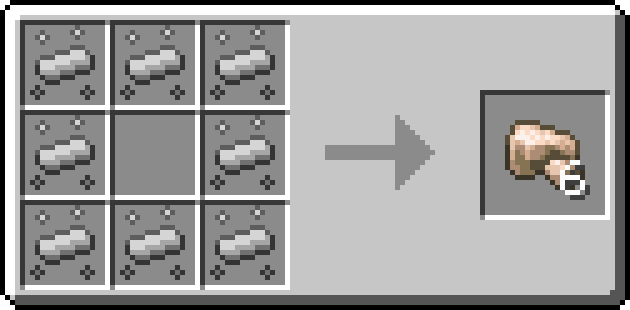
A data pack that changes the ingots that can be made from smelting to raw ores when using Mystical Agriculture Essences
by Seanthebaker
Download Claim this project
Add a badge to your pageLink to Ingots to Raw - Mystical Agriculture Data Pack from a README, website or forum post.
Preview: Badge

Badges update automatically and link to the data pack page on MineUniverse.

145 downloads
0 likes
0 followers
Updated Oct 14, 2026
0 hypes
Follow0
Miscellaneous
Advertisement Remove ads with Premium →

So you've set up a huge factory for processing your raw ore coming from your trips to the mines.

You decide to set up a Mystical Agriculture farm to get some materials without digging, but it gives you the straight ingots!

So now your factory is going to waste. sat there gathering digital dust.

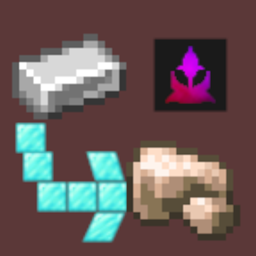
Well, this data pack gives you the raw ore from your essence rather than your ingots. Yes, it means extra steps, but it also means you're not wasting your factory.

It's a direct conversion, so the quantity you'd receive as ingots, you'll get as raw ore. Iron Essence would usually give 6 ingots, but it now gives you 6 raw ore (which you can double or more with the right mods).

Supported Materials

Minecraft

  • Iron
  • Copper
  • Gold

Common

  • Aluminium
  • Tin
  • Lead
  • Silver
  • Nickel
  • Zinc
  • Platinum
  • Iridium
  • Yellorium

Powah

  • Uraninite

Twilight Forest

  • Ironwood
  • Knightmetal (gives Armor Shard Clusters)

If you know a mod that adds their own seeds let me know through the issue tracker and I'll add it

Ingots to Raw - Mystical Agriculture.zip
MC 1.21.1
Release 2025-09-27 Get

Requirements & install

How to use this data pack in Minecraft
Mods needed
None, works in vanilla
Minecraft
1.21.1
Install folder
saves/<world>/datapacks

How to install data packs

  1. Download the data pack .zip file (do not extract it).
  2. New world: click Data Packs on the world creation screen and drop the .zip in. Existing world: open .minecraft/saves/<world>/datapacks.
  3. Put the .zip into the datapacks folder of the world (servers: world/datapacks).
  4. Run /reload in game (or rejoin the world) and check it with /datapack list.
Browse more: Data Packs for 1.21.1 All data packs

More from Seanthebaker

Advertisement Remove ads with Premium →

You Might Also Like