Mineuniverse
Data Packs
Hide and Seek

Hide and Seek

DATA PACK
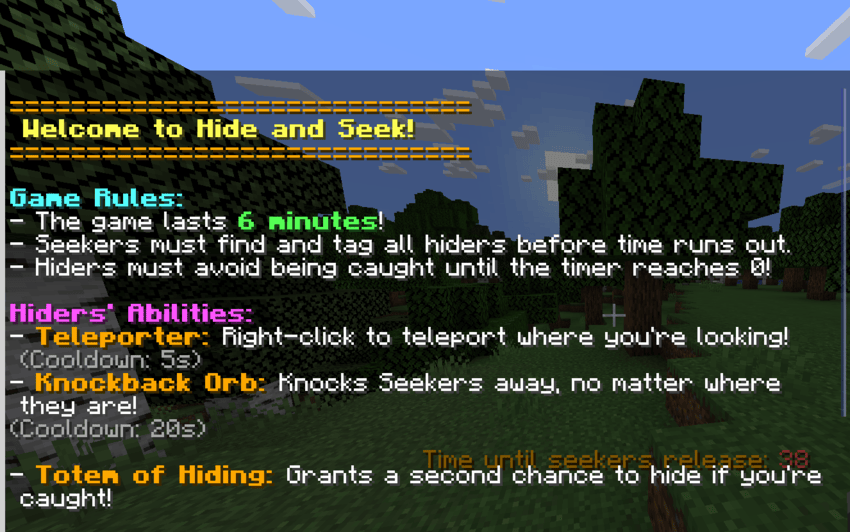
A unique twist on Hide and Seek, where players gain, mysterious abilities to either hide or hunt.
by DeepAzureBlue
Download Claim this project
358 downloads
0 likes
0 followers
Updated Oct 14, 2026
0 hypes
Follow0
Miscellaneous
Advertisement Remove ads with Premium →

How to Get Started:

  1. Install the Datapack: Download and add the datapack to your Minecraft world.

  2. Run the Setup Command: Once installed, run the command:
    /function hideandseek:setup
    This will initialize the game and set up the necessary components.

  3. Get Your Wool: Each player will receive two wool items in their inventory:

    • Red Wool – For Seekers.
    • Green Wool – For Hiders.
  4. Choose Your Role:

    • Right-click the Green Wool and hold for 1 second to become a Hider.
    • Right-click the Red Wool and hold for 1 second to become a Seeker.
  5. Start the Game:

    • Once everyone has chosen their role, the Seeker can start the game by using the wool in their Inventory
      This will begin a one minute countdown for the hiders to hide.

End of Game & Points:

  • Once the game ends, points will be automatically distributed to players based on their performance (Hiders remaining hidden or Seekers successfully finding Hiders).
  • The game will then reset automatically, ready for another round to begin.

Special Thanks:

A huge thank you to my friend Eoman, who gave me the idea for this datapack and helped with the concept. Without your creativity and input, this wouldn't have come to life!

Let the chase begin!

hideandseek 1.21.5.zip
MC 1.21.5
Release 2025-04-24 Get
hideandseek.zip
MC 1.21.5
Release 2025-04-23 Get
hideandseek-3.0.0-datapack-1.21.4.zip
MC 1.21.4
Release 2025-02-23 Get
hide and seek-2.9.2-datapack-1.21.4.zip
MC 1.21.4
Release 2025-02-18 Get

Requirements & install

How to use this data pack in Minecraft
Mods needed
None, works in vanilla
Minecraft
1.21.4 – 1.21.5
Install folder
saves/<world>/datapacks

How to install data packs

  1. Download the data pack .zip file (do not extract it).
  2. New world: click Data Packs on the world creation screen and drop the .zip in. Existing world: open .minecraft/saves/<world>/datapacks.
  3. Put the .zip into the datapacks folder of the world (servers: world/datapacks).
  4. Run /reload in game (or rejoin the world) and check it with /datapack list.
Browse more: Data Packs for 1.21.5 All data packs

More from DeepAzureBlue

Advertisement Remove ads with Premium →

You Might Also Like