Mineuniverse
Data Packs
Gear Echo

Gear Echo

DATA PACK
Gear Echo preserves a broken item’s name, enchantments, trim, colour, curses, and other supported data, then lets you restore it at a Smithing Table using an Amethyst Shard and a fresh matching item.
by quillphen
Download Claim this project
36 downloads
0 likes
Updated Oct 14, 2026
0 hypes
Utility
Advertisement Remove ads with Premium →

Gear Echo

Gear Echo is a Java datapack that saves the identity of valuable equipment when it reaches its breaking point.

If a supported item would break, it leaves behind a Gear Echo containing its supported name, enchantments, curses, trim, colour, lore, and other preserved data. The original item is gone, but its history remains.

To restore it, use a Smithing Table:

Template: Amethyst Shard

Base: Gear Echo

Addition: a fresh matching item
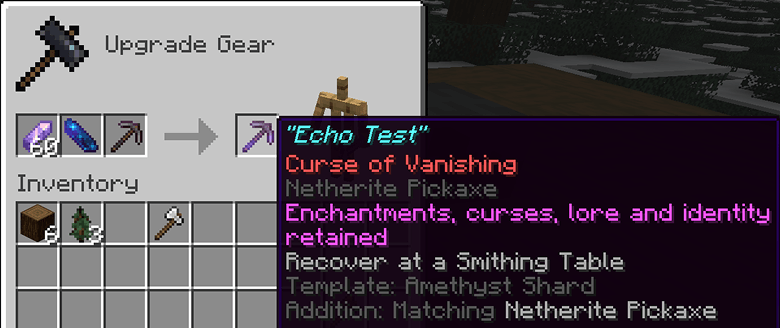
The fresh item provides the new body, while the Gear Echo restores the old item’s identity.

Example

A named Netherite Pickaxe with Efficiency V, Fortune III, Unbreaking III, and Mending reaches its final durability point.

Instead of losing everything, it leaves a Gear Echo. Combine that Echo with an Amethyst Shard and a fresh Netherite Pickaxe at a Smithing Table to rebuild the original pickaxe.


Installation

  1. Place the Gear Echo datapack ZIP inside your world’s datapacks folder.

  2. Place the Gear Echo resource pack ZIP inside your Minecraft resourcepacks folder.

  3. Enable the resource pack.

  4. Enter the world and run /reload if needed.

  5. Use /datapack list to confirm that Gear Echo is enabled.

GearEcho-Datapack-1.0.0+mc26.x.zip
MC 26.1, 26.1.1, 26.1.2, 26.2
Release 2026-08-01 Get

Requirements & install

How to use this data pack in Minecraft
Mods needed
None, works in vanilla
Minecraft
26.1 – 26.2
Install folder
saves/<world>/datapacks

How to install data packs

  1. Download the data pack .zip file (do not extract it).
  2. New world: click Data Packs on the world creation screen and drop the .zip in. Existing world: open .minecraft/saves/<world>/datapacks.
  3. Put the .zip into the datapacks folder of the world (servers: world/datapacks).
  4. Run /reload in game (or rejoin the world) and check it with /datapack list.
Browse more: Data Packs for 26.2 All data packs

More from quillphen

Advertisement Remove ads with Premium →

You Might Also Like