Mineuniverse
Resource Packs
Xray Java

Xray Java

RESOURCE PACK
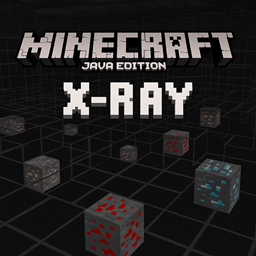
An X-Ray pack for Minecraft Java Edition that highlights ores like diamond, gold, and redstone while making most blocks transparent, allowing players to easily locate valuable resources underground.
by quillphen
Download Claim this project
80,385 downloads
0 likes
Updated Oct 14, 2026
0 hypes
Data Packs
Advertisement Remove ads with Premium →

X-Ray (.resource) for Minecraft Java Edition

Patreon

This mod makes stone, deepslate, and netherrack blocks transparent while keeping all ores fully visible perfect for finding resources quickly in both the Overworld and the Nether.

want a compiled jar https://www.curseforge.com/minecraft/mc-mods/x-ray-java-edition

Screenshots

Overworld View

Nether View

⚠️ Note: This mod is intended for use in singleplayer or on servers that explicitly allow it. Using it on public servers without permission may violate server rules.

How to Install (.jar Version)

  1. Make sure you have Forge or Fabric or Quilt or NeoForge installed (matching your Minecraft version).
  2. Download the .jar file from the Files section.
  3. Place the .jar file into your .minecraft/mods folder.
  4. Launch Minecraft with the correct mod loader profile.

Enjoy seeing through stone and finding ores instantly!

Frequently Asked Questions

  • Does this mod work with other mods? Yes, it’s lightweight and should work with most mods, but test for compatibility on your setup.
  • Can I toggle the X-Ray effect? Currently, the effect is always on when the mod is active. A toggle feature may be added in future updates.
  • Will this mod get me banned on servers? Only use it on servers that allow X-Ray mods to avoid violating rules.
XRAy.zip
MC 1.21.2-Snapshot, 1.21, 1.21.6-snapshot, 1.20.2-Snapshot, 1.20.5-Snapshot, 1.21.1-Snapshot, 1.20.2, 1.19.4, 1.21.8, 1.19.4-Snapshot, 1.20.5, 1.21.5, 1.21.4, 1.21.5-Snapshot, 1.20.1
Release 2026-03-06 Get

Requirements & install

How to use this resource pack in Minecraft
Resolution
Not specified
Minecraft
1.21 – 1.21.8
Install folder
.minecraft/resourcepacks

How to install resource packs

  1. Download the resource pack .zip file (do not extract it).
  2. In Minecraft open Options → Resource Packs → Open Pack Folder.
  3. Drop the .zip into the resourcepacks folder (.minecraft/resourcepacks).
  4. Move the pack to the Selected column and click Done.
Browse more: 16x resource packs 32x resource packs 64x resource packs 128x resource packs 256x resource packs 512x+ resource packs Resource Packs for 1.21.8 All resource packs

More from quillphen

Advertisement Remove ads with Premium →

You Might Also Like