
Mineuniverse
Data Packs
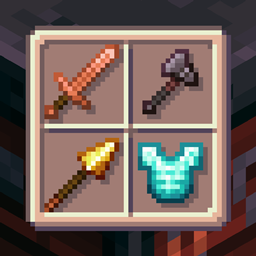
G+ | Copper and Rose Gold tools

G+ | Copper and Rose Gold tools

DATA PACK
Two new sets of tools for copper, finally! [GearPlus]
by Napino
Download Claim this project
1,401 downloads
0 likes
0 followers
Updated Oct 14, 2026
0 hypes
Follow0
Adventure Miscellaneous Utility
Advertisement Remove ads with Premium →

Project Title: "GearPlus: Copper tools module"

Resource Pack needed to correctly view the items and tools!

ko-fi


GearPlus is a group of small Data Packs that focuses on adding tools, weapons or armor to Minecraft to thematically and aesthetically diversify the range of acquirable gear without breaking the balance of the vanilla game experience.

The Copper and Rose Gold tools module does exactly what it says, adding:

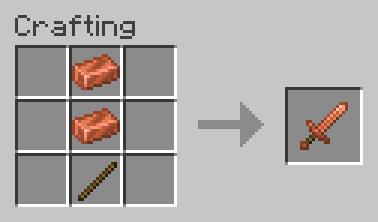
  • Craftable Copper tools;
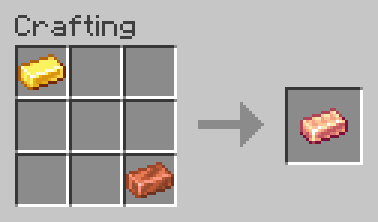
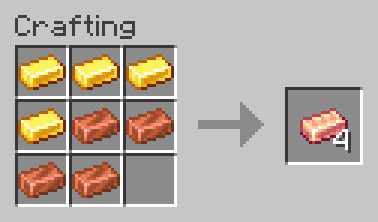
  • Rose Gold, a new material obtainable by combining Copper and Gold;
  • Craftable Rose Gold tools;

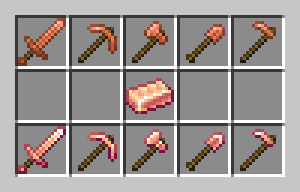
From left to right: Copper Sword, Copper Pickaxe, Copper Axe, Copper Shovel, Copper Hoe, Rose Gold Ingot, Rose Gold Sword, Rose Gold Pickaxe, Rose Gold Axe, Rose Gold Shovel, Rose Gold Hoe


Copper tools have the same durability of Wooden tools (60) and can mine the same blocks of Iron tools, with the exception of Diamond Ores for Copper Pickaxes. They can be repaired using Copper Ingots.

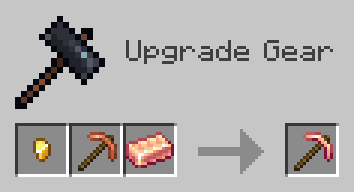
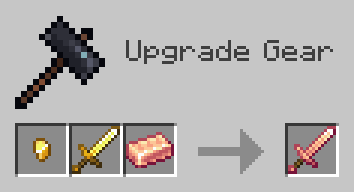
Both Copper tools and Golden tools can be upgraded in a Smithing Table with a Gold Nugget and a Rose Gold Ingot to obtain Rose Gold tools.

Rose Gold tools are similar to Iron tools, but mine slightly faster and have slightly more durability. They can be repaired using a material of choice between Copper, Gold and Rose Gold.


Installation

To properly view and use the module, both the Data Pack and the Resource Pack must be installed.

To manually install the Data Pack, simply drop the corresponding .zip file in the 'datapack' folder inside your world folder. To manually install the required Resource Pack, drop the corresponding .zip file in the 'resourcepacks' folder inside your main MC directory.

The module is extremely lightweight and is compatible with Multiplayer, as long as the Resource Pack is correctly loaded.

Currently supported versions: 1.21.2+


Support

If you like my Data Packs, Resource Packs or textures, consider donating, it would really mean a lot to me. If you are interested in commissioning any content, contact me on any available platform, I'll try to reach out to you as fast as I can.

Suggestions for future Minecraft content are also well received. Thank you for taking a look at my content. :)


GearPlus CRG 1.21.5 Data Pack v1.1.zip
MC 1.21.6-snapshot, 1.21.5, 1.21.7, 1.21.6
Release 2025-05-27 Get
GearPlus CRG 1.21.4 Data Pack v.1.1.zip
MC 1.21.4, 1.21.3, 1.21.4-Snapshot, 1.21.2
Release 2025-05-27 Get
GearPlus CRG 1.21.2-1.21.4 Data Pack.zip
MC 1.21.4, 1.21.3, 1.21.4-Snapshot, 1.21.2
Release 2025-05-26 Get

Requirements & install

How to use this data pack in Minecraft
Mods needed
None, works in vanilla
Minecraft
1.21.2 – 1.21.7
Install folder
saves/<world>/datapacks

How to install data packs

  1. Download the data pack .zip file (do not extract it).
  2. New world: click Data Packs on the world creation screen and drop the .zip in. Existing world: open .minecraft/saves/<world>/datapacks.
  3. Put the .zip into the datapacks folder of the world (servers: world/datapacks).
  4. Run /reload in game (or rejoin the world) and check it with /datapack list.
Browse more: Data Packs for 1.21.7 All data packs

More from Napino

Advertisement Remove ads with Premium →

You Might Also Like