Mineuniverse
Data Packs
Chunk Loaders & Scarecrows' Territory Advancement Fix

Chunk Loaders & Scarecrows' Territory Advancement Fix

DATA PACK
A fix for internal recipes from 'Chunk Loaders' & 'Scarecrows' Territory' showing up as JEA advancements
by GeorgeHaldane
Download Claim this project
Add a badge to your pageLink to Chunk Loaders & Scarecrows' Territory Advancement Fix from a README, website or forum post.
Preview: Badge

Badges update automatically and link to the data pack page on MineUniverse.

105 downloads
0 likes
0 followers
Updated Oct 14, 2026
0 hypes
Follow0
Mod Support Utility
Advertisement Remove ads with Premium →

This datapack was made for a modpack "Mechanized Rat".


Chunk Loaders & Scarecrows' Territory Advancement Fix

A fix for internal recipes from Chunk Loaders and Scarecrows' Territory showing up as "broken" advancements with no name and description when using Just Enough Advancements (JEA).

Note that this a DATAPACK and should be placed in .minecraft/saves/WORLD_NAME/datapacks/ and NOT in .minecraft/resourcepacks/. You can also use mods like Open Loader and Paxi to apply such datapacks globally across saves.
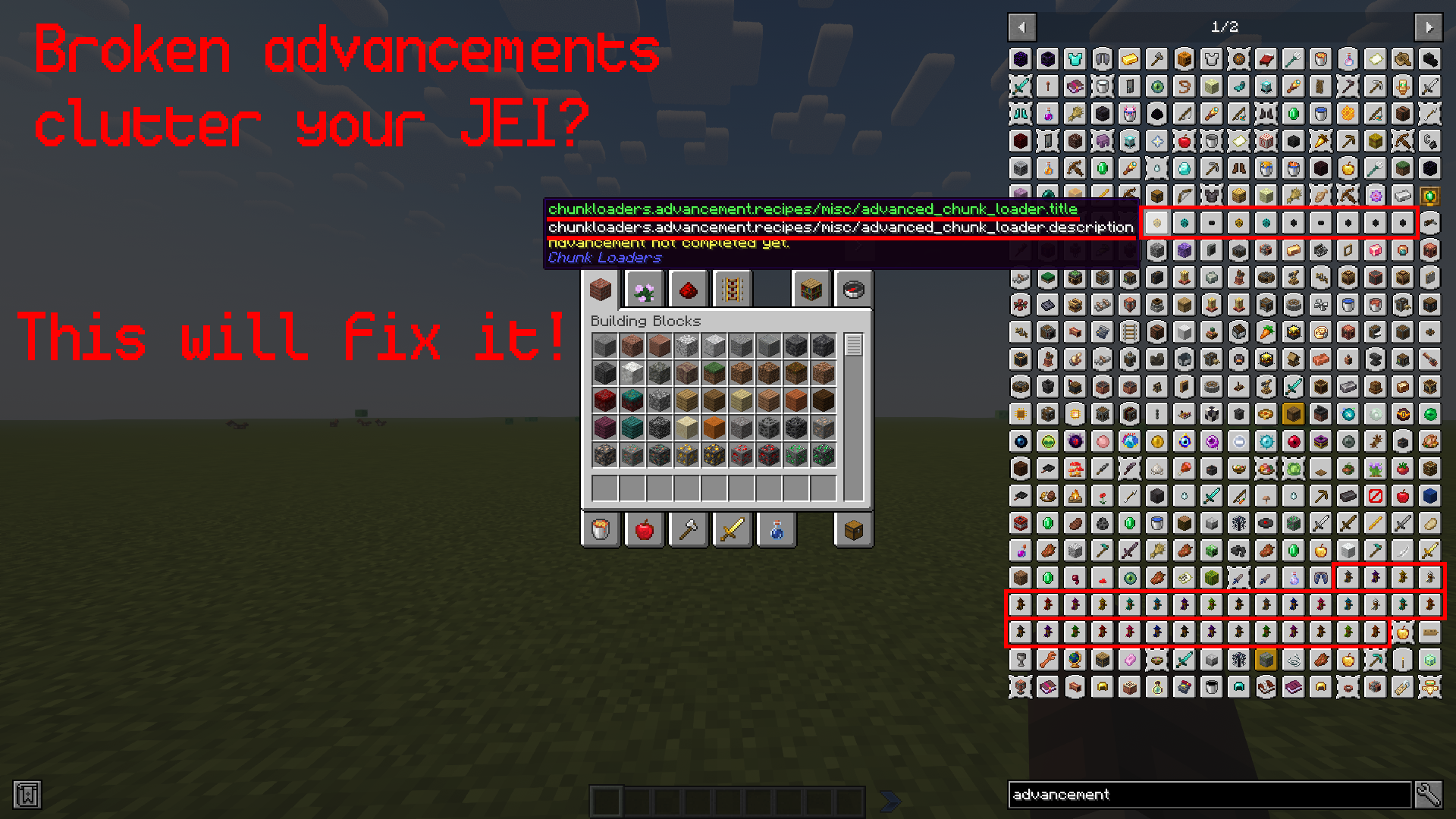
What the issue looks like

In-Game Showcase

How it works

It replaces advancement JSON's with empty ones, effectively removing broken "advancements" without affecting any actual functionality of the related mods.

Compatibility

This issue can be encountered when using corresponding mods for 1.18.2. Other versions were not tested, but may also have the same issue, in which case the fix should work all the same.

Chunk Loaders Scarecrows' Territory Advancement Fix v1.0.zip
MC 1.18.2
Release 2024-03-10 Get

Requirements & install

How to use this data pack in Minecraft
Mods needed
None, works in vanilla
Minecraft
1.18.2
Install folder
saves/<world>/datapacks

How to install data packs

  1. Download the data pack .zip file (do not extract it).
  2. New world: click Data Packs on the world creation screen and drop the .zip in. Existing world: open .minecraft/saves/<world>/datapacks.
  3. Put the .zip into the datapacks folder of the world (servers: world/datapacks).
  4. Run /reload in game (or rejoin the world) and check it with /datapack list.
Browse more: Data Packs for 1.18.2 All data packs

More from GeorgeHaldane

Advertisement Remove ads with Premium →

You Might Also Like