Badges update automatically and link to the data pack page on MineUniverse.
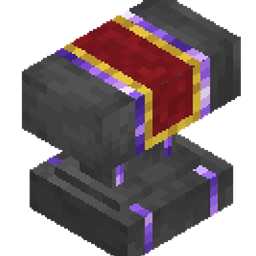
# Advanced Anvil Bundle — Break the Level 40 Cap & Forge Without Limits!
> **Tired of the "Too Expensive!" message? Forge, combine, and repair your endgame gear beyond level 40 with a custom interactive UI and sleek 3D anvil model.**
In vanilla Minecraft, combining heavily enchanted gear eventually hits the dreaded **"Too Expensive!"** wall at level 40. **Advanced Anvil** solves this problem completely—allowing you to forge items regardless of the XP level cost while maintaining vanilla-balanced prior work penalties and mechanics.
---
## Key Features
* **No "Too Expensive!" Limit**: Forge and repair items even if the cost exceeds level 40 (e.g., costs of 50, 68, or 100+ levels work seamlessly).
* **Intuitive Mainhand & Offhand UI**:
* **Main Hand:** Target item (Tool, Weapon, Armor, or Book).
* **Offhand:** Sacrificial item, Enchanted Book, or Repair Material.
* **Right-Click:** Opens an interactive preview dialog showing the result and exact XP cost. Click **[Forge]** to confirm!
* **Smart Material Repairs**: Restores 25% max durability per material ingot/gem and only consumes the exact amount required.
* **Full Enchantment Compatibility**:
* Full support for all **Minecraft 26.3 Vanilla enchantments**.
* Built-in support for **AppleTomaTo's Custom Enchants** (194 custom enchantments!).
* Strict conflict checks (e.g., Sharpness vs. Smite) and level capping.
* **Custom 3D Model & Textures**: Features dark forged iron with elegant amethyst accents.
* **Retains Anvil Physics**: Subject to gravity, falling damage, and wear degradation (Chipped/Damaged).
---
## Crafting Recipe
Craft the **Advanced Anvil** in a standard 3×3 Crafting Table:
| Recipe Layout | Materials |
| :---: | :--- |
| `[Amethyst]` `[Iron Block]` `[Amethyst]` |
| `[Iron Block]` `[Anvil]` `[Iron Block]` |
| `[Amethyst]` `[Iron Block]` `[Amethyst]` |
---
## How to Use
1. Place down your **Advanced Anvil**.
2. Hold your **base item** in your **Main Hand**.
3. Hold the **book, duplicate item, or repair material** in your **Offhand**.
4. **Right-Click** the anvil to inspect the preview and XP level cost.
5. Click **[Forge]** in the dialog to complete the operation.
> **To Retrieve / Move the Anvil:**
> Hold any Pickaxe, **Sneak (Shift) + Left-Click** the anvil. It retains its wear state when broken and placed again!
---
## What's Included in the Bundle?
This download is a **Bundle ZIP**. Please extract it before installing:
1. **`Advanced Anvil.zip`**: The core Datapack (handles crafting, XP costs, calculations, and forging logic).
2. **`Advanced Anvil Resources.zip`**: The Resource Pack (provides the custom 3D block model, textures, and clean UI text).
---
## Installation Guide
### Singleplayer:
1. Extract `Advanced Anvil Bundle.zip`.
2. Move `Advanced Anvil.zip` into your world's `.minecraft/saves/<WorldName>/datapacks/` folder.
3. Move `Advanced Anvil Resources.zip` into your `.minecraft/resourcepacks/` folder.
4. In Minecraft, go to **Options > Resource Packs** and enable **Advanced Anvil Resources**.
5. Join your world (run `/reload` if you were already inside the world).
### Multiplayer / Server:
1. Place `Advanced Anvil.zip` inside the server's `world/datapacks/` folder and restart/reload.
2. Ensure players download and enable `Advanced Anvil Resources.zip` on their clients (or configure it as the server resource pack).
---
## Technical Details
* **Target Version:** Minecraft Java Edition **26.3**
* **Server-Side Safe:** 100% vanilla data pack architecture. No forge/fabric mods or server plugins required.
* **Non-Destructive:** Does not modify vanilla anvils or standard item textures.
---
*Created by **AppleTomaTo***