
The Mining Gadget is a laser that breaks blocks while you hold the use button. On its own it mines one block at a time; upgrades add a bigger area, more range, enchantments and other helpers. The gadget runs on Forge Energy (FE) — the mod has no charger block of its own, so charge it with an FE charger from another mod. This page follows Mining Gadgets 1.18.8 for Minecraft 1.21.1.
1. Blank Upgrade Module and the gadget
Everything starts with the  Blank Upgrade Module: four
 Redstone Dust, two
 Lapis Lazuli, two
 diamonds and a
 Glass Pane. One goes into each Mining Gadget and one into every upgrade.
The gadget comes in three versions — 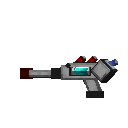 Mining Gadget MK1,
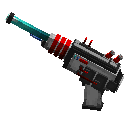 Mining Gadget MK2 and
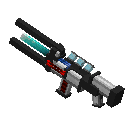 Mining Gadget MK3 — each with its own look. All three are three diamonds, redstone and a Blank Upgrade Module with iron and gold; the MK3 uses two gold ingots, the MK1 and MK2 one gold ingot and one more iron.
Redstone Dust#c:dusts/redstoneLapis Lazuli#c:gems/lapisRedstone Dust#c:dusts/redstoneDiamond#c:gems/diamond





 Any #c:glass_panes
- Glass Pane
- White Stained Glass Pane
- Orange Stained Glass Pane
- Magenta Stained Glass Pane
- Light Blue Stained Glass Pane
- Yellow Stained Glass Pane
- Lime Stained Glass Pane
- Pink Stained Glass Pane
- Gray Stained Glass Pane
- Light Gray Stained Glass Pane
- Cyan Stained Glass Pane
- Purple Stained Glass Pane
- + 5 more
Diamond#c:gems/diamondRedstone Dust#c:dusts/redstoneLapis Lazuli#c:gems/lapisRedstone Dust#c:dusts/redstone4 × any Redstone Dust + 2 × any Lapis Lazuli + 2 × any Diamond + any Glass Pane (#c:glass_panes) → Blank Upgrade Module
Diamond#c:gems/diamond Iron Ingot#c:ingots/iron
 Gold Ingot#c:ingots/goldDiamond#c:gems/diamondRedstone Dust#c:dusts/redstoneDiamond#c:gems/diamondIron Ingot#c:ingots/ironIron Ingot#c:ingots/iron
3 × any Diamond + 3 × any Iron Ingot + any Gold Ingot + Blank Upgrade Module + any Redstone Dust → Mining Gadget MK1
Diamond#c:gems/diamondIron Ingot#c:ingots/ironIron Ingot#c:ingots/ironDiamond#c:gems/diamondRedstone Dust#c:dusts/redstoneDiamond#c:gems/diamondIron Ingot#c:ingots/ironGold Ingot#c:ingots/gold3 × any Diamond + 3 × any Iron Ingot + Blank Upgrade Module + any Redstone Dust + any Gold Ingot → Mining Gadget MK2
Diamond#c:gems/diamondIron Ingot#c:ingots/ironGold Ingot#c:ingots/goldDiamond#c:gems/diamondRedstone Dust#c:dusts/redstoneDiamond#c:gems/diamondIron Ingot#c:ingots/ironGold Ingot#c:ingots/gold3 × any Diamond + 2 × any Iron Ingot + 2 × any Gold Ingot + Blank Upgrade Module + any Redstone Dust → Mining Gadget MK3
| Setting | Default value |
|---|---|
| Energy capacity of the gadget | 1,000,000 FE |
| Base cost per block broken | 200 FE |
| Battery upgrade boost (tier 1 / 2 / 3) | 2,000,000 / 5,000,000 / 10,000,000 FE |
2. Fitting upgrades: the Modification Table
Upgrades are not crafted onto the gadget — they go in at the 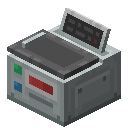 Modification Table (six iron ingots, two redstone and a Blank Upgrade Module).
Iron Ingot#c:ingots/ironIron Ingot#c:ingots/ironIron Ingot#c:ingots/ironRedstone Dust#c:dusts/redstoneRedstone Dust#c:dusts/redstoneIron Ingot#c:ingots/ironIron Ingot#c:ingots/ironIron Ingot#c:ingots/iron6 × any Iron Ingot + 2 × any Redstone Dust + Blank Upgrade Module → Modification Table
- Place the Modification Table and open it.
- Put your Mining Gadget into the table.
- Shift-click upgrades from your inventory, or drop them onto the screen, to install them.
- Click an installed upgrade to take it out again.
3. What the upgrades do
| Upgrade | Effect | Extra FE per block (default settings) |
|---|---|---|
 Upgrade: 3x3,  Upgrade: 5x5,  Upgrade: 7x7 | Mine a 3×3, 5×5 or 7×7 area | — |
 Upgrade: Range, Tier 1 to tier 3 | Range +5 blocks per tier | — |
 Upgrade: Efficiency, Tier 1 to tier 5 | Efficiency enchantment | 10 / 20 / 30 / 40 / 50 |
 Upgrade: Fortune, Tier 1 to tier 3 | Fortune enchantment | 30 / 60 / 100 |
 Upgrade: Silk touch | Silk Touch enchantment | 100 |
 Upgrade: Magnet | Mined blocks go straight into your inventory | 25 |
 Upgrade: Void Junk | Voids unwanted blocks and adds filters | 10 |
 Upgrade: Freezing | Freezes water and stops lava in place | 100 per block frozen |
 Upgrade: Light Placer | Its tooltip says it places torches whenever the light level around is lower than 8 | 100 per light placed |
 Upgrade: Battery, Tier 1 to tier 3 | More energy storage (see the table above) | — |
The config has no per-block cost for the size, range and battery upgrades. Each tier of Efficiency, Fortune, Range, Battery and the size upgrades is crafted from the tier before it, so you upgrade step by step.
4 × Block of Redstone + Block of Diamond + 2 × any Ender Pearl + Blank Upgrade Module + Diamond Pickaxe → Upgrade: 3x3
 Ender Pearl#c:ender_pearls
 Ender Pearl#c:ender_pearls
 Ender Pearl#c:ender_pearls
 Ender Pearl#c:ender_pearls
4 × any Ender Pearl + Block of Netherite + 2 × Block of Diamond + Upgrade: 3x3 + Netherite Pickaxe → Upgrade: 5x5
 Nether Star#c:nether_starsNether Star#c:nether_starsEnder Pearl#c:ender_pearlsEnder Pearl#c:ender_pearlsNether Star#c:nether_starsNether Star#c:nether_stars
4 × any Nether Star + Block of Netherite + 2 × any Ender Pearl + Upgrade: 5x5 + Netherite Pickaxe → Upgrade: 7x7
Redstone Dust#c:dusts/redstoneRedstone Dust#c:dusts/redstoneRedstone Dust#c:dusts/redstoneRedstone Dust#c:dusts/redstoneRedstone Dust#c:dusts/redstoneRedstone Dust#c:dusts/redstoneRedstone Dust#c:dusts/redstoneRedstone Dust#c:dusts/redstone8 × any Redstone Dust + Blank Upgrade Module → Upgrade: Efficiency, Tier 1
Redstone Dust#c:dusts/redstone Redstone Dust#c:dusts/redstoneRedstone Dust#c:dusts/redstoneRedstone Dust#c:dusts/redstoneRedstone Dust#c:dusts/redstoneRedstone Dust#c:dusts/redstone

6 × any Redstone Dust + 2 × Block of Redstone + Upgrade: Efficiency, Tier 1 → Upgrade: Efficiency, Tier 2
6 × Block of Lapis Lazuli + 2 × Block of Iron + Blank Upgrade Module → Upgrade: Fortune, Tier 1
 Slimeball#c:slimeballs
 Slimeball#c:slimeballsGold Ingot#c:ingots/goldGold Ingot#c:ingots/goldSlimeball#c:slimeballsSlimeball#c:slimeballsSlimeball#c:slimeballs
5 × any Slimeball + Golden Apple + 2 × any Gold Ingot + Blank Upgrade Module → Upgrade: Silk touch
Redstone Dust#c:dusts/redstoneGold Ingot#c:ingots/goldRedstone Dust#c:dusts/redstoneIron Ingot#c:ingots/ironIron Ingot#c:ingots/ironRedstone Dust#c:dusts/redstoneGold Ingot#c:ingots/goldRedstone Dust#c:dusts/redstone4 × any Redstone Dust + 2 × any Gold Ingot + 2 × any Iron Ingot + Blank Upgrade Module → Upgrade: Magnet
Redstone Dust#c:dusts/redstone Redstone Dust#c:dusts/redstoneEnder Pearl#c:ender_pearlsEnder Pearl#c:ender_pearlsRedstone Dust#c:dusts/redstoneRedstone Dust#c:dusts/redstone
4 × any Redstone Dust + 2 × Obsidian + 2 × any Ender Pearl + Blank Upgrade Module → Upgrade: Void Junk
4 × Lapis Lazuli + 2 × Glass + 2 × Diamond + Blank Upgrade Module → Upgrade: Range, Tier 1
8 × Nether Quartz + Blank Upgrade Module → Upgrade: Battery, Tier 1

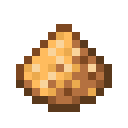
2 × Lantern + 2 × Redstone Lamp + 2 × Glowstone + Blank Upgrade Module + 2 × Glowstone Dust → Upgrade: Light Placer

8 × Snowball + Blank Upgrade Module → Upgrade: Freezing
4. The settings screen
The gadget has its own settings screen. It opens with the key binding Open Mining Gadget Settings in the Controls menu. Depending on the installed upgrades it shows:
- Size and the size mode: Normal, Automatic or 2 Down (Pathways).
- Range, a slider for the beam length, and Precision Mode.
- Toggle Upgrades — switch installed upgrades on and off without taking them out.
- Edit Filters with a Keep List or Destroy List mode, once the Void Junk upgrade is installed.
- Freeze Delay for the Freezing upgrade's particles, and the sound Volume.
- Visual Settings: the inner beam colour, the outer glow colour and the breaking style (Shrink Blocks or Fade Blocks).