Mineuniverse
Shaders
Butter Shaders

Butter Shaders

SHADER
Enjoy beautiful lighting, soft shadows, and realistic water in Minecraft with great performance — perfect for both low-end and high-end devices.
by Typon
Download Claim this project
Add a badge to your pageLink to Butter Shaders from a README, website or forum post.
Preview: Badge

Badges update automatically and link to the shader page on MineUniverse.

114,319 downloads
0 likes
0 followers
Updated Oct 14, 2026
0 hypes
Follow0
Fantasy Realistic
Advertisement Remove ads with Premium →

BUTTER | Shaders

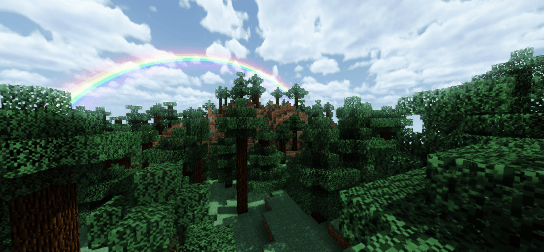
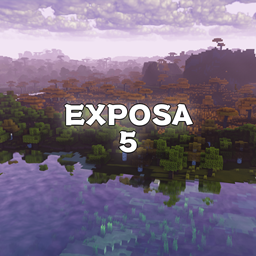
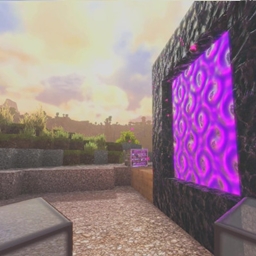
Butter Shaders is a lightweight Minecraft shaderpack designed to bring a warm, soft, and realistic atmosphere to your world.

Based on MakeUp Ultra Fast Shaders, it enhances the original project with improved lighting, smoother air reflections, and softer sky rendering — all while maintaining excellent performance.

Featuring soft lighting, natural air reflections, dynamic clouds, and vibrant sunsets, this shader focuses on balancing beauty and performance — perfect for both low-end and high-end devices.

Features:

• Shadows
• Depth of Field
• Temporal Anti-Aliasing
• Enhanced Ambient Occlusion
• Chromatic Aberration
• Motion Blur
• Volumetric Clouds
• Volumetric Lighting
• Reflections
• Waving Vegetation
• ... and much more

Credits:

Original creator: Javier Garduño
Links:

• https://www.planetminecraft.com/mod/makeup-ultra-fast-shader
• https://www.curseforge.com/minecraft/customization/makeup-ultra-fast-shader

BUG REPORTS:

https://discord.gg/GfcRKJxXfk

Butter_v1.2d
MC 1.16.3, 1.13.1, 1.9.3, 1.8.7, 1.17.1, 1.9.1, 1.21, 1.16.1, 1.18.1, 1.14.3, 1.15, 1.16, 1.13, 1.16.5, 1.10.2, 1.19.3, 1.20.2, 1.19.4, 1.21.8, 1.8.8, 1.9.4, 1.9.2, 1.8.4
Release 2026-02-16 Get
Butter_v1.2c
MC 1.16.3, 1.13.1, 1.9.3, 1.8.7, 1.17.1, 1.9.1, 1.21, 1.16.1, 1.18.1, 1.14.3, 1.15, 1.16, 1.13, 1.16.5, 1.10.2, 1.19.3, 1.20.2, 1.21.8, 1.8.8, 1.9.4, 1.9.2, 1.8.4, 1.14.4
Release 2025-11-26 Get
Butter_v1.2b
MC 1.16.3, 1.13.1, 1.9.3, 1.8.7, 1.17.1, 1.9.1, 1.21, 1.16.1, 1.18.1, 1.14.3, 1.15, 1.16, 1.13, 1.16.5, 1.10.2, 1.19.3, 1.20.2, 1.19.4, 1.21.8, 1.8.8, 1.9.4, 1.9.2, 1.8.4
Release 2025-11-03 Get
Butter_v1.2a
MC 1.17.1, 1.16.3, 1.13.1, 1.19.3, 1.20.2, 1.21, 1.16.1, 1.18.1, 1.20.5, 1.21.5, 1.14.4, 1.14.1, 1.12.1, 1.17, 1.12, 1.14.3, 1.15, 1.16, 1.13, 1.19.4, 1.21.8, 1.21.9, 1.16.5
Release 2025-10-26 Get
Butter_v1.2
MC 1.17.1, 1.16.3, 1.13.1, 1.19.3, 1.20.2, 1.21, 1.16.1, 1.18.1, 1.20.5, 1.21.5, 1.14.4, 1.14.1, 1.12.1, 1.17, 1.12, 1.14.3, 1.15, 1.16, 1.13, 1.19.4, 1.21.8, 1.21.9, 1.16.5
Beta 2025-10-23 Get
Butter_v1.1
MC 1.17.1, 1.16.3, 1.13.1, 1.19.3, 1.20.2, 1.21, 1.16.1, 1.18.1, 1.20.5, 1.21.5, 1.14.4, 1.14.1, 1.12.1, 1.17, 1.12, 1.14.3, 1.15, 1.16, 1.13, 1.19.4, 1.21.8, 1.21.9, 1.16.5
Beta 2025-10-21 Get

Requirements & install

How to use this shader in Minecraft
Shader loader
Iris or OptiFine
Minecraft
1.19.3 – 1.21.9
Install folder
.minecraft/shaderpacks

How to install shaders

  1. Install a shader loader for your Minecraft version: Iris (with Sodium) or OptiFine.
  2. Download the shader pack .zip file (do not extract it).
  3. Put the .zip into the shaderpacks folder (.minecraft/shaderpacks).
  4. In game open Options → Video Settings → Shader Packs, select the pack and apply it.
Browse more: Iris shaders OptiFine shaders Shaders for 1.21.9 All shaders

More from Typon

Advertisement Remove ads with Premium →

You Might Also Like