Mineuniverse
Resource Packs
Xaero's Naturalist Icons

Xaero's Naturalist Icons

RESOURCE PACK
Resource pack that adds Naturalist icons for Xaero's Minimap
by brenbronze
Download Claim this project
Add a badge to your pageLink to Xaero's Naturalist Icons from a README, website or forum post.
Preview: Badge

Badges update automatically and link to the resource pack page on MineUniverse.

274,988 downloads
0 likes
0 followers
Updated Oct 14, 2026
0 hypes
Follow0
256x Miscellaneous
Advertisement Remove ads with Premium →

THIS RESOURCE PACK WILL SOON BE OUTDATED!

Naturalist is beginning to roll out Xaero's compat in their newest versions, meaning this pack will no longer be needed to see icons on Xaero's minimap! :D

(This resource pack was kinda bad anyway lol)
 

Xaero's Naturalist Icons

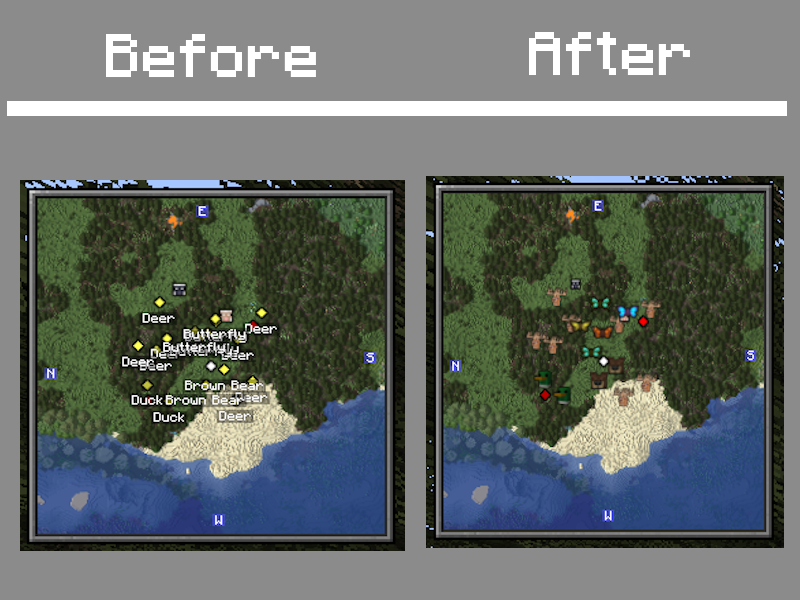
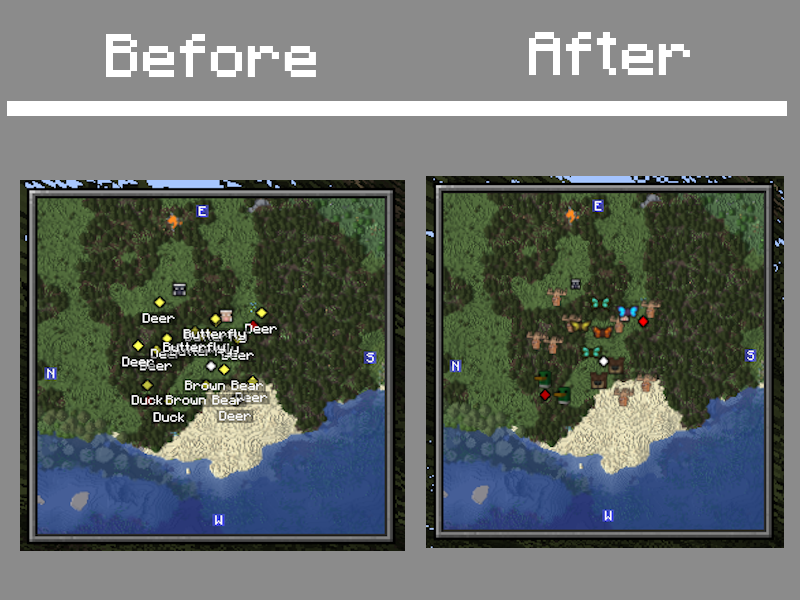
A resource pack that adds Naturalist icons for Xaero's Minimap.

Before, without the resource pack, and after, with it.

This is an experimental side project of mine, meaning there may be some missing icons or issues with the resource pack. If you come across any issues, please report it at this site or at the "Issues" link at the top of the page. You can also report it at the comments tab at the top of this page. Thank you!

Modrinth

Xaeros Naturalist Icons - 1.19-1.19.2.zip
MC 1.19.2, 1.19.1, 1.19
Release 2024-06-26 Get
Xaeros Naturalist Icons - 1.20.1.zip
MC 1.20.1
Release 2024-06-26 Get
[FIXES] Xaeros Naturalist Icons - 1.19-1.19.2.zip
MC 1.19.2, 1.19.1, 1.19
Release 2024-02-21 Get
[FIXES] Xaeros Naturalist Icons - 1.20.1.zip
MC 1.20.1
Release 2024-02-21 Get
Xaeros Naturalist Icons - 1.18.2.zip
MC 1.18.2
Release 2024-01-17 Get
Xaeros Naturalist Icons - 1.19-1.19.2.zip
MC 1.19.2, 1.19.1, 1.19
Release 2024-01-17 Get
Xaeros Naturalist Icons - 1.20.1.zip
MC 1.20.1
Release 2024-01-17 Get

Requirements & install

How to use this resource pack in Minecraft
Resolution
256x
Minecraft
1.18.2 – 1.20.1
Install folder
.minecraft/resourcepacks

How to install resource packs

  1. Download the resource pack .zip file (do not extract it).
  2. In Minecraft open Options → Resource Packs → Open Pack Folder.
  3. Drop the .zip into the resourcepacks folder (.minecraft/resourcepacks).
  4. Move the pack to the Selected column and click Done.

Packs from 128x upwards need more video memory: install a performance mod such as Sodium for smooth frame rates.

Browse more: 16x resource packs 32x resource packs 64x resource packs 128x resource packs 256x resource packs 512x+ resource packs Resource Packs for 1.20.1 All resource packs
Advertisement Remove ads with Premium →

You Might Also Like