Mineuniverse
Resource Packs
X-Crosshair-X

X-Crosshair-X

RESOURCE PACK
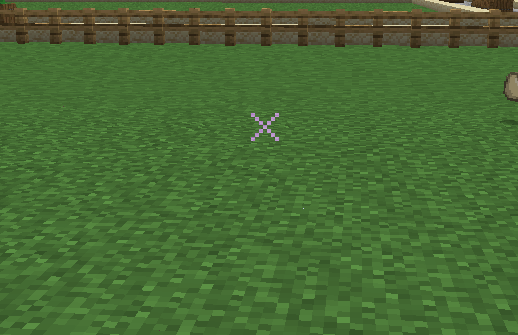
This Pack makes the Crosshair an X
by UnCooler
Download Claim this project
Add a badge to your pageLink to X-Crosshair-X from a README, website or forum post.
Preview: Badge

Badges update automatically and link to the resource pack page on MineUniverse.

1,062 downloads
0 likes
0 followers
Updated Oct 14, 2026
0 hypes
Follow0
16x Miscellaneous Modern Traditional
Advertisement Remove ads with Premium →

Take your aim to the next level with the X-Crosshair Texture Pack, designed for players who want a clean, precise, and stylish crosshair for PvP, minigames, or survival! This pack replaces the default crosshair with an optimized X-shaped design, giving you a fresh new look while maintaining excellent functionality.

Features

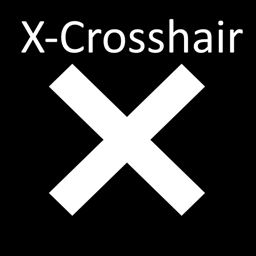
  • Custom X-Crosshair: A sleek, minimalist X-shaped crosshair for improved visibility and accuracy.
  • Enhanced Precision: Perfectly balanced for PvP combat, archery, and intense survival situations.
  • Performance-Ready: Lightweight pack that focuses solely on the crosshair, ensuring no impact on FPS.
  • Personalized Experience: Subtle changes that enhance gameplay without distracting from Minecraft's core design.
  • Version Compatibility: Fully compatible with Minecraft 1.21 and earlier versions.

Why This Pack?

I created this texture pack because I wanted a better crosshair option that feels modern and precise, perfect for players who demand a sharper edge in competitive gameplay. Whether you’re battling other players or taking on mobs, the X-Crosshair gives you the clarity and style you need.

X-Crosshair.zip
MC 1.17.1, 1.19.3, 1.20.2, 1.21.2-Snapshot, 1.21, 1.18.1, 1.19.4-Snapshot, 1.20.5, 1.17, 1.20.2-Snapshot, 1.20.5-Snapshot, 1.19.4, 1.19-Snapshot, 1.21.1-Snapshot, 1.21.4, 1.18.2
Release 2025-01-01 Get

Requirements & install

How to use this resource pack in Minecraft
Resolution
16x
Minecraft
1.20.2-Snapshot – 1.21.4
Install folder
.minecraft/resourcepacks

How to install resource packs

  1. Download the resource pack .zip file (do not extract it).
  2. In Minecraft open Options → Resource Packs → Open Pack Folder.
  3. Drop the .zip into the resourcepacks folder (.minecraft/resourcepacks).
  4. Move the pack to the Selected column and click Done.
Browse more: 16x resource packs 32x resource packs 64x resource packs 128x resource packs 256x resource packs 512x+ resource packs Resource Packs for 1.21.4 All resource packs

More from UnCooler

Advertisement Remove ads with Premium →

You Might Also Like