Mineuniverse
Resource Packs
Vatican Flag Banner

Vatican Flag Banner

RESOURCE PACK
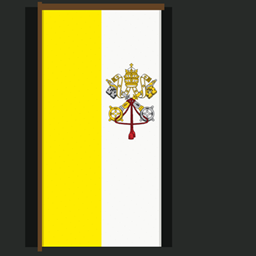
Transforms the Thing Banner Pattern into a detailed Vatican flag for use in churches, cities, villages, and other builds.
by NitRam2
Download Claim this project
Add a badge to your pageLink to Vatican Flag Banner from a README, website or forum post.
Preview: Badge

Badges update automatically and link to the resource pack page on MineUniverse.

70 downloads
0 likes
0 followers
Updated Oct 14, 2026
0 hypes
Follow0
256x
Advertisement Remove ads with Premium →

This resource pack transforms the Thing Banner Pattern into the flag of Vatican City, complete with its yellow and white fields and detailed papal emblem.

It is perfect for churches, cathedrals, monasteries, Vatican-inspired builds, Catholic-themed worlds, and historical projects. The banner also fits naturally into ordinary villages, cities, castles, and survival worlds, so your build does not need a specific religious theme for it to look appropriate.

Features

  • Replaces the Thing Banner Pattern with the Vatican flag
  • Includes a detailed papal emblem
  • Changes the Thing Banner Pattern item texture and name
  • Preserves Minecraft’s normal banner behaviour
  • Requires no mods, OptiFine, Fabric, or Forge

How to create the flag

Place the following items into a loom:

  1. A banner
  2. White dye
  3. The Thing Banner Pattern

White dye is recommended because other dye colours may tint the flag.

Vatican Flag Thing Banner 16x16.zip
MC 1.21, 1.20.1, 1.20, 26.1, 26.2
Release 2026-07-28 Get
Vatican Flag Thing Banner 32x32.zip
MC 1.21, 1.20.1, 1.20, 26.1, 26.2
Release 2026-07-28 Get
Vatican Flag Thing Banner 64x64.zip
MC 1.21, 1.20.1, 1.20, 26.1, 26.2
Release 2026-07-28 Get
Vatican Flag Thing Banner 512x512.zip
MC 1.21, 1.20.1, 1.20, 26.1, 26.2
Release 2026-07-28 Get
Vatican Flag Thing Banner 128x128.zip
MC 1.21, 1.20.1, 1.20, 26.1, 26.2
Release 2026-07-28 Get

Requirements & install

How to use this resource pack in Minecraft
Resolution
256x
Minecraft
1.20 – 26.2
Install folder
.minecraft/resourcepacks

How to install resource packs

  1. Download the resource pack .zip file (do not extract it).
  2. In Minecraft open Options → Resource Packs → Open Pack Folder.
  3. Drop the .zip into the resourcepacks folder (.minecraft/resourcepacks).
  4. Move the pack to the Selected column and click Done.

Packs from 128x upwards need more video memory: install a performance mod such as Sodium for smooth frame rates.

Browse more: 16x resource packs 32x resource packs 64x resource packs 128x resource packs 256x resource packs 512x+ resource packs Resource Packs for 26.2 All resource packs

More from NitRam2

Advertisement Remove ads with Premium →

You Might Also Like