Mineuniverse
Resource Packs
VanillaEnhanced

VanillaEnhanced

RESOURCE PACK
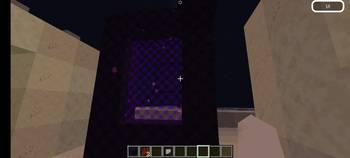
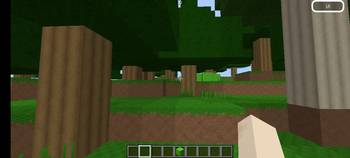
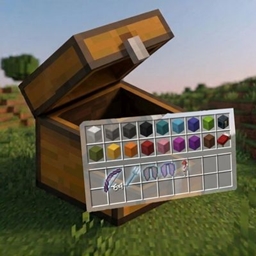
A vanilla-friendly 32x32 resource pack that enhances Minecraft's natural environment with richer grass, leaves, flowers, moss, vines, and dirt textures while preserving the original art style.
by Timexo
Download Claim this project
Add a badge to your pageLink to VanillaEnhanced from a README, website or forum post.
Preview: Badge

Badges update automatically and link to the resource pack page on MineUniverse.

76 downloads
0 likes
0 followers
Updated Oct 14, 2026
0 hypes
Follow0
32x
Advertisement Remove ads with Premium →

🌿 Nature Enhanced

Nature Enhanced is a 32x32 resource pack that brings extra depth, detail, and life to Minecraft's natural environment — without breaking the vanilla look you know and love.

Every texture was carefully designed to feel like a natural extension of the base game: same color palette, same proportions, just sharper detail and more organic variation.

✨ Key Features

🌱 Grass & Ground

  • More detailed grass blocks with richer color variation and depth
  • Improved short grass and tall grass with natural blade shapes
  • Enhanced dirt, coarse dirt, podzol, mud, and rooted dirt
  • Better roots (hanging roots, mangrove roots)

🍃 Leaves

Every leaf type has been individually redesigned for a more layered, realistic look:

  • Oak, Birch, Spruce, Jungle, Acacia, Dark Oak
  • Cherry Blossom, Mangrove, Azalea & Flowering Azalea

🌸 Flowers & Plants

  • All vanilla flowers redesigned with cleaner shapes and richer colors
  • Improved moss blocks and moss carpet
  • Better vines, ferns, seagrass, kelp, and bamboo

🪨 Beyond Nature

This pack goes further than just plants — it also includes a near-complete retexture of:

  • Stone variants, ores, and deepslate
  • Wood types, planks, and logs
  • Wool, concrete, terracotta, and glass in every color
  • Functional blocks (furnaces, chests, crafting tables, and more)
  • Tools, armor, food, and miscellaneous items

All in the same consistent, vanilla-friendly art style.

🎮 Compatibility

Minecraft Version Supported
1.20.2 – 1.21.5+ ✅

Pack Format: 46 (with supported_formats range for broad version compatibility)

📥 Installation

  1. Download the .zip file — do not extract it
  2. Place it in your resourcepacks folder:
    • Windows: %appdata%\.minecraft\resourcepacks
    • macOS: ~/Library/Application Support/minecraft/resourcepacks
    • Linux: ~/.minecraft/resourcepacks
  3. Open Minecraft → Options → Resource Packs
  4. Activate Nature Enhanced and click Done

💬 Feedback

Found a texture that doesn't quite fit, or have an idea for an improvement? Leave a comment — feedback helps shape future updates!

Nature Enhanced - V1.2.0.zip
MC 1.21.2-Snapshot, 1.21, 1.21.6-snapshot, 1.20.2-Snapshot, 1.20.5-Snapshot, 1.21.1-Snapshot, 1.20.2, 1.21.8, 1.20.5, 1.21.5, 1.21.4, 1.21.5-Snapshot, 1.20.1, 1.20, 1.20.6
Release 2026-06-28 Get
Nature Enhanced - 1.1.0.zip
MC 1.21.2-Snapshot, 1.21, 1.21.6-snapshot, 1.20.2-Snapshot, 1.20.5-Snapshot, 1.21.1-Snapshot, 1.20.2, 1.21.8, 1.20.5, 1.21.5, 1.21.4, 1.21.5-Snapshot, 1.20.1, 1.20, 1.20.6
Release 2026-06-25 Get

Requirements & install

How to use this resource pack in Minecraft
Resolution
32x
Minecraft
1.21 – 1.21.8
Install folder
.minecraft/resourcepacks

How to install resource packs

  1. Download the resource pack .zip file (do not extract it).
  2. In Minecraft open Options → Resource Packs → Open Pack Folder.
  3. Drop the .zip into the resourcepacks folder (.minecraft/resourcepacks).
  4. Move the pack to the Selected column and click Done.
Browse more: 16x resource packs 32x resource packs 64x resource packs 128x resource packs 256x resource packs 512x+ resource packs Resource Packs for 1.21.8 All resource packs

More from Timexo

Advertisement Remove ads with Premium →

You Might Also Like