Mineuniverse
Resource Packs
Ultimate Multi Tool Textures

Ultimate Multi Tool Textures

RESOURCE PACK
Textures for Ultimate Multi Tool
by BrainStone
Download Claim this project
159 downloads
0 likes
0 followers
Updated Oct 14, 2026
0 hypes
Follow0
Data Packs Traditional
Advertisement Remove ads with Premium →

UltimateMultiTool

The ultimate Minecraft MultiTool datapack (and resourcepack)

Get the datapack here.

Features

  • Allows combining any combination of tools
  • Discoverable recipes for the vanilla recipe book
  • Tiered recipes based on how many tools are combined
  • Slight durability increase for combined tools (tier 1 increases by 10%, tier 2 by 20%, tier 3 by 30%)
  • Upgrading your diamond tools via the smithing table works
  • Enchantments and item renaming works. Everything with an axe can additionally receive damage enhancing enchantments
  • Secondary tool functions partially preserved. The priority for which tool's secondary functions are retained is: axe, shovel, hoe
  • Easy to use commands to give the items outright: /loot give @s loot umultitool:<material>_<tool> (example: /loot give @s loot umultitool:netherite_paxeloe)
  • Only one continuously running command with a predicate in place to further reduce the impact (required for the netherite upgrading logic)

Screenshots

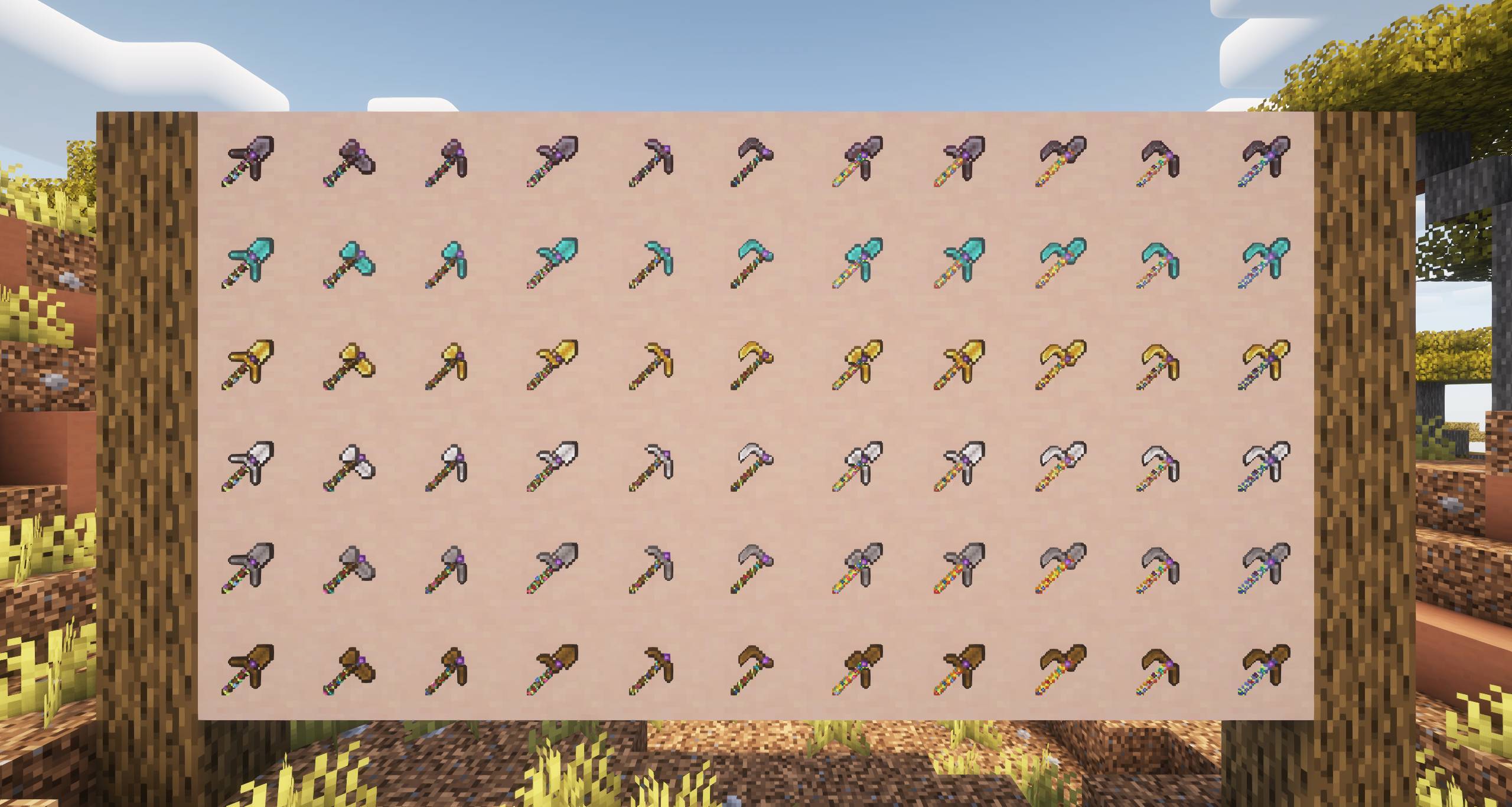
Showing off all tools available in this datapack.

Recipes

These recipes work with all materials and the tools are interchangeable.

Tool Recipe
Povel Povel recipe
Shaxe Shaxe recipe
Paxe Paxe recipe
Hovel Hovel recipe
Poe Poe recipe
Haxe Haxe recipe
Paxel Paxel recipe
Poveloe Poveloe recipe
Shaxoe Shaxoe recipe
Paxoe Paxoe recipe
Paxeloe Paxeloe recipe
UMultiTool.resources.zip
MC 1.21.3, 1.21.2
Release 2024-11-01 Get

Requirements & install

How to use this resource pack in Minecraft
Resolution
Not specified
Minecraft
1.21.2 – 1.21.3
Install folder
.minecraft/resourcepacks

How to install resource packs

  1. Download the resource pack .zip file (do not extract it).
  2. In Minecraft open Options → Resource Packs → Open Pack Folder.
  3. Drop the .zip into the resourcepacks folder (.minecraft/resourcepacks).
  4. Move the pack to the Selected column and click Done.
Browse more: 16x resource packs 32x resource packs 64x resource packs 128x resource packs 256x resource packs 512x+ resource packs Resource Packs for 1.21.3 All resource packs

More from BrainStone

Advertisement Remove ads with Premium →

You Might Also Like